We are finally at a state in the GenAI-space where we can create agentic AI solutions with ease.
I’m most familiar with Semantic Kernel, when working with LLMs, and this library works great for creating these solutions.
In a nutshell, what you need to do is create a group chat, add your agents to it, and then let them work together to solve a problem.
Do keep in mind, at the time of this writing, version 1.58.0 of the Semantic Kernel library is used. Development is going fast in this space, so behavior might change in future versions.
For my proof of concept, I’ve created a simple solution capable of creating a Fibonacci sequence, validate if a number is part of that sequence or answer random questions you would also ask to a regular LLM-powered chatbot. If you’re interested, the full sourcecode can be found on GitHub in my console-agent repository.
Create the agents
Agents are created with the ChatCompletionAgent class. You should provide the instructions & the kernel to use.
The instructions is just a regular prompt we all know and love when working with an LLM and specifies what the agent should do. I won’t repeat it over here as it’s not relevant for this post.
Read more →When creating solutions for a company, you often use an internal package feed.
There might come a time when you need to provide the source code to an external party or you want to make the solution open source.
If this has ever happened to you, you know one of the first things to validate if all dependencies (NuGet packages) are available to the public. Especially in large corporations it’s easy to use some platform packages used throughout the company but should not be shared with the public.
I recently had to so one of those exercises. And instead of manually searching for all packages on NuGet.org, I created a small PowerShell script to search for the packages and version in the feed.
# Path to the Directory.Packages.props file
$filePath = "C:\Projects\Internal\MySolution\Directory.Packages.props"

# Load the XML file
[xml]$xml = Get-Content $filePath

# Iterate through each PackageVersion element
foreach ($package in $xml.Project.ItemGroup.PackageVersion) {
    $packageName = $package.Include
    $packageVersion = $package.Version

    # Check if the package exists in NuGet
    $result = nuget list $packageName -Source https://api.nuget.org/v3/index.json

    if ($result -match $packageName) {
        Write-Host "Package '$packageName' (Version: $packageVersion) is available."
    } else {
        Write-Host "Package '$packageName' (Version: $packageVersion) is NOT available."
    }
}
By running this, you can see in the output if a package is or is not available for your external consumers. It’s not rocket science but has sure saved me hours of searching for this information manually.
Read more →It’s not something a lot of people need to do on a regular basis, but when you do, you don’t want to spend a lot of time doing it. I’m referring to the process of “create an SDK for your APIs”.
When your service is exposing endpoints for your consumers to use, it’s easy to refer them to using raw endpoints and let them figure out how to deal with it based on the Open API specifications (formerly known as Swagger) provided. This requires quite a bit of plumbing on their part.
Needless to say, invoking endpoints from your API by using HTTP-calls isn’t very user-friendly and quite error prone. Providing your consumers with a proper SDK is much better from an onboarding perspective.
How to start building an SDK?
As mentioned, either you or your customer needs to do quite a bit of plumbing to invoke your API endpoints properly. This isn’t something anyone will enjoy, so automation is everyones friend over here.
To start, you first need to make sure you are generating Open API specs for the API. Just about every ecosystem has generators for this process. In het .NET ecosystem we’ve been using Swashbuckle for a couple of years now, and with the release of .NET 9 there’s also out-of-the-box capabilities to generate the API specifications.
With these files generated, you’re already halfway of creating an SDK. For best results, be as complete as possible with your Open API specs. Provide descriptions, all error codes, use DTOs, adhere to the HTTP specifications, etc.
Read more →A friend asked me a question, a while ago, stating:
Hey Jan,
One stupid question around which I have thought a lot and often get stuck while deciding.
When to make a function static/non-static specifically the helpers or utility ones.
I read 2 arguments
- All the functions that don’t need to use a state of the object, (don’t update any variable value of the object ) should be static.
- All the functions that should/can be test independently and have some logic. Not only transformation or mapping. Should be non-static.
These 2 arguments are against each other and are often confusing, and mostly in the context of our repo. We often use multiple resources and their clients to implement a logic.
Now these mostly don’t update any state of an object, mostly the value of the attributes of the class are read, never updated. And it does make sense to test them independently
One example
Reading from the storage account, filter data based on some logic and then updating that in, let’s say, a Function App.
Now, how do you decide?
Let me start by: There’s no such thing as a stupid question in engineering! These are the type of questions everyone is wondering about, but only few dare to ask. Iris Classon has done an entire blog-series on these ‘not so stupid questions’.
Read more →When working in Azure, storing secrets in Key Vault is a good idea. And to make it better, there’s the Key Vault Reference notation. This feature makes sure no one can read the secret(s) unless someone grants permission.
For storing configuration, values a different service is available, called Azure App Configuration.
Both services are excellent for storing & sharing the values of your cloud services.
Wouldn’t it be great to be able to combine the two? What I mean by that is to use Key Vault references inside your App Configuration. Well, you can!
There is some work involved as you need to set up access to Key Vault from within the application.
Key Vault References in App Configuration
If you’re using the Azure Portal, it’s easy to add a new Key Vault reference in the App Configuration.
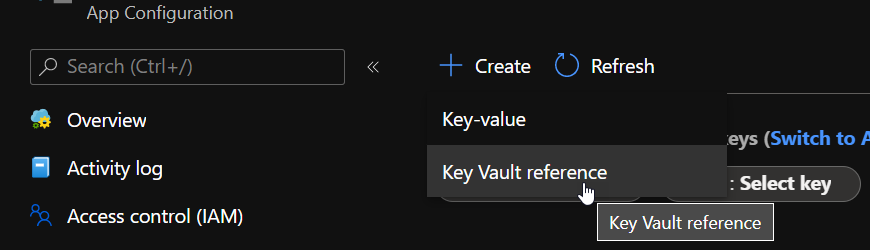
Head to the Configuration Explorer and press the Create button.
It will bring a small blade to the side of the screen from which you can add the secret with an appropriate name.
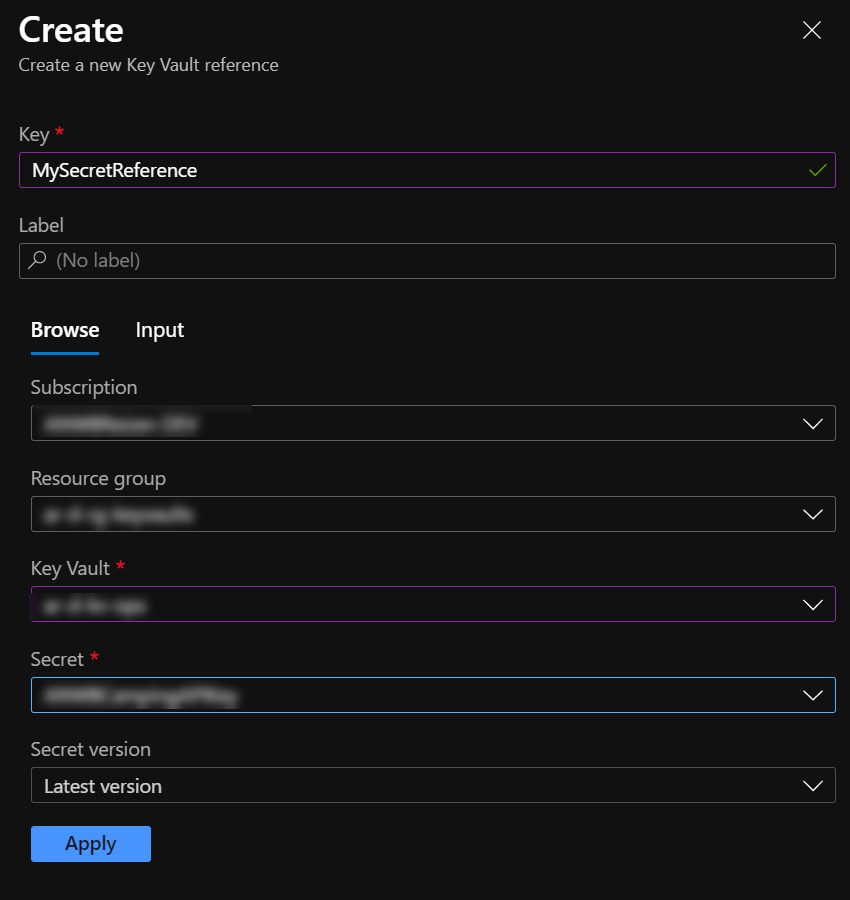
Having finished this, press the Apply button, and you’ll see the reference added and visible in the Configuration Manager.
Read more →