As of late I’ve started using the VMWare products for virtualizing my development environments again as a replacement for Hyper-V.
Today I wanted to access some files of my virtual machine on the host in order to write a blog post on some code I had saved in there. The VMWare disk files are stored as a VMDK file and it’s not possible to mount these type of files in Windows like a VHD file.
In order to mount a VMDK file you’ll need some third party software. Most people tell you to download the VMWare Disk Mount Utility (note the date: 2005-11-29). This probably was a valid solution back in the day, but it appears this software isn’t compatible with the recent versions of the Microsoft Windows operating system.
When installing the VMWare Disk Mount Utility I’m receiving the following event when checking out the event viewer:
Windows Installer installed the product. Product Name: VMware DiskMount Utility. Product Version: 1.00.0000. Product Language: 1033. Manufacturer: VMware, Inc.. Installation success or error status: 1603.
While troubleshooting this error you’ll probably stumble across the following KB article which tells you to set the appropriate security permissions on the Program Files folder. I’ve tried setting these permissions for both the SYSTEM account as the Administrators group, but to no avail. So I think it’s safe to assume this software doesn’t work properly anymore.
Read more →I finally succeeded in setting up a VM with OSX Lion installed. Setting up an OSX environment in any VM tool has always been hard, but since Apple has decided to build for the x86 platform it has gotten a lot easier.
In the past couple of years I’ve tried to set up an Apple VM, but never really succeeded in it. Today I decided to try again. Apparently there are a lot of torrents out there containing OSX VM’s, so I’ve downloaded one of them to try out the OS.
After setting up the VM in VMWare Workstation and booting up I received an error telling me this guest OS couldn’t run with software virtualization and I had to enable hardware virtualization. My development machine has the VT-x option (Intel Virtualization Technology) in the BIOS, so enabling that fixed this issue.

Now, booting the guest OS again gave another error. VMWare Workstation told me the guest OS wasn’t Mac OS X Server. Changing this option to ‘Other 64-bit’ didn’t help either.
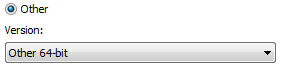
The virtual processors kept failing when booting up.
Lucky for me, the guys at SysProbs had already created a fix for this problem. Running the windows.bat file which is nested in the tar file of their download added a new option to the VMWare Workstation software
Read more →Waar ik eerst bijna altijd VMWare Workstation gebruikte, ben ik nu genoodzaakt om toch vaak VMWare Player te installeren. Op zich geen probleem, aangezien VMWare Player tegenwoordig voldoende toereikend is waar ik het voor wil gebruiken (namelijk draaien van ontwikkel images). Hier heb ik momenteel nog niet echt perse de extra features van Workstation voor nodig.
Nu heb ik bij een klant waar ik zit alleen toegang tot het draadloze netwerk. Op zich geen probleem, echter hebben m’n meeste images een Bridged connection op de netwerkkaart. Deze bind zichzelf aan een netwerkkaart op het systeem en dat is niet altijd de draadloze netwerkkaart. Ik kon me herinneren dat dit kon worden geconfigureerd bij Workstation, maar had de optie nog niet gezien bij de gratis Player.
Blijkbaar is het standaard niet mogelijk om de netwerkconfiguratie in te stellen bij VMWare player. Gelukkig kwam ik op een blog post waar exact staat uitgelegd welke stappen moeten worden genomen om dit toch te kunnen doen.
Wat je moet doen is eigenlijk alle bestanden van VMWare Player uit de installer uitpakken en daarna het bestand vmnetcfg.exe uit network.cab kopieren naar de locatie waar VMWare Player staat geinstalleerd.
Omdat het doelloos is om een goed stappenplan slecht te vertalen, hier een quote van de gelinkte blog post:
Read more →