I’ve written about empowering your Teams with Azure Functions
a while back, but this isn’t the only way to create value. You can also use Azure Logic Apps
.
Logic Apps are a way to express powerful integrations with (several different) systems in a visual workflow based way. It has a lot of similarities with other (Microsoft) workflow systems from the past, so it should strike very familiar to most (Enterprise) developers.
Being a visual workflow solution, it doesn’t warm the heart of most developers. However, the world doesn’t consist solely of developers and this solution being visual is a very big advantage if you’re not a coder or like to deliver value instead of just more code.
First step
The first step you need (or actually, WANT) to take is create a Webhook connector on a channel. You can check my previous post
on how to do this.
Posting to this channel has to be done in a similar way. You will still need to post some JSON in a predefined format to this webhook.
Next step: Setting up Alerts
In order to make your DevOps process a bit easier, it’s very useful to leverage the power of Application Insights and Alerts. For this to work, you need to know what metrics you actually want to be alerted for. I’m going to assume you already have some monitoring in place with appropriate metrics. If not, you should definitely define some. They can be tuned afterward.
Read more →You might remember me writing on how to warm up your App Service instances when moving between slots
. The use of the applicationInitialization-element is implemented on nearly every IIS webserver nowadays and works great, until it doesn’t.
I’ve been working on a project which has been designed, as I’d like to call it, a distributed monolith
. To give you an oversimplified overview, here’s what we have.
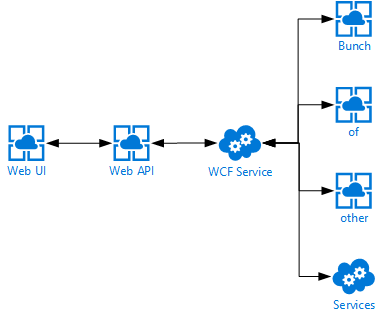
First off we have a single page web application which communicates directly to an ASP.NET Web API, which in turn communicates to a backend WCF service, which in turn also communicates with a bunch of other services. You can probably imagine I’m not very happy with this kind of a design, but I can’t do much about it currently.
One of the problems with this design is having cold-starts whenever a service is being deployed.
Since we’re deploying continuously to test & production there are a lot of cold starts. Using the applicationInitialization-element really helped spinning up our App Services, but we were still facing some slowness whenever the WCF service was being deployed to any of our environments. This service is being deployed to an ‘old-fashioned’ Cloud Service so we figured the applicationInitialization-element should just work as it’s still running on IIS.
Read more →Warming up your web applications and websites is something which we have been doing for quite some time now and will probably be doing for the next couple of years also. This warmup is necessary to ‘spin up’ your services, like the just-in-time compiler, your database context, caches, etc.
I’ve worked in several teams where we had solved the warming up of a web application in different ways. Running smoke-tests, pinging some endpoint on a regular basis, making sure the IIS application recycle timeout is set to infinite and some more creative solutions.
Luckily you don’t need to resort to these kind of solutions anymore. There is built-in functionality inside IIS and the ASP.NET framework. Just add an applicationInitialization-element inside the system.WebServer-element in your web.config file and you are good to go! This configuration will look very similar to the following block.
<system.webServer>

  ...
	<applicationInitialization>
		<add initializationPage="/Warmup" />
  </applicationInitialization>
</system.webServer>
What this will do is invoke a call to the /Warmup-endpoint whenever the application is being deployed/spun up. Quite awesome, right? This way you don’t have to resort to those arcane solutions anymore and just use the functionality which is delivered out of the box.
The above works quite well most of the time.
However, we were noticing some strange behavior while using this for our Azure App Services. The App Services weren’t ‘hot’ when a new version was deployed and swapped. This probably isn’t much of a problem if you’re only deploying your application once per day, but it does become a problem when your application is being deployed multiple times per hour.
Read more →You’ve probably heard a lot of talk around a new buzzword serverless. It’s a pretty confusing name for an awesome technology/technique.
The main reason the word serverless isn’t a very good one is because it implies there aren’t any servers when using this technique. I found a fairly funny CommitStrip about this topic.

https://www.commitstrip.com/en/2017/04/26/servers-there-are-no-servers-here`
But what does the term mean then?
Well, it means you don’t have to worry about servers anymore. You just upload your software to the cloud provider of your choice and it runs on-demand/by-request. As Mark Russinovich said in an interview with InfoWorld
_“I don’t have to worry about the servers. The platform gives me the resources as I need them.”. _Of course the hardware, operating system, webserver, firewall, etc. is all still there, but as a developer and operational person you don’t really have to care about it.
Isn’t this the same as PaaS from a couple of years ago?
The answer is: Yes and no!
Yes, there are a lot of similarities and the serverless offerings from each cloud provider are based upon their current PaaS offerings. Therefore, you could call it an evolution of PaaS.
No, because the ideology is a bit different.
Read more →Including a lot of files in your website can impact the performance of your site. Your browser needs to request all those files from the webserver(s) and download them individually. Luckily this fetching is pretty fast and your browser can do multiple requests at once. However, there is a maximum to the number of requests a browser can make, so if you include 100 external files, will probably be (relatively) slow.
I’ve tested this by creating a new MVC 3 web application, copying the Site.css file 12 times and include all of them in the head-element of the page. Below you can see the FireBug
and YSlow
reports for this test page.
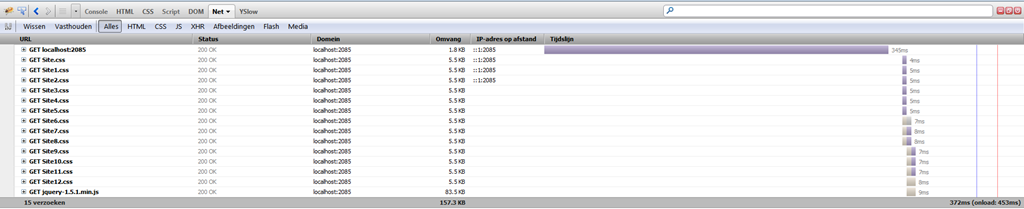

I’ve pressed the Refresh-button several times and came to the conclusion each individual file has a loading time between 5ms and 25ms.
Even though 13x25ms still is pretty fast, you probably understand it’s better to minimize the number of requests, because each request has some overhead and some have to wait for the other to be completed.
To minimize the number of files which need to be included in a website, devigners
often create one huge CSS file and one huge JavaScript file which contains everything needed for the website to work. This way the browser only needs to make 3 requests to load the page, the HTML, the CSS and the JavaScript. An additional request will be made for the JavaScript framework you are using (if any) and some more additional requests will be made to fetch the images of the page you are loading.
Read more →