I recently read this post from my colleague Marnix on using Dev Containers to isolate your service logins for a project
. This is especially useful for Azure and GitHub accounts, as they are configured per system in the ~/.azure and ~/.config/gh folders.
As a consultant, I’m often hopping between multiple customers. Even someone working solely for one company might have side projects in different environments. This system configuration is often suboptimal and requires you to think about where you’re logged in and switch around. Marnix has done a great job describing why Dev Containers are a great solution to this problem, so I won’t repeat that here.
One annoying aspect is working with worktrees. Currently, coding agents default to Git worktrees, so you can work on multiple things at the same time without conflicts. This is great, but they create a copy of the repository in a random folder. This also creates a new Dev Container for you to use, which means you have to log in again. Having to log in to every Dev Container is quite cumbersome, and I don’t like that.
What I want is a shared login for my repositories that works for all the worktrees I have.
After playing around with this feature, I found out that this is quite possible!
Read more →A couple of months ago, we migrated from using the Completions endpoints to the Responses endpoints for the language models we use, hosted in Microsoft Foundry. This worked quite well after some refactoring. That is, until a couple of weeks ago…
During my vacation, ‘something’ changed. Suddenly, some of the requests we made to the language models (gpt-4.1 and gpt-4.1-mini) took about 73 seconds to complete. Previously, the responses were returned well within 4 seconds. Because of this, our agents and chat experience no longer worked as expected.
After doing quite a bit of research and testing, I finally found the issue. We had to change our code from non-streaming responses to streaming responses. Responses are now served well within the expected 4-second time slot.
Doing the analysis
I’m not sure exactly when the mentioned regression appeared, as I was on vacation at the time. But it’s safe to say “some time in July or August 2026”.
When starting the analysis, I first tried to discover where the issue was. Because of our extensive logging, it was easy to discover that a couple of agents took ~73 seconds to complete their actions. We have a nice agentic workflow going on, so responses often took more than 200 seconds to complete due to multiple agents collaborating to get to an answer. Needless to say, we received feedback stating “chat doesn’t work!”.
Read more →In one of our deployments we use deploymentScripts. We use it to apply SQL migration scripts and assign SQL principals and roles in a piece of test software that persists metrics for specific test runs.
What I noticed recently is that the deployments are taking 7+ minutes to finish, even when nothing has changed in the infrastructure.
The problem
After reading the docs for a bit, I discovered we set the forceUpdateTag
to the current deployment time via a parameter (param deploymentTimestamp string = utcNow('yyyyMMdd-HHmmss')). This property states the following:
Gets or sets how the deployment script should be forced to execute even if the script resource has not changed. Can be current time stamp or a GUID.
Because of the way we set the property, the deployment scripts are invoked EVERY time we run a new deployment. While that might not sound like it should have much impact because it’s just a small PowerShell script, it’s important to understand what a deployment script is doing under the hood.
A deploymentScripts resource does not run inline. It provisions a real Azure Container Instance (ACI) as the execution environment. The full lifecycle per script execution is:
- ARM provisions an ACI container and storage account
- The ACI pulls the specified container image, in our case
azPowerShellVersion: '14.0', a multi-hundred-MB image - The PowerShell script executes inside the container
- On success (
cleanupPreference: 'OnSuccess'), the ACI is torn down along with the storage account
This lifecycle can take 3-5 minutes per script under normal conditions, not because the SQL work takes a long time, but because of the ACI cold-start overhead. Because we have two deployment scripts with a dependency between them, they run sequentially and each deploys its own infrastructure, doubling the total time.
Read more →For an evaluation tool that measures regressions and improvements in agent responses, I need to visualize the output. At first, I figured it would be nice to create a web application with lots of charts and grids. Then it occurred to me that we also have Azure Managed Grafana
nowadays. This software is built for data visualization and supports a ton of data sources
, one of them being SQL Server
.
As I had never worked with this before, and because we need this visualization to analyze our measurements, I had a good excuse to start working with it.
Deploy the resource
The Managed Grafana offering is a regular Azure resource and is deployed as such. It is important to assign an identity to this resource, either a system-assigned identity or a user-assigned managed identity (UAMI). For demo purposes, I’m using a system-assigned identity, but for production, a UAMI is the way to go in my opinion.
resource grafana 'Microsoft.Dashboard/grafana@2024-10-01' = {
  name: name
  location: location
  tags: allTags
  identity: {
      type: 'SystemAssigned'
    }
  sku: {
    name: skuName
  }
  properties: {
    apiKey: enableApiKey ? 'Enabled' : 'Disabled'
    autoGeneratedDomainNameLabelScope: 'TenantReuse'
    deterministicOutboundIP: deterministicOutboundIp ? 'Enabled' : 'Disabled'
    publicNetworkAccess: publicNetworkAccess ? 'Enabled' : 'Disabled'
    zoneRedundancy: zoneRedundancy ? 'Enabled' : 'Disabled'
  }
}
Assigning permissions to Grafana’s data plane
I’m running the entire deployment via my deployment pipelines, including the dashboards in the Grafana resource. Because of this, I also need to make sure the deployment principal has enough permissions to create resources on the Grafana data plane. Choose the Grafana Editor (a79a5197-3a5c-4973-a920-486035ffd60f) or Grafana Admin (22926164-76b3-42b3-bc55-97df8dab3e41) role for this purpose. From a least-privilege standpoint, the Grafana Editor role is preferred.
Read more →I’m working on something where I need to deploy multiple versions of my software and validate whether there’s an improvement or regression. The solution heavily relies on deployed language models, so that’s something we want to evaluate first.
The solution I’m working on looks fairly similar to the setup in my Trial & Error GitHub repository
, so I have a .NET frontend service and a Python backend service, both invoking language models deployed in Microsoft Foundry.
The baseline
I’ve deployed this using the following services:
- Azure API Management
This is the public entry point for my services - Azure Container Apps Environment
Hosting two Container Apps for both .NET and Python - Microsoft Foundry + some models
For my agents & MAF to work with
Of course, there are some other resources deployed too, but those aren’t important for now.
The way this works is:
- A client makes an HTTP request
- APIM processes the request and routes it to the default backend, the .NET Container App
- The .NET Container App takes the request and processes it
- The request gets forwarded to the Python Container App, which processes it
- The processed request is passed along to a language model in Microsoft Foundry
- The response gets processed and sent back to the client through the .NET Container App and APIM
  sequenceDiagram
    participant Client
    participant APIM as Azure API Management
    participant NET as .NET Container App
    participant Python as Python Container App
    participant Foundry as Microsoft Foundry (LLM)

    Client->>APIM: HTTP Request
    APIM->>NET: Route to default backend
    NET->>Python: Forward request
    Python->>Foundry: Send to language model
    Foundry-->>Python: Model response
    Python-->>NET: Processed response
    NET-->>APIM: Return response
    APIM-->>Client: HTTP Response
I think you’ll find this to be a common design. Obviously, the .NET and Python services also provide some additional value on top of forwarding requests, but that’s not relevant to this post.
Read more →Last Thursday, we started having connectivity issues with our data repositories hosted in Microsoft Fabric. We experienced multiple timeouts, were no longer able to connect to the SQL databases, and queries to the Warehouse and Lakehouse also failed. After some initial analysis, we discovered the following error in our logs and IDEs:
Retrieval of MWC token used for accessing storage failed with error ‘0xa (MWC service error: Server responded with error: 400)(DmsPbiServiceUserException: An internal system error has occurred.)’ (7451)
Opening the Warehouse and running a simple SELECT-query resulted in the same error:
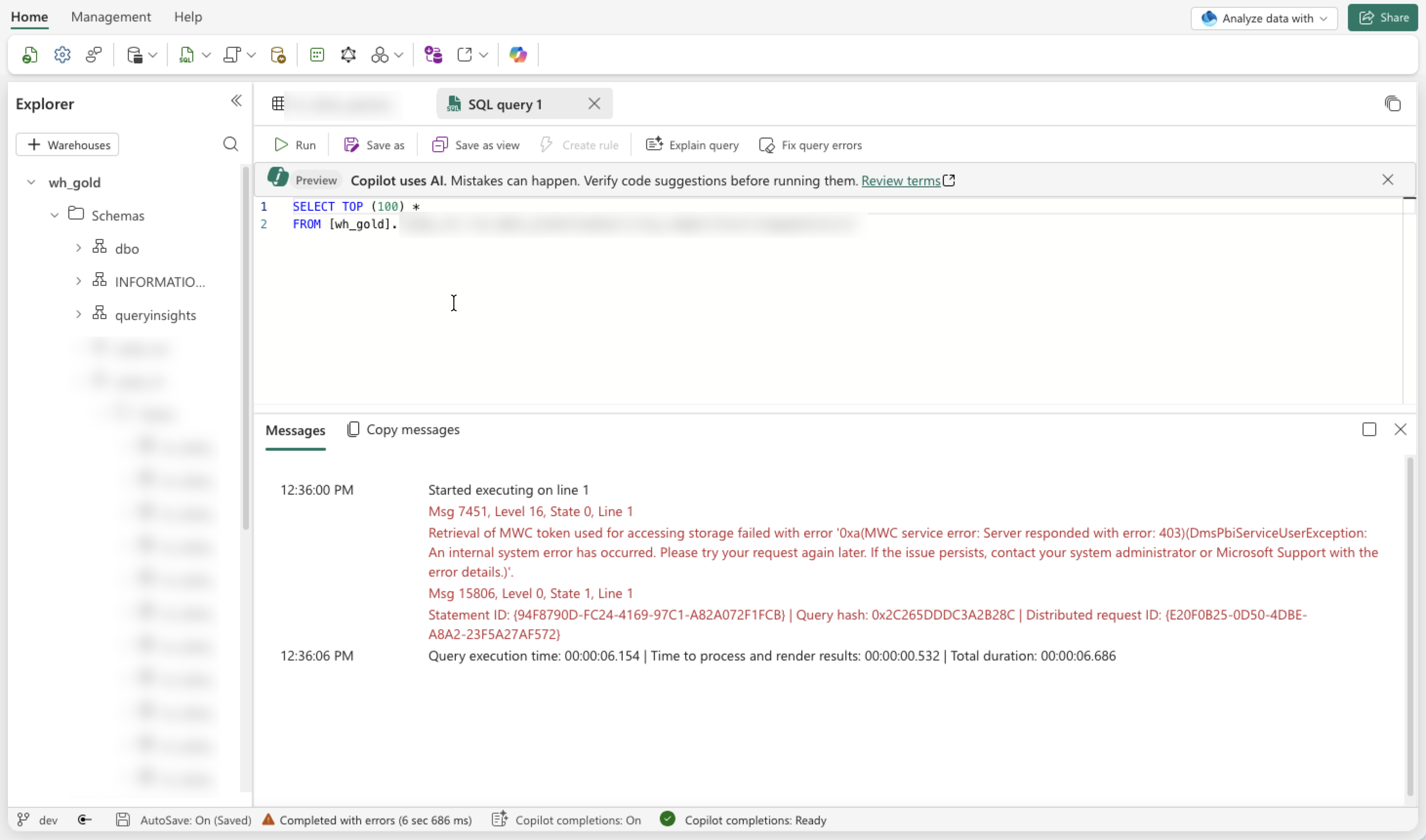
We found this quite strange, as there had not been any deployments or changes in either Microsoft Fabric or our Microsoft Azure solution in the past couple of days.
The error was not very obvious to me either. I figured there must have been something wrong with the Workspace, maybe due to suspending and resuming the Capacity on a daily basis. It could be that something was stuck in an erroneous state, or maybe the capacity had reached its limits and throttling was occurring, which would be strange because this is a DEV instance.
What I did to troubleshoot:
- Suspend and resume the Capacity again.
No luck - Scale up from an F4 to an F8.
No luck, and based on my monitoring solution we were only using about 50% of the capacity anyway. - Changed the permissions of the managed identity connecting to the Workspace (Viewer and Contributor via direct and group assignments).
No luck. As mentioned, nothing had changed, so everything should still have been working as before.
The solution
You will never guess this, or at least I would not have.
Not based on the exception, nor on my expectations of how a product like Fabric should behave.
Read more →I use Microsoft Fabric on a project to store all customer data. Each customer gets their own workspace, so data is isolated. While Microsoft Fabric has its challenges and comes with a hefty price, it does bring quite a lot of useful data solutions under one umbrella. If you only need to store data in a (simple) database there are many more solutions that will fit your use case better. For my project we need to do ingestion, transformation, cleansing, store structured data, store unstructured data, etc. With all of these requirements, using Fabric makes more sense.
During development and testing we ran into capacity issues, which resulted in strange errors when querying or ingesting data.
To keep track of capacity usage you can install the Microsoft Fabric Capacity Metrics app
from the store. This app provides useful insights, but it does require users to have a Power BI Pro license. If your users already have this, make sure to install the app. If not, you might want to get this for the users managing the solution, so be sure to discuss that.
I wanted to see if I could create something to deliver the same or similar insights. The Metrics app is based on the available data, so I figured it should be possible to query this myself too. Spoiler: it’s possible, but it does require a bit of setup.
Read more →The project I’m working on is in a maturing state. This means it needs to remain stable while still delivering new features. This is where feature toggles come into play. By adding these toggles and conditional execution paths to your code, you can keep the functionality unchanged until you turn a toggle on and then return to the previous behavior by turning it off again.
In the Azure ecosystem, we have the App Configuration resource with fairly basic feature toggle capabilities, so that’s what I’m using because it fits our current needs.
July 2026 update
There is no need to create your own App Configuration emulator image for macOS anymore.
The team has pushed an official image to the MCR
.
https://mcr.microsoft.com/en-us/artifact/mar/azure-app-configuration/app-configuration-emulator/tags
amd64 arch image has been released!
Setup in Aspire
For ease of local development, we use Aspire. To enable App Configuration, you’ll need the Aspire.Hosting.Azure.AppConfiguration package.
This lets you add a new resource to the AppHost: var appConfig = builder.AddAzureAppConfiguration("config");.
On your local machine, you probably don’t want to use an actual Azure resource, but an emulator. This can be configured using these lines of code:
appConfig.RunAsEmulator(emulator =>
{
    emulator.WithLifetime(ContainerLifetime.Persistent);
    emulator.WithDataVolume();
});
This works like a charm on Windows.
If you’re on Apple Silicon, like I am, it won’t.
Read more →My current project requires us to create multiple agents running complex algorithms with large volumes of data.
The algorithms work on large datasets and compute outcomes to be used in the next steps of our workflow. Our data scientists are creating these algorithms, and they’re most comfortable in Python, so that’s what our application is running as well, in a setup similar to the one I created in my Trial and Error
repository.
If you head to this repository, you’ll notice a file called large_data_analysis.py. This file is responsible for creating agents that are capable of working with large volumes of data.
As you probably know, context windows for agents are limited. They are growing at a rapid pace, but ideally you keep the context small.
When you need to work with millions of records from a repository, you can put them in the agent’s context, but you’ll notice the limitations of this practice quite quickly. Either the agent will start hallucinating or forget details, or you’ll be prompted with an error stating that the context is too large. Both scenarios are disastrous when relying on the agent and its outcome.
In my previous post, you could see how to create tools that can be used in agents
.
Oftentimes, these tools require data to work with. If the data already exists inside the prompt, that’s great. The language model will take care of passing the correct parameters based on the descriptions.
Read more →I’m a big fan of the coding agents we have at our disposal. I use OpenCode
a lot myself, switch to GitHub Copilot
regularly, and several of my colleagues use Claude Code
.
All of these coding agents have similar capabilities, but they work slightly different. When you are doing the same thing over and over again, it makes sense to create generic commands
for it. Some examples can also be found in the Awesome Copilot repository
.
Another very useful feature is Agent Skills
. Commands and skills overlap in some areas, but they differ in an important way.
The description for commands is:
Custom commands let you specify a prompt you want to run when that command is executed in the TUI.
The description for skills is:
Agent skills let OpenCode discover reusable instructions from your repo or home directory. Skills are loaded on-demand via the native skill tool—agents see available skills and can load the full content when needed.
Can you spot the difference? It’s this: “loaded on-demand”.
Skills are only used when the agent determines they are relevant, so the frontmatter fields are important.
You can also grant permissions to skills, which saves you from having to press the “Allow” button every time.
Read more →