
Tune your Terminal with a PowerShell profile

With the new Windows Terminal available I’ve been searching on how to upgrade my console experience. I see a lot of people improving their terminal to show important information, like which Git branch you are working on, which Azure subscription, the actual location on disk, etc.

A couple of months ago I came across Brad Wilson his post on the matter and I like the way his terminal looks. His post, is rather straightforward, but there was some information missing. Well, ‘missing’ isn’t the correct word. In his post he has assumed some prerequisites which I hadn’t set up on my machine(s).

For reference sake, I’ll repeat some steps over here from Brad his post and add some of myself which were unclear to me.

First of all, you need to install posh-git. This is a small PowerShell module which integrates Git in PowerShell. It’s very useful and now that I know of it I advise everyone to use it!

I did have some versioning issues when installing this though. The first time when I ran the command PS> install-module posh-git I got the following message(s).

PowerShellGet requires NuGet provider version '2.8.5.201' or newer to interact with NuGet-based repositories. The NuGet provider must be available in 'C:\Program Files\PackageManagement\ProviderAssemblies' or 'C:\Users\jan\AppData\Local\PackageManagement\ProviderAssemblies'. You can also install the NuGet provider by running 'Install-PackageProvider -Name NuGet -MinimumVersion 2.8.5.201 -Force'. Do you want PowerShellGet to install and import the NuGet provider now?

[Y] Yes  [N] No  [S] Suspend  [?] Help (default is "Y"): y

Untrusted repository

You are installing the modules from an untrusted repository. If you trust this repository, change its InstallationPolicy value by running the Set-PSRepository cmdlet. Are you sure you want to install the modules from 'PSGallery'?

[Y] Yes  [A] Yes to All  [N] No  [L] No to All  [S] Suspend  [?] Help (default is "N"):

Eventually, I was able to get this to work, but I had to update my PowerShellGet repository first. As you can see from the script below, this also failed.
Read more →

Reinstall Modern apps via PowerShell

As of late, there are a couple of Store apps which just won’t install on any of my Windows 10 machines (One Commander and Open Live Writer in case you are interested).

The message shown is:

The error code is 0x80073CF9, in case you need it.

If you do a search on the error number you’ll find numerous posts and articles explaining on how this error might be solved. As it happens, the error also occurs on Windows Phone/Mobile systems.

One of the suggestions I came across is re-installing the Store app.

Uninstalling a Modern App is quite easy with tools like CCleaner. If you don’t have tools like this, it’s also possible to do this via the PowerShell Remove-AppxPackage cmdlet of course.

However, once uninstalled, how will you install the Store, without having a Store.
A System Restore might help, but I didn’t have any usable restore points.

An easier solution is to re-install the Store app via PowerShell. With the following command you will see all the applications which still reside on your system.

Get-AppxPackage -allusers | Select Name, PackageFullName

One of these should have a name similar to Microsoft.WindowsStore.
You can re-install this app by using the Add-AppxPackage cmdlet.

Read more →

Selecting multiple wallpapers for your multiple monitors in Windows 10

With Windows 10 we’ve gotten a lot of nice little features which help us modifying the theme. There is however 1 option which the team hasn’t implemented (yet). The option to select different wallpapers for all of your connected displays.

I’m working with a triple monitor setup at home and at work most of the time with a dual or also a triple setup. Of course I don’t really need different wallpapers on all of my monitors, but it’s a nice feature.

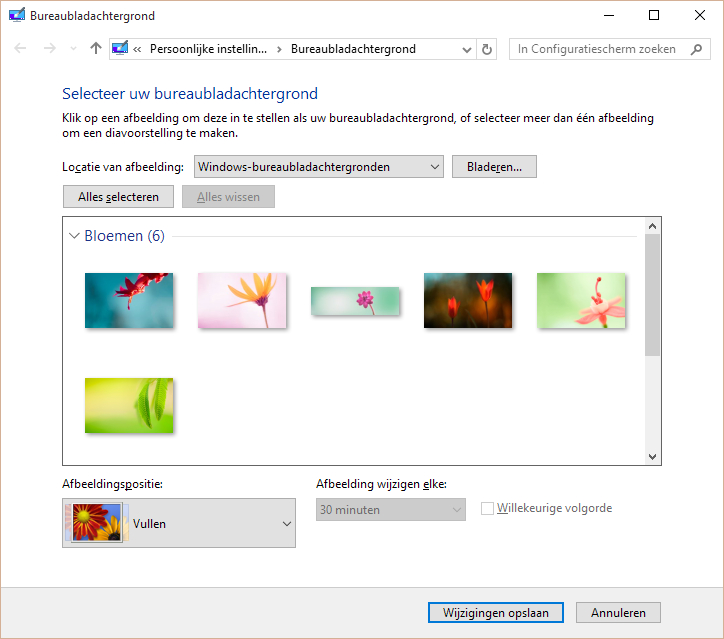
Luckily we are still able to do this, using the ‘old’ control panel pages which are still available in Windows 10. If you type in the following command inside a Windows Explorer address bar or the Run command window you’ll be able to get there.

control /name Microsoft.Personalization /page pageWallpaper

image

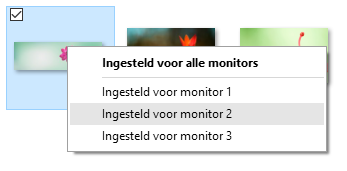
On this screen you are still able to select your wallpaper for every connected display.

image

Just a little tip, hope it helps.

Read more →