Warming up your web applications and websites is something which we have been doing for quite some time now and will probably be doing for the next couple of years also. This warmup is necessary to ‘spin up’ your services, like the just-in-time compiler, your database context, caches, etc.
I’ve worked in several teams where we had solved the warming up of a web application in different ways. Running smoke-tests, pinging some endpoint on a regular basis, making sure the IIS application recycle timeout is set to infinite and some more creative solutions.
Luckily you don’t need to resort to these kind of solutions anymore. There is built-in functionality inside IIS and the ASP.NET framework. Just add an applicationInitialization-element inside the system.WebServer-element in your web.config file and you are good to go! This configuration will look very similar to the following block.
<system.webServer>

  ...
	<applicationInitialization>
		<add initializationPage="/Warmup" />
  </applicationInitialization>
</system.webServer>
What this will do is invoke a call to the /Warmup-endpoint whenever the application is being deployed/spun up. Quite awesome, right? This way you don’t have to resort to those arcane solutions anymore and just use the functionality which is delivered out of the box.
The above works quite well most of the time.
However, we were noticing some strange behavior while using this for our Azure App Services. The App Services weren’t ‘hot’ when a new version was deployed and swapped. This probably isn’t much of a problem if you’re only deploying your application once per day, but it does become a problem when your application is being deployed multiple times per hour.
Read more →It has become increasingly important to have your site secured via some kind of certificate. Even your Google ranking
is affected by it.
The main problem with SSL/TLS certificates is the fact most of them cost money. Now, I don’t have any problem with paying some money for something like a certificate, but it will cost quite a lot if I want to set this up for all of my sites & domains. In theory it’s possible to create a self-signed certificate
and publish your site with it, but that’s not a very good idea as there’s no one who trusts your self-signed certificate besides yourself.
Luckily Mozilla is helping us, poor content-creators, out with their service called Let’s Encrypt. Let’s Encrypt
is a rather new Certificate Authority
which is offering a free, open and automated service to create certificates. Their Getting Started
guide contains some details on how to set this up for your website or hosting provider.
This is all fun and games, but when hosting your site(s) in the Azure App Service ecosystem you can’t do much with the steps defined in the Getting Started guide. At least, I couldn’t make any sense off it.
There’s a developer who has been so kind to create a so called Site extension for an Azure App Service called Azure Let’s Encrypt. It comes in two flavors for both x86 and x64 systems. Depending on which platform you have deployed your site to, you need to activate one corresponding this platform.
Read more →I’ve just started setting up some continuous deployment for my personal websites. All of the sites are hosted within Azure App Services and the sources are located on either GitHub or BitBucket. By having the source code located on a public accessible repository (be it private or public), it’s rather easy to connect Azure to these locations.
On my day-job I come across a lot of web- and desktop applications which also need continuous integration and deployment steps in order for them to go live. For some of these projects I’ve used Octopus Deploy
and currently looking towards Azure Release Management
. These are all great systems, but they offer quite a lot of overhead for my personal sites. Currently my, most important, personal sites are so called static websites using MiniBlog
(this site) and Hugo (for keto.jan-v.nl
). Some of the other websites I have aren’t set up with a continuous deployment path yet.
I don’t really want to set up an Octopus Deploy server or a path in Azure Release Management for these two sites. Lucky for me, the Azure team has come up with some great addition in order to provide some custom deployment steps of your Azure App Service. In order to set this up, you need to enable the automatic deployments via the Deployment Options blade in the Azure portal.
Read more →Windows 8 has given us a lot of new and cool features for both developers and users. One of these features is the possibility to pin websites to your start screen. Default this tile will look like the favicon of the website, but you are also able to change the pinned tile to a live tile. The live tile will get the necessary information from the RSS feed of the website.
To enable this website-live-tile-feature, just follow these steps.
First, navigate to the https://www.buildmypinnedsite.com
website which acts as a wizard. This website is able to create both the icons and necessary HTML you need to implement on the website.
Just specify the title of the website, the background color of your tile and upload an image you want to use for your live tile. The result will be something like the image below.
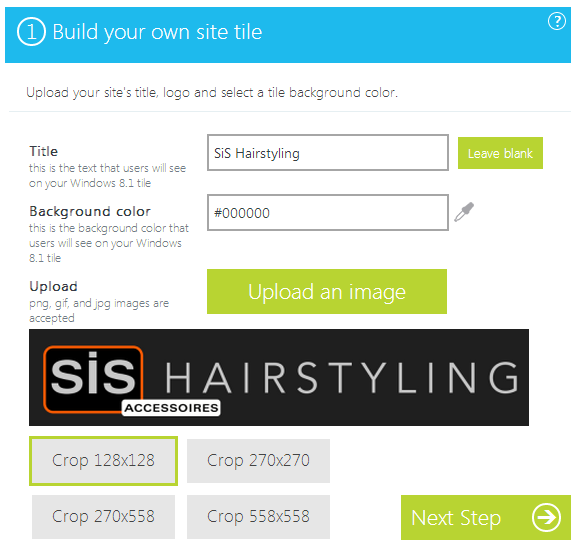
As you can see, there are 4 tile sizes you need to configure. The preview of the tiles is available at the right side of the screen.
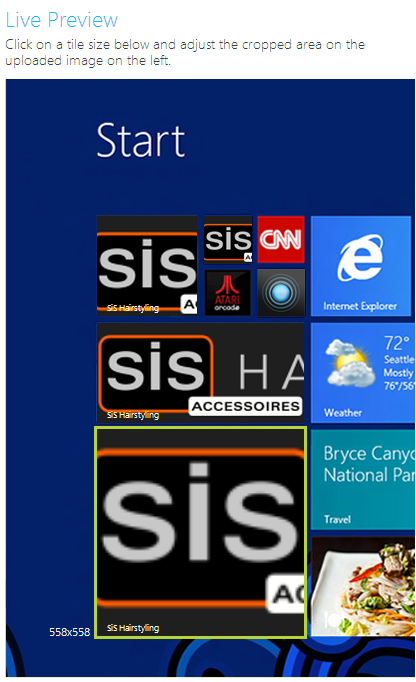
The wizard doesn’t do a very good job at creating images. Therefore I’ve created my own tiles using Paint.NET
with the correct dimensions. The dimensions you need to use for a tile are specified in the table below.
Read more →