I’m a big fan of the coding agents we have at our disposal. I use OpenCode
a lot myself, switch to GitHub Copilot
regularly, and several of my colleagues use Claude Code
.
All of these coding agents have similar capabilities, but they work slightly different. When you are doing the same thing over and over again, it makes sense to create generic commands
for it. Some examples can also be found in the Awesome Copilot repository
.
Another very useful feature is Agent Skills
. Commands and skills overlap in some areas, but they differ in an important way.
The description for commands is:
Custom commands let you specify a prompt you want to run when that command is executed in the TUI.
The description for skills is:
Agent skills let OpenCode discover reusable instructions from your repo or home directory. Skills are loaded on-demand via the native skill tool—agents see available skills and can load the full content when needed.
Can you spot the difference? It’s this: “loaded on-demand”.
Skills are only used when the agent determines they are relevant, so the frontmatter fields are important.
You can also grant permissions to skills, which saves you from having to press the “Allow” button every time.
Read more →Some time ago I had to validate who or what has access to the applications we created in our Azure environment.
There were hundreds of different applications with each their own specific Application Roles. Both users and service principals had roles assigned to the applications to perform the required operations.
It is possible to click through every application in Entra ID and validate the assigned roles. However, this takes quite a bit of time.
So I figured “Is it possible to iterate through all my applications in Entra ID and see who or what has an application role assigned?”
Needless to say, the answer is “Yes!”.
By using the Azure CLI and the Graph API I was able to accomplish what is required.
#########################################################
# Login if running local and you haven't done so already
#########################################################
Function Login {
    # Subscription used for logging in. Necessary to get a context to work in.
    $loggedInSubscription = "The subscription name"
    $tenantId = "73fefcf4-c062-45ef-9607-e19aba33f82d"
    az login --tenant $tenantId
    # # Log in to a subscription which resides in the tentant we want to add & configure MG's to.
    az account set --subscription $loggedInSubscription
}
Function Get-AppRoleAssignments {
    [CmdletBinding()]Param()
    Write-Verbose -Message "Starting to retrieve all Enterprise Applications matching the naming convention."
    $roleAssignmentsForAllApplications = $null
    $enterpriseAppRegistrationCollection =
        az ad sp list --filter "startswith(displayname, 'jv-sample-app1') or startswith(displayname, 'jv-sample-app2')"
        | ConvertFrom-Json

    Write-Verbose -Message "Found $($enterpriseAppRegistrationCollection.Length) enterprise applications."
    foreach ($enterpriseAppRegistration in $enterpriseAppRegistrationCollection) {
        $servicePrincipalAppRoles = $null
        $assignedAppRolesForServicePrincipal = $null

        # The service principal from 'az ad sp list' already has all the data we need
        $servicePrincipalAppRoles = $enterpriseAppRegistration.appRoles

        Write-Verbose -Message "Found $($servicePrincipalAppRoles.Length) appRoles for $($enterpriseAppRegistration.id)."
        $assignedAppRolesForServicePrincipal =
            az rest `
            --method get `
            --uri https://graph.microsoft.com/v1.0/servicePrincipals/$($enterpriseAppRegistration.id)/appRoleAssignedTo
            | ConvertFrom-Json
            | Select-Object -expand value

            Write-Verbose -Message "Found $($assignedAppRolesForServicePrincipal.Length) assigned identities for $($enterpriseAppRegistration.id)."
        $roleAssignmentsForAllApplications += foreach($assignedAppRole in $assignedAppRolesForServicePrincipal) {
            $role = $servicePrincipalAppRoles | Where-Object{ $_.id -eq $assignedAppRole.appRoleId}
            Write-Verbose -Message "Adding $($role.displayName) to collection for $($assignedAppRole.principalDisplayName) on application $($enterpriseAppRegistration.displayName)."
            New-Object PsObject -Property @{
                AppRoleId = $assignedAppRole.appRoleId
                AppRoleDisplayName = $role.displayName
                PrincipalObjectId = $assignedAppRole.principalId
                PrincipalDisplayName = $assignedAppRole.principalDisplayName
                ApplicationDisplayName = $enterpriseAppRegistration.displayName
                ApplicationApplicationId = $enterpriseAppRegistration.appId
                ApplicationObjectId = $enterpriseAppRegistration.id
            }
        }
    }
    return $roleAssignmentsForAllApplications
}
#Login
Get-AppRoleAssignments -Verbose | Sort-Object -Property ApplicationDisplayName | Format-Table -Property ApplicationDisplayName, ApplicationApplicationId, ApplicationObjectId, PrincipalObjectId, PrincipalDisplayName, AppRoleId, AppRoleDisplayName | Out-File "AppRoleAssignments.md"
The output looks pretty much like this
Read more →When creating solutions for a company, you often use an internal package feed.
There might come a time when you need to provide the source code to an external party or you want to make the solution open source.
If this has ever happened to you, you know one of the first things to validate if all dependencies (NuGet packages) are available to the public. Especially in large corporations it’s easy to use some platform packages used throughout the company but should not be shared with the public.
I recently had to so one of those exercises. And instead of manually searching for all packages on NuGet.org, I created a small PowerShell script to search for the packages and version in the feed.
# Path to the Directory.Packages.props file
$filePath = "C:\Projects\Internal\MySolution\Directory.Packages.props"

# Load the XML file
[xml]$xml = Get-Content $filePath

# Iterate through each PackageVersion element
foreach ($package in $xml.Project.ItemGroup.PackageVersion) {
    $packageName = $package.Include
    $packageVersion = $package.Version

    # Check if the package exists in NuGet
    $result = nuget list $packageName -Source https://api.nuget.org/v3/index.json

    if ($result -match $packageName) {
        Write-Host "Package '$packageName' (Version: $packageVersion) is available."
    } else {
        Write-Host "Package '$packageName' (Version: $packageVersion) is NOT available."
    }
}
By running this, you can see in the output if a package is or is not available for your external consumers. It’s not rocket science but has sure saved me hours of searching for this information manually.
Read more →A few years ago, I was assigned on a project with a friend of mine, Marnix van Valen
and we needed to update our APIs in API Management with the latest Open API schema for each release. As we don’t like to do this work manually, it got added to our build- and release pipeline
. I like this approach, as it removes the need to host Swagger / Open API compute on my own service and only static files need to be hosted in some folder.
So I started re-implementing the approach we did a couple of years ago.
Turns out, this still works! Well, it would if the packages were still kept up-to-date with the latest ASP.NET features.
No minimal API support
Like many engineering teams, we adopted to use the (recommended) minimal APIs to create the services
. Apparently, this doesn’t play nice with the Swashbuckle tooling. There are multiple issues at GitHub on this topic
. All without a resolution, aside to migrating back to the ‘old’ way of working with a Program.cs and Startup.cs class.
I understand the core maintainers have different priorities nowadays, but this estimated 15-minute task now took up more time from my part.
Only running on .NET 7
There’s another problem I encountered. The Swagger CLI 6.5.0 tooling only has support up to .NET 7
. Our build agents don’t have this version installed anymore.
Lucky for me, there’s an environment variable you can set to make sure the latest version of .NET is being used.
Read more →A request came by me to:
Get all the commits associated to a specific release, based on the previous succesful release.
The fun thing is, we’re using Azure DevOps.
Easy right?
Well, that’s what I thought, because this information is readily available in the web interface of Azure DevOps.
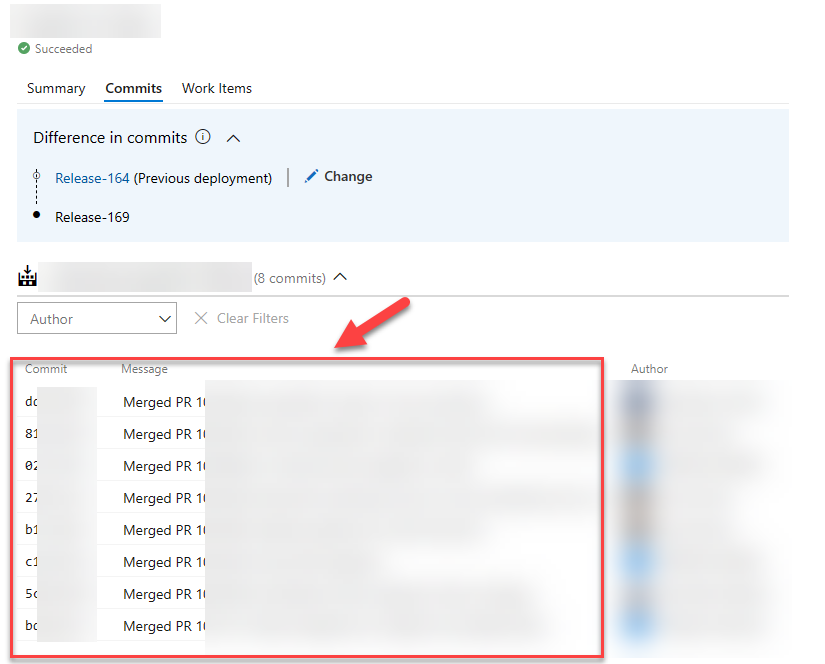
As the saying goes:
We do things not because it is easy, but because we thought it would be easy!
This phrase applies to the above request.
When starting out, I figured there must be some environment variable, or endpoint I can invoke to get these details. On the command-line, this is pretty git log command. Turns out, there isn’t. I did ask on Stack Overflow
, but it appears the only way to get this data is to invoke several Azure DevOps REST API endpoints.
Not a big problem, but surely more work as expected.
Because of my earlier investigations
on integrating with Azure DevOps, I was aware of the REST API service & documentation that is provided on the topic
.
The initial implementation
With the documentation available I kind of knew the /_apis/release/releases would be my starting point.
From with the response of this endpoint you should be able to identify the current, and previous releases. In my case, I want to get the previous succesful release that had a specific stage in a succesful state. Quite possible with the response that you get.
Now that you know the previous release identifier, the changes endpoint can be invoked, taking the release id of the current and previous run.
Read more →For a project I’m working on we have a massive ARM template and I had to add some stuff, deployment scripts, to it. While I still have enough love for ARM templates to work with it, creating & deploying big deployment scripts with isn’t a great experience.
However, with Bicep I can create (and debug) the script in a proper PowerShell file and load it in the Bicep template using the loadTextContent function
. After compiling (az bicep build) the template it will output a nice ARM template for me with the PowerShell file contents inside.
The downside?
Now I’m stuck with 2 ARM templates, and while manual merges are possible I think we all know that’s not something to strive for. What do you do when there’s something on your local machine which needs automation? Right! Reach out to PowerShell to do the automation for you.
Because ARM Templates are JSON (sort of) we can use the built-in functions ConvertFrom-Json and ConvertTo-Json to read & write documents, so that’s what I did.
There’s also this great module called Join-Object
by iRon7
which is able to:
Combines two object lists based on a related property between them.
This module has several join options, like InnerJoin, OuterJoin, Merge, and many more. So that’s everything I need for what I want to accomplish, merging 2 ARM templates with eachother.
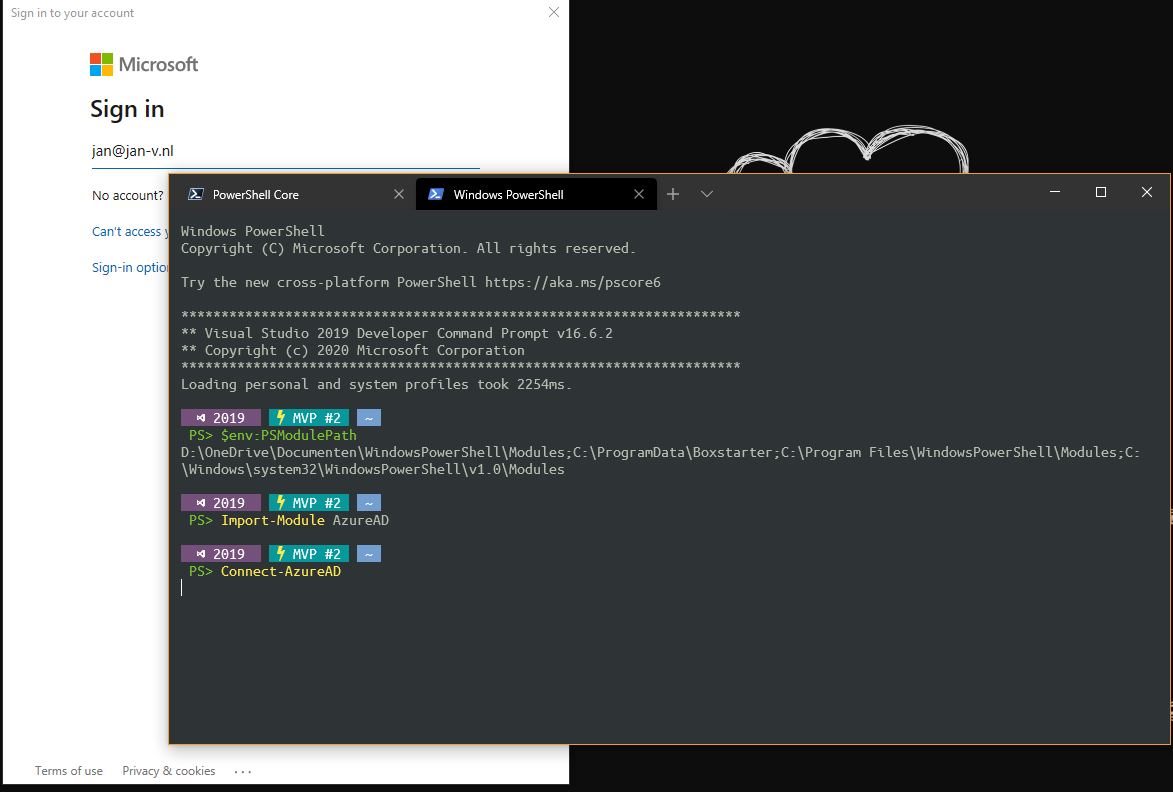
Read more →In one of my most recent live coding sessions, I had an issue with my PowerShell configuration. When running any of the Azure PowerShell cmdlets I got the message
The ‘[command]’ command was found in the module ‘Az.[someModule]’, but the module could not be loaded. For more information, run the ‘Import-Module Az.someModule’
Running the Import-Module command didn’t help much, because the module was already loaded. I even tried Import-Module Az and verified everything was installed correctly with the Get-InstalledModule -Name Az* command. This all appeared to be correct.
After my session, I researched the matter a bit more and read the Stack Overflow post with the title ‘Import powershell module fails’
. This one pointed me in the right direction.
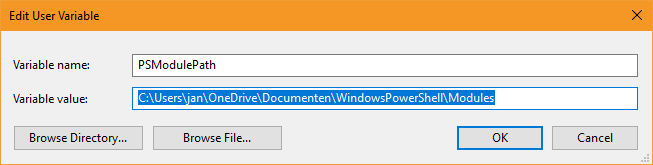
After printing the $env:PSModulePath I saw at least one of the folders was pointing to my Documents folder, which has its location redirected to OneDrive.
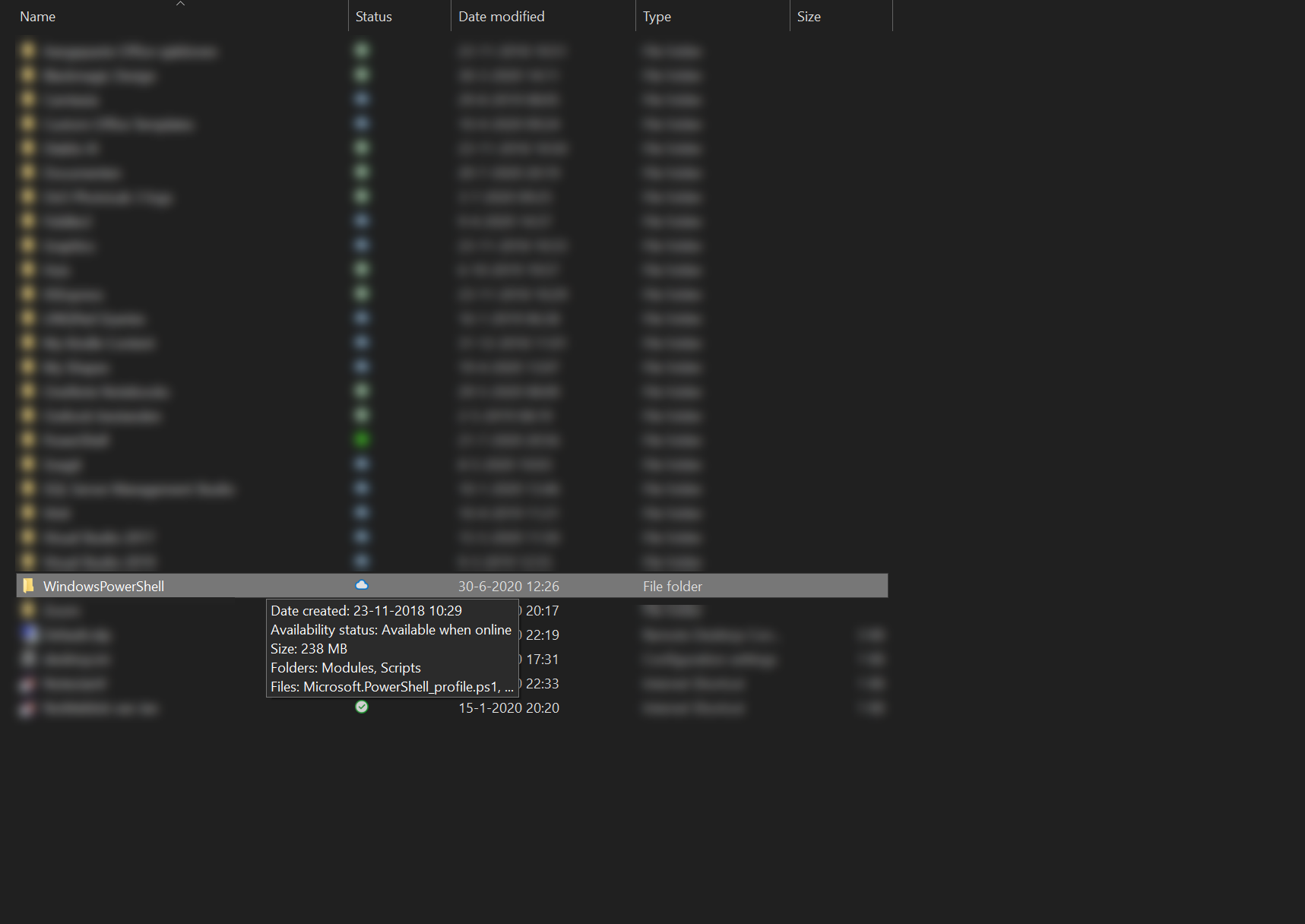
Nowadays, OneDrive has a nice feature where files aren’t downloaded automatically, but you can choose which files/folders to sync on your machine. The WindowsPowerShell folder wasn’t synced, yet.
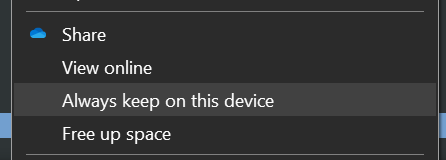
This can be solved by selecting the Always keep on this device option in OneDrive
Once all files & modules are loaded, you can start working with Azure via PowerShell again.
Read more →This won’t be a long post, but useful nonetheless. It’s more like a script-dump as a post.
A while ago, someone assigned a task to me where I had to retrieve all the existing secrets in a specific Key Vault and list them. These secrets were to be placed in another Key Vault on a shared location. The exact reasons for this migration don’t matter for this post, but it has something to do with having a single Key Vault instance compared to having a Key Vault ‘per domain’, which I like a bit better
.
It is possible to extract the secrets via the UI, but I didn’t feel much for doing this manually. Most of the time, when something is possible in the Azure Portal, it can also be done via the Azure CLI or Azure PowerShell.
I quickly navigated to the az keyvault documentation
to see which commands are available.
The information I got from over there pointed me to the secret list
and secret show
commands.
Because I had to extract the secrets of multiple Key Vault instances in several subscriptions, a small function was in order. This is what I came up with.
Function GetKeyVaultEntries(
    [string]$subscriptionName,
    [string]$keyVaultName
)
{
    az account set --subscription $subscriptionName
    $keyVaultEntries = (az keyvault secret list --vault-name $keyVaultName | ConvertFrom-Json) | Select-Object id, name

    Write-Host "Secret values of '$($subscriptionName)' for key vault '$($keyVaultName)'"
    Write-Host "| key | secret value |"
    Write-Host "| --- | ------------ |"
    foreach($entry in $keyVaultEntries)
    {
        $secretValue = (az keyvault secret show --id $entry.id | ConvertFrom-Json) | Select-Object name, value
        Write-Host "| " $secretValue.name " | " $secretValue.value " |"
    }
    Write-Host ""
}
This will list all of the secrets in your console if you invoke the function like so:
Read more →Any now and then you have to make some major changes to the ARM templates of the project you’re working from. While this isn’t hard to do, it can become quite a time-intensive if you have to wait for the build/deployment server to pick up the changes and the actual deployment itself.
A faster way to test your changes is by using PowerShell
or the Azure CLI to deploy your templates and see what happens.
However, when using linked templates
this can become quite troublesome as you need to specify an absolute URL where the templates can be found. At this moment in time, linked templates don’t support using a relative URL
. While this issue currently is Under review, we still might want to test our templates today. So how to proceed?
Well, you will have to deploy your linked ARM templates to some (public) location on the internet. For your side projects, a GitHub repository might suffice, but for an actual commercial project, you might want to take on a different approach.
How to do this in Azure DevOps
For one of the projects I’m working on, I’m using the Azure Blob File Copy step in the deployment pipeline to copy over all of the ARM templates to a container in a Storage Account.
Read more →With the new Windows Terminal available I’ve been searching on how to upgrade my console experience. I see a lot of people improving their terminal to show important information, like which Git branch you are working on, which Azure subscription, the actual location on disk, etc.
A couple of months ago I came across Brad Wilson his post on the matter
and I like the way his terminal looks. His post, is rather straightforward, but there was some information missing. Well, ‘missing’ isn’t the correct word. In his post he has assumed some prerequisites which I hadn’t set up on my machine(s).
For reference sake, I’ll repeat some steps over here from Brad his post and add some of myself which were unclear to me.
First of all, you need to install posh-git
. This is a small PowerShell module which integrates Git in PowerShell. It’s very useful and now that I know of it I advise everyone to use it!
I did have some versioning issues when installing this though. The first time when I ran the command PS> install-module posh-git I got the following message(s).
PowerShellGet requires NuGet provider version '2.8.5.201' or newer to interact with NuGet-based repositories. The NuGet provider must be available in 'C:\Program Files\PackageManagement\ProviderAssemblies' or 'C:\Users\jan\AppData\Local\PackageManagement\ProviderAssemblies'. You can also install the NuGet provider by running 'Install-PackageProvider -Name NuGet -MinimumVersion 2.8.5.201 -Force'. Do you want PowerShellGet to install and import the NuGet provider now?

[Y] Yes  [N] No  [S] Suspend  [?] Help (default is "Y"): y

Untrusted repository

You are installing the modules from an untrusted repository. If you trust this repository, change its InstallationPolicy value by running the Set-PSRepository cmdlet. Are you sure you want to install the modules from 'PSGallery'?

[Y] Yes  [A] Yes to All  [N] No  [L] No to All  [S] Suspend  [?] Help (default is "N"):
Eventually, I was able to get this to work, but I had to update my PowerShellGet repository first. As you can see from the script below, this also failed.
Read more →