The past couple of days I’ve been working on migrating my blog from the Orchard CMS
to MiniBlog
. The main reason for me to migrate to a different system is because I don’t work a lot with Orchard anymore. There were also some crashes from time to time which I couldn’t explain.
I’m currently hosting my websites on Azure Websites, because of that I didn’t feel much for using a database system. SQL Azure is very nice of course, but it can also be quite expensive, especially if you don’t really need the features. The alternative is SQL Compact, but I’m not very keen on using this as well.
While searching for a database-less blogging system, I came across several solutions like Ghost
, Jekyll
and MiniBlog. All of these systems are slightly different and work with different techniques. The main reason I’m using MiniBlog as my new blogging engine is because it’s based on .NET. I could list all the cool features which are included, but as it’s already stated on the GitHub page, I won’t repeat it over here.
MiniBlog is a system which saves it’s posts in XML files. Therefore, I had to migrate all of my posts from the Orchard database to the files which MiniBlog understands. There’s already a project on GitHub called MiniBlogFormatter
. This tool is able to export posts from DasBlog
, BlogEngine.NET
and WordPress
to the MiniBlog format. I’ve used the code from this project as a basis for exporting my own Orchard posts.
Read more →Note:
Going through my blogpost draftfolder I noticed this post which I wrote about a year ago. Seeing a lot of time has gone into it I decided to post it anyway. It’s based on Orchard version 1.2, so things might have changed, but the basics are probably the same. Now for the real post.
I’ve got a new job where I was needed to create a new CMS website and add some client specific features on it. As Orchard is my preferred choice at the moment, it didn’t take me long to choose which CMS I was going to use.
To create some new, custom, features to the website I had to create new Modules and wanted to let them act as a Widget. A Widget in Orchard is much like a SharePoint webpart or an old-fashioned ASP.NET usercontrol.
Lucky for me the Orchard team has documented their work quite good, so I could use a lot of code from the ‘Writing a Content Part
’ and ‘Writing a Widget
’ tutorials.
One of the things I was asked to create is a widget which implements the SlideShowPro
viewer. This widget is what I’ll use in this blogpost as an example.
Read more →As I’m busy designing and developing my new weblog I noticed a minor Orchard version was released. Because I’m in the starting phase of the development cycle, I decided to upgrade to the latest version.
This is rather easy, as you can just download the latest sources from CodePlex
, extract and copy them over the old codebase (well, I deleted the original 1.3 files and copied the 1.4 files to a ‘clean’ folder).
Upgrading the Orchard sources broke several of my new modules, so I had to fix the broken code. After resolving those issues I pressed [Ctrl]+[F5] to see if everything was still working. It wasn’t.
Starting the site, I received a 404 error, because the pages couldn’t be found. Logs weren’t very helpful, aside from telling me some queries couldn’t run correctly. Deleting the /Sites/-folder in the App_Data did help me a bit, because now it showed me the normal ‘Orchard set up new site’ form.
Because I was starting to get a bit frustrated I decided to create a new website and have the connectionstring map to my old Orchard weblog database. This didn’t work either. Now there was an error the Recipes modules couldn’t be found or instantiated.
Read more →If you create a theme for Orchard, it’s only a matter of time before you stumble across a yellow screen of death
. I know this, because it happened multiple times to me. One of the reasons for these errors are the dynamic
objects, which are used a lot in Orchard.
You won’t get compile-time errors with these objects, so they need to be handled with care.
Now, when a theme causes a yellow screen you are kind of screwed as you can’t do anything anymore on the website, like logging in to the admin area.
Lucky for us developers, the database isn’t obfuscated and we can make rapid changes to it. You can use this script to update your current Orchard theme and set it back to the default Theme Machine theme.
UPDATE [OrchardDatabaseName].[dbo].[default_Orchard_Themes_ThemeSiteSettingsPartRecord]
   SET [Id] = 1
      ,[CurrentThemeName] = 'TheThemeMachine'
GO
Run the above script on your Orchard database and you will be able to start developing again.
If the above script doesn’t work, check the default_Orchard_Themes_ThemeSiteSettingsPartRecord table entries. You possibly need to change the Id parameter of the script to the one which is the same as in the database
Read more →A few months ago I decided to migrate my weblog from SharePoint to Orchard
, because it’s more lightweight and better suited as a simple blog. I also started to develop some custom modules and themes for this CMS and have to say I like it!
One thing though, which has bothered me from the beginning, was the empty Archive block at the right side of my blog. I had done so much work to import the SharePoint blog entries to Orchard (a manual copy-paste action), so I knew the posts were there, I could even browse to them.
Why was it my posts weren’t visible in the archive block?
Today, I found the answer to my problem. It’s a small bug in Orchard when you set the blog to be the homepage
of the site. Somehow the records in the [Orchard_Blogs_BlogArchivesPartRecord] table aren’t updated properly. The BlogSlug column should be changed to NULL and not contain the name of your weblog.
Once I knew this I changed the entries so they would contain the value NULL:
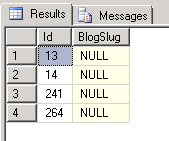
Note: You probably have got 1 record, but apparently I’ve done some adding and deleting of blogs, so I’ve got multiple. I can probably delete 3 of them, but just to be sure I didn’t.`
Read more →Zoals is te lezen
ben ik onlangs overgestapt naar Orchard
als blogging platform. Qua interface en beleving bevalt het me tot nu toe prima. Het is een redelijk snel platform en laat zich eenvoudig installeren, mede dankzij het WebMatrix
platform van Microsoft.
Hoewel de installatie redelijk goed ging, waren er toch enkele haken en ogen die ik tegen kwam. Om deze reden beschrijf ik de genomen stappen even stuk voor stuk.
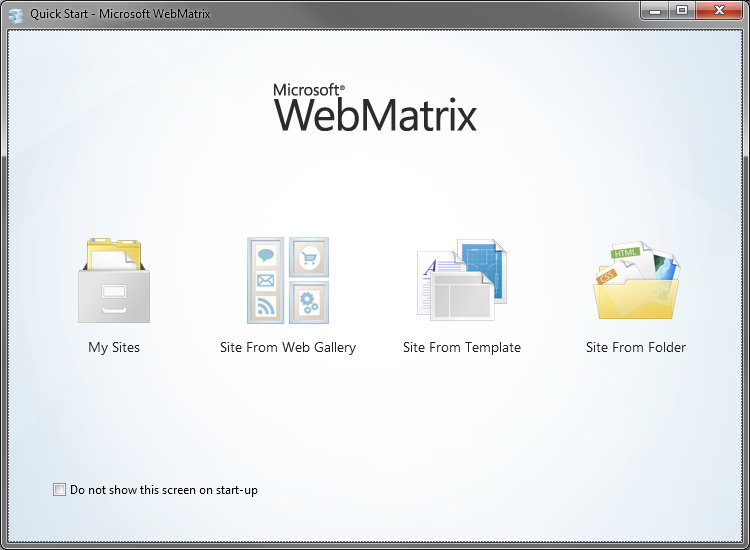
Ten eerste moet WeMatrix worden opgestart. Op het startscherm kan dan worden gekozen voor de optie Site From Web Gallery, we willen immers een Orchard site maken en dat is een type site dat door WebMatrix wordt ondersteund. Uiteraard kan er ook voor een Joomla, WordPress, Umbraco of ander systeem worden gekozen.
Zodra het vervolgscherm is geladen zoeken we naar het Orchard template.
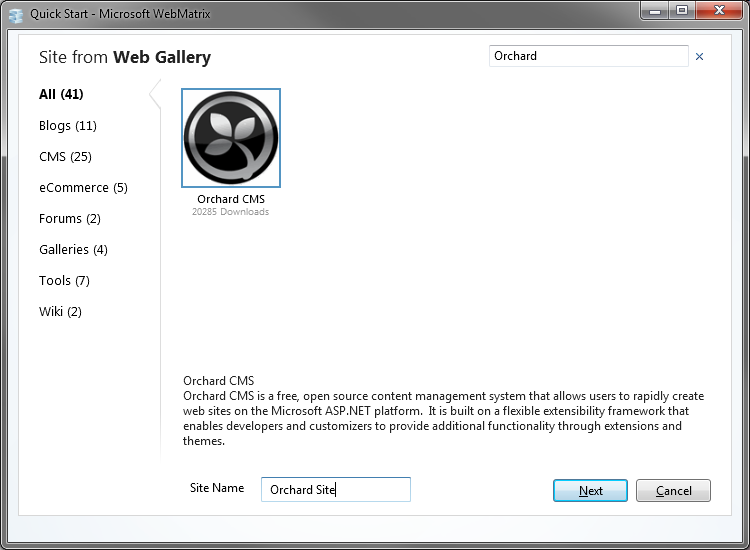
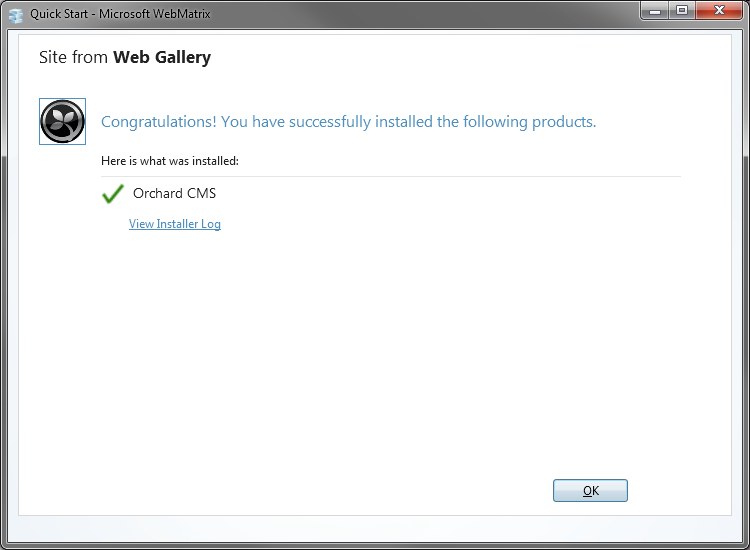
Na het invullen van de site naam kan er op Next worden gedrukt. Door in het vervolgscherm op I Accept te drukken zal het template worden gedownload en de site worden aangemaakt. Dit wordt bevestigd in nog een vervolgscherm.
Uiteindelijk zul je in een WebMatrix scherm verschijnen waar eigenlijk alles in kan worden beheerd. De interface biedt (nog) niet enorm veel opties, maar op zich voldoende om mee uit de voeten te kunnen.
Read more →Sinds gisteren draait m’n weblog niet meer op SharePoint (WSS3.0), maar op het nieuwe .NET CMS genaamd Orchard
. Het lokaal installeren was heel eenvoudig met WebMatrix
.
Na installatie kon ik gelijk aan de slag met het systeem. Moet zeggen dat het allemaal goed in elkaar steekt en behoorlijk gebruikersvriendelijk is. Installeren van verschillende modules en thema’s kan met 1 klik worden gedaan in de web interface. Dat is wel even wennen als je van SharePoint af komt. Daar moet je eerst allerlei packages installeren, configuraties instellen, etc.
Tot nu toe ben ik dan ook behoorlijk tevreden over het geheel.
Wat wel vervelend is, is dat er momenteel alleen een import (en export) kan worden gedaan met het BlogML
formaat.
Op zich mooi dat die functionaliteit wordt aangeboden, maar zelf vond ik het nogal lastig om hier even snel een export voor te maken vanuit SharePoint. Het verkrijgen van de posts, comments en overige zaken is wel prima te doen, echter moet het dan ook in het valide BlogML formaat worden geplaatst. Dit is op zich ook prima te doen, maar ben er halverwege maar mee gestopt omdat ik teveel zaken onduidelijk vond. Heb alles dus maar ge-copy-paste.
Het is iets meer werk, maar zo’n 300 posts zijn nog prima te overzien. Gelukkig heb ik weinig tot geen comments, waardoor eigenlijk alleen de posts over moesten.
Read more →