For an evaluation tool that measures regressions and improvements in agent responses, I need to visualize the output. At first, I figured it would be nice to create a web application with lots of charts and grids. Then it occurred to me that we also have Azure Managed Grafana
nowadays. This software is built for data visualization and supports a ton of data sources
, one of them being SQL Server
.
As I had never worked with this before, and because we need this visualization to analyze our measurements, I had a good excuse to start working with it.
Deploy the resource
The Managed Grafana offering is a regular Azure resource and is deployed as such. It is important to assign an identity to this resource, either a system-assigned identity or a user-assigned managed identity (UAMI). For demo purposes, I’m using a system-assigned identity, but for production, a UAMI is the way to go in my opinion.
resource grafana 'Microsoft.Dashboard/grafana@2024-10-01' = {
  name: name
  location: location
  tags: allTags
  identity: {
      type: 'SystemAssigned'
    }
  sku: {
    name: skuName
  }
  properties: {
    apiKey: enableApiKey ? 'Enabled' : 'Disabled'
    autoGeneratedDomainNameLabelScope: 'TenantReuse'
    deterministicOutboundIP: deterministicOutboundIp ? 'Enabled' : 'Disabled'
    publicNetworkAccess: publicNetworkAccess ? 'Enabled' : 'Disabled'
    zoneRedundancy: zoneRedundancy ? 'Enabled' : 'Disabled'
  }
}
Assigning permissions to Grafana’s data plane
I’m running the entire deployment via my deployment pipelines, including the dashboards in the Grafana resource. Because of this, I also need to make sure the deployment principal has enough permissions to create resources on the Grafana data plane. Choose the Grafana Editor (a79a5197-3a5c-4973-a920-486035ffd60f) or Grafana Admin (22926164-76b3-42b3-bc55-97df8dab3e41) role for this purpose. From a least-privilege standpoint, the Grafana Editor role is preferred.
Read more →A request came by me to:
Get all the commits associated to a specific release, based on the previous succesful release.
The fun thing is, we’re using Azure DevOps.
Easy right?
Well, that’s what I thought, because this information is readily available in the web interface of Azure DevOps.
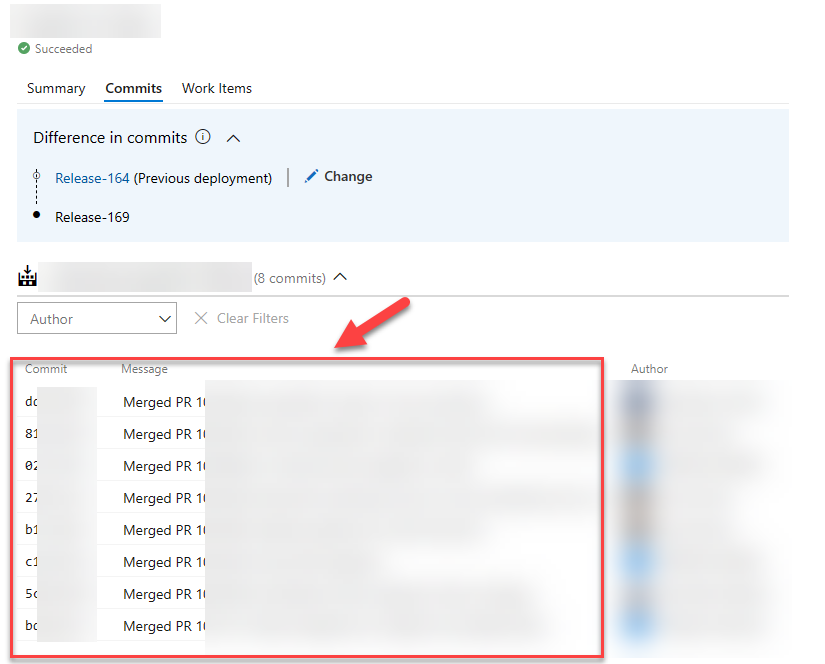
As the saying goes:
We do things not because it is easy, but because we thought it would be easy!
This phrase applies to the above request.
When starting out, I figured there must be some environment variable, or endpoint I can invoke to get these details. On the command-line, this is pretty git log command. Turns out, there isn’t. I did ask on Stack Overflow
, but it appears the only way to get this data is to invoke several Azure DevOps REST API endpoints.
Not a big problem, but surely more work as expected.
Because of my earlier investigations
on integrating with Azure DevOps, I was aware of the REST API service & documentation that is provided on the topic
.
The initial implementation
With the documentation available I kind of knew the /_apis/release/releases would be my starting point.
From with the response of this endpoint you should be able to identify the current, and previous releases. In my case, I want to get the previous succesful release that had a specific stage in a succesful state. Quite possible with the response that you get.
Now that you know the previous release identifier, the changes endpoint can be invoked, taking the release id of the current and previous run.
Read more →In my previous post
, I wrote how to create & host private build agents for Azure DevOps running in Azure Container Instances.
One of the reasons for doing so is to eliminate creating build agent VM’s and performant pipelines for my side projects. But, of course, the build agents also need to be as cheap as possible. Azure Container Instances have per-second billing
, which is excellent for build agent containers.
The thing is, I don’t want to turn them on or off manually.
It would be great to have an automated process turn on the agents when necessary and turn them off when done.
I started looking for a trigger or webhook that I can invoke whenever a build or release is put on the queue, but I couldn’t find such a feature in Azure DevOps. However, I did find some functionality in the Azure DevOps REST API
which can be helpful in my scenario.
Azure DevOps REST API
When going through the documentation, you will probably get confused about the terminology quite fast, or at least I did.
At first, I was going through the Pipelines
docs and made some queries, but from this, I didn’t get the responses I expected.
Read more →I’ve been complaining for a while about how slow the hosted build agent in Azure DevOps is. The reason for this is simple, as it’s a shared, free, hosted agent.
A solution for this is to host your agents, for example, via a virtual machine.
I’m not a big fan of maintaining virtual machines, and then it struck me that we now have containers that are sort of the same but easier to manage.
A container is based on a specific image, and every time you spin it up, it uses the same image (baseline). This makes sure no funny business is happening in the container, and manual modifications to the system will are deleted whenever a new container is spun up.
The build agent image
As a .NET developer, we needed Windows agents. Nowadays, we can build our solutions on a Linux machine. A great benefit from this is, Linux images are much smaller compared to their Windows counterparts. Another benefit, which I learned from experience, builds are much faster on a Linux machine. File operations in specific are way faster on a Linux operating system (NuGet/NPM).
There is a step-by-step sample on the Azure DevOps documentation site
on how to create an Azure DevOps build agent, which I’ve also used myself.
Read more →Some time ago, about 7 months, I had to build a service that creates a PDF document from HTML. The library of choice was IronPDF
. Creating PDF documents with this library is a breeze, but we stumbled across a small issue.
The HTML-to-PDF-converter-service is hosted inside an Azure Function, for reasons.
We noticed creating the documents took quite a lot of time. After inspecting the allocated instances we discovered both the CPU and Memory were constantly spiking to maximum capacity. That’s not good.
What made things worse, the generation sometimes took up to 37 minutes to complete! That’s not acceptable if your customers are waiting for the document.
This service was deployed on Windows instances, as it’s the default.
Because Linux is more lightweight compared to Windows, we started doing a test if the document rendering would be faster on Azure Functions hosted on Linux instances. The results were staggering!
On the Linux instances, all of the documents being generated never took more than 3 minutes to complete (99th percentile) and the used resources were less. We were still using a lot of CPU and memory, but acceptable levels. That’s the moment we decided to go forward using Linux hosted Azure Functions for this part of the system.
We just had to find out how to deploy them.
Read more →A while ago I was confronted with the fact one of our Azure App Services needed multiple hostname bindings.
I was planning to do this by making multiple Microsoft.Web/sites/hostNameBindings resources, for this specific App Service, in our ARM template. When deploying I was confronted with the following error
{
      "ErrorEntity": {
        "Code": "Conflict",
        "Message": "Cannot modify this site because another operation is in progress. [some more details]",
        "ExtendedCode": "59203",
        "MessageTemplate": "Cannot modify this site because another operation is in progress. Details: {0}",
        "Parameters": [
          "Id: {guid}, OperationName: {someName}, CreatedTime: 3/21/2020 11:13:54 PM, RequestId:{guid}, EntityType: 1"
        ],
        "InnerErrors": null
      }
    }
  ],
  "Innererror": null
}
This is because adding a hostnameBinding can’t be done simultaneously. The way to solve this is by using the copy() function.
To work with this function, you first need an array with data. I’ve named mine hostenameBindings as you can see below.
"variables": {
    "hostnameBindings": [
      "[concat(variables('appServiceCname') ,'.customer.com')]",
      "[concat(variables('appServiceCname') ,'-seconddomain.customer.com')]",
      "[concat(variables('appServiceCname') ,'-another.customer.nl')]"
    ]
}
Now continue creating your ARM template like you’re used to, but when defining the hostnameBindings resource(s), check out this sample.
{
    "type": "Microsoft.Web/sites/hostNameBindings",
    "apiVersion": "2019-08-01",
    "name": "[concat(variables('appServiceName'), '/', variables('hostnameBindings')[copyIndex()])]",
    "location": "[resourceGroup().location]",
    "dependsOn": [
        "[resourceId('Microsoft.Web/sites', variables('appServiceName'))]",
        "[resourceId('Microsoft.Web/certificates', variables('certificate').name)]"
    ],
    "copy": {
        "name": "hostNameBindingsEndpointLoop",
        "mode": "serial",
        "batchSize": 1,
        "count": "[length(variables('hostnameBindings'))]"
    },
    "properties": {
        "siteName": "Sitecore",
        "hostNameType": "Verified",
        "sslState": "SniEnabled",
        "thumbprint": "[parameters('certificateThumbprint')]"
    }
},
Over here I’m telling the resource manager to deploy these resources in serial with a batchSize of 1. This will make sure all hostnameBindings resources will be deployed after each other.
You can use the copyIndex() function to get the N-th element from your array.
Read more →Recently, I was trying to deploy an Azure App Service which was in need for a couple of certificates, which are stored in Azure Key Vault.
Our ARM template looked very similar to the one below in order to install & configure the certificates in our App Service.
"resources": [
    {
        "type": "Microsoft.Web/certificates",
        "name": "[parameters('certificateName')]",
        "apiVersion": "2019-08-01",
        "location": "[parameters('existingAppLocation')]",
        "properties": {
            "keyVaultId": "[parameters('existingKeyVaultId')]",
            "keyVaultSecretName": "[parameters('existingKeyVaultSecretName')]",
            "serverFarmId": "[parameters('existingServerFarmId')]"
        }
    },
    {
        "type": "Microsoft.Web/sites",
        "name": "[parameters('existingWebAppName')]",
        "apiVersion": "2019-08-01",
        "location": "[parameters('existingAppLocation')]",
        "dependsOn": [
            "[resourceId('Microsoft.Web/certificates', parameters('certificateName'))]"
        ],
        "properties": {
            "hostNameSslStates": [
                {
                    "name": "[parameters('hostname')]",
                    "sslState": "SniEnabled",
                    "thumbprint": "[reference(resourceId('Microsoft.Web/certificates', parameters('certificateName'))).Thumbprint]",
                    "toUpdate": true
                }
            ]
        }
    }
]
When deploying said template, we quickly received a message the deployment had failed.
Resource Microsoft.Web/certificates ‘[myCert]’ failed with message
{ “Code”: “BadRequest”, “Message”: “The service does not have access to ‘/subscriptions/[subscription]/resourcegroups/[resourcegroup]/providers/microsoft.keyvault/vaults/[myVault]’ Key Vault. Please make sure that you have granted necessary permissions to the service to perform the request operation.”, “Target”: null, “Details”: [
{
"Message": "The service does not have access to '/subscriptions/[subscription]/resourcegroups/[resourcegroup]/providers/microsoft.keyvault/vaults/[myVault]' Key Vault. Please make sure that you have granted necessary permissions to the service to perform the request operation."
},
{
"Code": "BadRequest"
},
{
"ErrorEntity": {
"ExtendedCode": "59716",
"MessageTemplate": "The service does not have access to '{0}' Key Vault. Please make sure that you have granted necessary permissions to the service to perform the request operation.",
"Parameters": [ "/subscriptions/[subscription]/resourcegroups/[resourcegroup]/providers/microsoft.keyvault/vaults/[myVault]"
],
"Code": "BadRequest",
"Message": "The service does not have access to '/subscriptions/[subscription]/resourcegroups/[resourcegroup]/providers/microsoft.keyvault/vaults/[myVault]' Key Vault. Please make sure that you have granted necessary permissions to the service to perform the request operation."
Read more →
In my last post
, I described how to create a Hugo website
and what I did to migrate from my Miniblog platform, along with some details on how to create the build & deployment pipeline.
I started by deploying my Hugo websites to a regular Azure App Service. This is a full-blown web application platform. It’s a bit too overpowered for hosting a simple, static, website. As I mentioned in the earlier post, it makes a lot more sense to host static websites on an Azure Storage Account with the Static website hosting
. The main reason I postponed this is that I had some issues creating my routing rules.
Moving to static site hosting ASAP
After having migrated to Hugo & the App Service hosting model, I quickly noticed moving to the static site hosting option was quite important.
Every time my deployment pipeline was deploying the files to the App Service, the site became unavailable.

The pages returned a 404 and when navigating to the root site, the site was just empty.
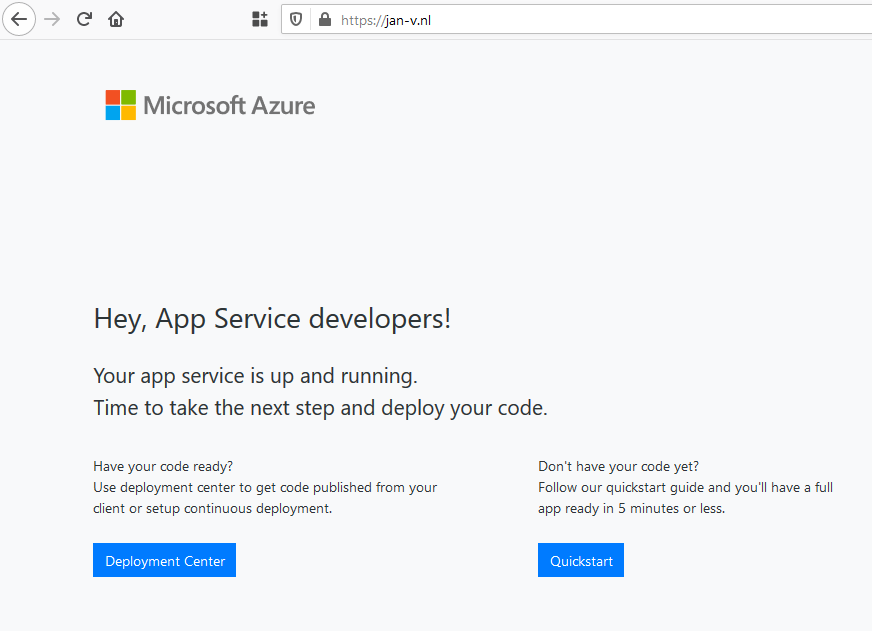
This is bad, really bad.
Of course, I can solve this by deploying the site to a Staging slot and swap with Production when ready. This is quite doable, but not a path I wanted to pursue.
Read more →So, a couple of weeks back I wrote about leveraging the power of Logic Apps to retrieve Alerts from within your Azure ecosystem and send them to Microsoft Teams. This works great and a fellow Azure MVP, Tom Kerkhove
, has enhanced the Logic Apps Template when handling Azure Monitor events
.I’m starting to become a pretty big van of Logic Apps, but there are some (obvious) downsides to it.
First, they live inside your Azure Portal. You can create, modify and export them from within the Portal, which is great, unless you want to integrate them in your ‘regular’ development cycle.The export feature enables you to copy/paste the Logic Apps to your ARM templates, but this is suboptimal in my opinion. There’s also the Azure Logic Apps Tools for Visual Studio
extension, which makes the integration a bit better, but it still feels a bit quirky.Another downside is the ’language’. When exporting a Logic App you’ll be seeing a lot of JSON. While there might be a good reason for this, it’s not something I like working in and create (complex?) workflows.If you can overcome, or accept, these downsides I’d really advice you to look into Logic Apps. If not, well read on!
Read more →