I recently read this post from my colleague Marnix on using Dev Containers to isolate your service logins for a project
. This is especially useful for Azure and GitHub accounts, as they are configured per system in the ~/.azure and ~/.config/gh folders.
As a consultant, I’m often hopping between multiple customers. Even someone working solely for one company might have side projects in different environments. This system configuration is often suboptimal and requires you to think about where you’re logged in and switch around. Marnix has done a great job describing why Dev Containers are a great solution to this problem, so I won’t repeat that here.
One annoying aspect is working with worktrees. Currently, coding agents default to Git worktrees, so you can work on multiple things at the same time without conflicts. This is great, but they create a copy of the repository in a random folder. This also creates a new Dev Container for you to use, which means you have to log in again. Having to log in to every Dev Container is quite cumbersome, and I don’t like that.
What I want is a shared login for my repositories that works for all the worktrees I have.
After playing around with this feature, I found out that this is quite possible!
Read more →The project I’m working on is in a maturing state. This means it needs to remain stable while still delivering new features. This is where feature toggles come into play. By adding these toggles and conditional execution paths to your code, you can keep the functionality unchanged until you turn a toggle on and then return to the previous behavior by turning it off again.
In the Azure ecosystem, we have the App Configuration resource with fairly basic feature toggle capabilities, so that’s what I’m using because it fits our current needs.
July 2026 update
There is no need to create your own App Configuration emulator image for macOS anymore.
The team has pushed an official image to the MCR
.
https://mcr.microsoft.com/en-us/artifact/mar/azure-app-configuration/app-configuration-emulator/tags
amd64 arch image has been released!
Setup in Aspire
For ease of local development, we use Aspire. To enable App Configuration, you’ll need the Aspire.Hosting.Azure.AppConfiguration package.
This lets you add a new resource to the AppHost: var appConfig = builder.AddAzureAppConfiguration("config");.
On your local machine, you probably don’t want to use an actual Azure resource, but an emulator. This can be configured using these lines of code:
appConfig.RunAsEmulator(emulator =>
{
    emulator.WithLifetime(ContainerLifetime.Persistent);
    emulator.WithDataVolume();
});
This works like a charm on Windows.
If you’re on Apple Silicon, like I am, it won’t.
Read more →My current project requires us to create multiple agents running complex algorithms with large volumes of data.
The algorithms work on large datasets and compute outcomes to be used in the next steps of our workflow. Our data scientists are creating these algorithms, and they’re most comfortable in Python, so that’s what our application is running as well, in a setup similar to the one I created in my Trial and Error
repository.
If you head to this repository, you’ll notice a file called large_data_analysis.py. This file is responsible for creating agents that are capable of working with large volumes of data.
As you probably know, context windows for agents are limited. They are growing at a rapid pace, but ideally you keep the context small.
When you need to work with millions of records from a repository, you can put them in the agent’s context, but you’ll notice the limitations of this practice quite quickly. Either the agent will start hallucinating or forget details, or you’ll be prompted with an error stating that the context is too large. Both scenarios are disastrous when relying on the agent and its outcome.
In my previous post, you could see how to create tools that can be used in agents
.
Oftentimes, these tools require data to work with. If the data already exists inside the prompt, that’s great. The language model will take care of passing the correct parameters based on the descriptions.
Read more →I’m a big fan of the coding agents we have at our disposal. I use OpenCode
a lot myself, switch to GitHub Copilot
regularly, and several of my colleagues use Claude Code
.
All of these coding agents have similar capabilities, but they work slightly different. When you are doing the same thing over and over again, it makes sense to create generic commands
for it. Some examples can also be found in the Awesome Copilot repository
.
Another very useful feature is Agent Skills
. Commands and skills overlap in some areas, but they differ in an important way.
The description for commands is:
Custom commands let you specify a prompt you want to run when that command is executed in the TUI.
The description for skills is:
Agent skills let OpenCode discover reusable instructions from your repo or home directory. Skills are loaded on-demand via the native skill tool—agents see available skills and can load the full content when needed.
Can you spot the difference? It’s this: “loaded on-demand”.
Skills are only used when the agent determines they are relevant, so the frontmatter fields are important.
You can also grant permissions to skills, which saves you from having to press the “Allow” button every time.
Read more →You know what’s cool? Having agents talk to each other and letting them figure out how to get to the answer you’re looking for.
One way to do this is by using the Agent-to-Agent protocol
in your application. Version 0.3.0 is the latest released version, and there’s an RC v1.0 available already.
The Microsoft Agent Framework
(MAF) also has an implementation of this protocol available. The current version of the MAF packages, 1.0.0b260130 at the time of writing, isn’t compatible with the proposed changes of 1.0, but I’m pretty sure this will be supported in upcoming releases. The team is adding and changing features quite quickly. There are also newer versions of MAF available now, but I have yet to validate those.
In my current project, we’re creating a dozen agents, each doing its own little thing. What we could do is create some workflow or state machine, invoking each agent in turn, much like the good old days. However, we don’t always need to run every agent or run them in a specific order. While it is possible to add this dynamic nature to an application, we can also leverage the power of a language model for this. Based on the knowledge of what an agent can do, the language model can figure out which agents to invoke and in what order. The A2A protocol can help here.
Read more →GitHub Copilot is great, but somehow I get better results and a nicer UX/DX with OpenCode
. It integrates with all the models I have available via GitHub Copilot and more.
There’s also a great ecosystem around this software and the documentation is quite good as well. The Awesome OpenCode
repository lists quite a few useful tools, plugins and agents. Currently, I use the Smart Title Plugin
and Open Agents Control
, but Oh My OpenCode
also has my interest even though it has a bit of overlap.
All of this is awesome and greatly enhances my joy in creating solutions during my dayjob and side projects. However, it does cost quite a bit of (premium) requests. Especially when using the rather expensive (and good) models.
What is great about OpenCode is you can connect it to your models deployed in Azure too!
This way, when your premium requests are all used up, you can use a GPT-Codex or Kimi model deployed in your own environment. Or even when you do still have premium requests available, you can offload your questions to a model of your choice.
When I was searching for the correct configuration I couldn’t find the correct documentation for this, so decided to post it over here.
If you have OpenCode installed, there should be a folder with an opencode.json file on your system. On a Mac it’s at ~/.config/opencode/opencode.json. In this file you can add a property called providers, if it doesn’t exist already, and configure your models.
Read more →It looks like everyone is creating agents nowadays. Most of the time with elaborate prompts to tell a language model what it should do.
Great, but we all know a language model isn’t good at doing everything. Also, I don’t want it to do everything either as it would need to be granted access to every possible resource in my environment.
To extend the capabilities of an agent (and the underlying language model), you can provide tools. With good tool documentation, agents are empowered to do more. Take, for example, counting how many times the letter r appears in Strawberry. Browsing around the internet, it looks like this is one of those important life questions everyone wants an answer to.
The problem is that people are asking this question to a model that’s good at language and guessing what the best possible output should be, not a model that’s good at counting.
What I did was create an agent that’s empowered with a few tools capable of doing simple math, just to see how this is supposed to work. I’m using the Microsoft Agent Framework. The team isn’t shying away from making breaking changes with every release, so newer (and older) versions may need a different implementation. Currently, I’m working in Python with the agent-framework-azure-ai package, version 1.0.0b260130.
Read more →Some time ago I had to validate who or what has access to the applications we created in our Azure environment.
There were hundreds of different applications with each their own specific Application Roles. Both users and service principals had roles assigned to the applications to perform the required operations.
It is possible to click through every application in Entra ID and validate the assigned roles. However, this takes quite a bit of time.
So I figured “Is it possible to iterate through all my applications in Entra ID and see who or what has an application role assigned?”
Needless to say, the answer is “Yes!”.
By using the Azure CLI and the Graph API I was able to accomplish what is required.
#########################################################
# Login if running local and you haven't done so already
#########################################################
Function Login {
    # Subscription used for logging in. Necessary to get a context to work in.
    $loggedInSubscription = "The subscription name"
    $tenantId = "73fefcf4-c062-45ef-9607-e19aba33f82d"
    az login --tenant $tenantId
    # # Log in to a subscription which resides in the tentant we want to add & configure MG's to.
    az account set --subscription $loggedInSubscription
}
Function Get-AppRoleAssignments {
    [CmdletBinding()]Param()
    Write-Verbose -Message "Starting to retrieve all Enterprise Applications matching the naming convention."
    $roleAssignmentsForAllApplications = $null
    $enterpriseAppRegistrationCollection =
        az ad sp list --filter "startswith(displayname, 'jv-sample-app1') or startswith(displayname, 'jv-sample-app2')"
        | ConvertFrom-Json

    Write-Verbose -Message "Found $($enterpriseAppRegistrationCollection.Length) enterprise applications."
    foreach ($enterpriseAppRegistration in $enterpriseAppRegistrationCollection) {
        $servicePrincipalAppRoles = $null
        $assignedAppRolesForServicePrincipal = $null

        # The service principal from 'az ad sp list' already has all the data we need
        $servicePrincipalAppRoles = $enterpriseAppRegistration.appRoles

        Write-Verbose -Message "Found $($servicePrincipalAppRoles.Length) appRoles for $($enterpriseAppRegistration.id)."
        $assignedAppRolesForServicePrincipal =
            az rest `
            --method get `
            --uri https://graph.microsoft.com/v1.0/servicePrincipals/$($enterpriseAppRegistration.id)/appRoleAssignedTo
            | ConvertFrom-Json
            | Select-Object -expand value

            Write-Verbose -Message "Found $($assignedAppRolesForServicePrincipal.Length) assigned identities for $($enterpriseAppRegistration.id)."
        $roleAssignmentsForAllApplications += foreach($assignedAppRole in $assignedAppRolesForServicePrincipal) {
            $role = $servicePrincipalAppRoles | Where-Object{ $_.id -eq $assignedAppRole.appRoleId}
            Write-Verbose -Message "Adding $($role.displayName) to collection for $($assignedAppRole.principalDisplayName) on application $($enterpriseAppRegistration.displayName)."
            New-Object PsObject -Property @{
                AppRoleId = $assignedAppRole.appRoleId
                AppRoleDisplayName = $role.displayName
                PrincipalObjectId = $assignedAppRole.principalId
                PrincipalDisplayName = $assignedAppRole.principalDisplayName
                ApplicationDisplayName = $enterpriseAppRegistration.displayName
                ApplicationApplicationId = $enterpriseAppRegistration.appId
                ApplicationObjectId = $enterpriseAppRegistration.id
            }
        }
    }
    return $roleAssignmentsForAllApplications
}
#Login
Get-AppRoleAssignments -Verbose | Sort-Object -Property ApplicationDisplayName | Format-Table -Property ApplicationDisplayName, ApplicationApplicationId, ApplicationObjectId, PrincipalObjectId, PrincipalDisplayName, AppRoleId, AppRoleDisplayName | Out-File "AppRoleAssignments.md"
The output looks pretty much like this
Read more →I had the opportunity to get a new development machine and it had to be a laptop. I’ve used solely Windows machines in the past and was always annoyed to see my peers, using a Mac, have awesome battery life and could have their laptop on their lap or table without melting the surface and never have fans turning on when doing simple stuff.
That’s a couple of reasons I chose to get a Macbook Pro myself this time. Of course, having the laptop integrate with all my other Apple hardware at home is a nice perk too.
What did I get
At this moment, a Macbook Pro comes with an M4 chip.
Based on what I’m reading on the internet, you can’t go wrong with any of these chips. Be it the M4, M4 Pro or M4 Max. I did read the fan turns on from time to time with the M4 Max, but that kind of makes sense. The M4 Pro machine was within the budget I was looking for, so chose that one.
There isn’t much to choose from when you know the size, 14", and CPU you want. I went with the 48GB memory and 1TB of storage option and that’s the machine I’m typing this post on right now.
Read more →There’s a new feature over here, my weekly links archive
.
Every week a page will be added automatically based on content I have read and found interesting to share. I’m using a self-hosted Linkwarden
instance to collect pages and links for a variety of topics. For the purpose of this weekly links archive I have created a new tag called Newsletter which I use to fetch the weekly links to share with all of you.
Of course, I don’t want to make my Linkwarden service open to the internet. To fetch the content from Linkwarden in my scheduled GitHub Action I use Tailscale as shared earlier on this blog
.
Query Linkwarden API
Linkwarden provides a nice API that is documented (somewhat) on their site: https://docs.linkwarden.app/api/api-introduction
Not all features and possibilities are mentioned over here, but with some creativity you’ll be able to figure out a lot.
To use the API you first need an access token.
These tokens can be created on the Settings -> Access Tokens page.
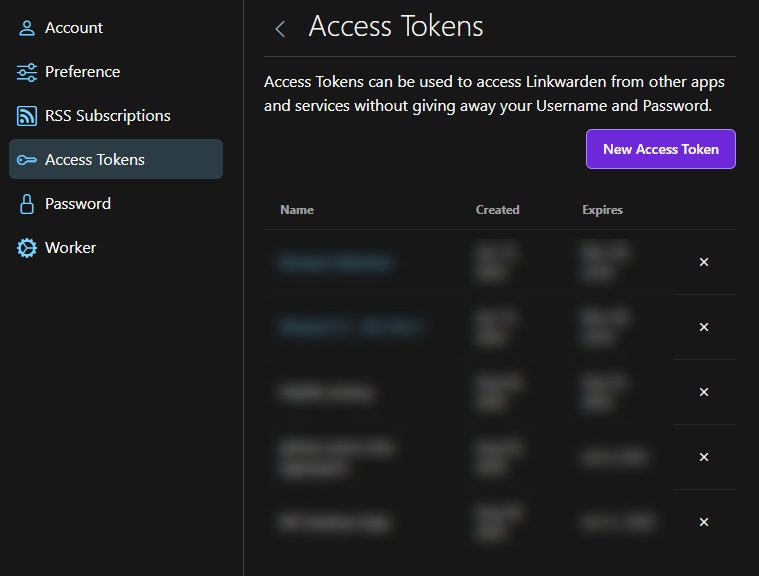
Once you have this token, make sure to store it somewhere safe.
As you can see in the documentation there’s a search endpoint. This one is useful to validate your requests are working. The endpoint I’m most interested in is the links endpoint and using the tagId querystring parameter
. To make good use of this, you do need to know which tag to query, in my case it’s 5.
Do note, this endpoint is being deprecated in favor of the search endpoint. At this point, I have not been able to figure out how to use the search-endpoint to retrieve all posts for a specific tag, but this will probably be necessary at some time in the future.
Read more →