You might remember me writing on how to warm up your App Service instances when moving between slots
. The use of the applicationInitialization-element is implemented on nearly every IIS webserver nowadays and works great, until it doesn’t.
I’ve been working on a project which has been designed, as I’d like to call it, a distributed monolith
. To give you an oversimplified overview, here’s what we have.
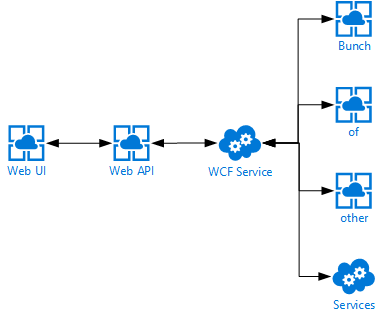
First off we have a single page web application which communicates directly to an ASP.NET Web API, which in turn communicates to a backend WCF service, which in turn also communicates with a bunch of other services. You can probably imagine I’m not very happy with this kind of a design, but I can’t do much about it currently.
One of the problems with this design is having cold-starts whenever a service is being deployed.
Since we’re deploying continuously to test & production there are a lot of cold starts. Using the applicationInitialization-element really helped spinning up our App Services, but we were still facing some slowness whenever the WCF service was being deployed to any of our environments. This service is being deployed to an ‘old-fashioned’ Cloud Service so we figured the applicationInitialization-element should just work as it’s still running on IIS.
Read more →So you might remember me posting about using the Let’s Encrypt
site extension for Azure App Services, called Azure Let’s Encrypt, created by SJKP.
This has quite well for over a year now and even works for Function Apps
.
However, last month I got notified my SSL certificate was expired on one of my sites. Strange, as an automated job should just handle this for me. I thought the job probably didn’t execute because of some glitch in the matrix. Therefore I logged in manually, started the site extension wizard again and was stuck on this screen.
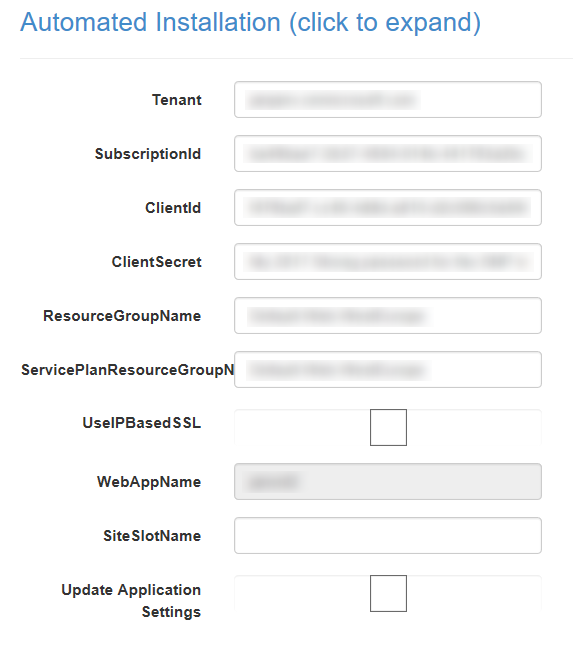
The reason I was stuck was because the ClientId and ClientSecret didn’t work anymore. As these settings hadn’t changed since I started using this extension I found it quite strange.
Apparently, the Server Principal
, which I had created last year, somehow had changed and I didn’t know how to change it back. Lucky for me, managing the AAD isn’t very hard to do nowadays. With a bit of trial and error I was able to create a new SNP and use these details on the Let’s Encrypt site extension.
Creating a new application in AAD
First thing you need to do is add a new Appliction to your AAD. Be sure to pick the option App registrations over here and press the New application registration.
Read more →Using certificates to secure, sign and validate information has become a common practice in the past couple of years. Therefore, it makes sense to use them in combination with Azure Functions as well.
As Azure Functions are hosted on top of an Azure App Service this is quite possible, but you do have to configure something before you can start using certificates.
Adding your certificate to the Function App
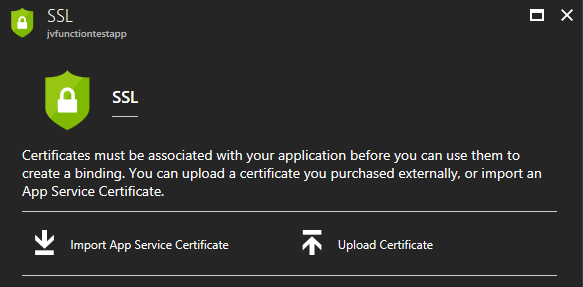
Let’s just start at the beginning, in case you are wondering on how to add these certificates to your Function App. Adding certificates is ‘hidden’ on the SSL blade in the Azure portal. Over here you can add SSL certificates, but also regular certificates
Keep in mind though, if you are going to use certificates in your own project, please just add them to Azure Key Vault
in order to keep them secure. Using the Key Vault is the preferred way to work with certificates (and secrets).
For the purpose of this post I’ve just pressed the Upload Certificate-link, which will prompt you with a new blade from which you can upload a private or public certificate.
![clip_image001[4]](https://jan-v.nl/files/8047a43c-7dd3-4c73-8f80-f76e0789deb4.png)
You will be able to see the certificate’s thumbprint, name and expiration date on the SSL blade if it has been added correctly.
Read more →You might remember me writing a post on how you can set up your site with SSL while using Let’s Encrypt and Azure App Services
.
Well, as it goes, the same post applies for Azure Functions. You just have to do some extra work for it, but it’s not very hard.
Simon Pedersen
, the author of the Azure Let’s Encrypt site extension
, has done some work in explaining the steps on his GitHub wiki page
. This page is based on some old screenshots, but it still applies.
The first thing you need to do is create a new function which will be able to do the ACME challenge
. This function will look something like this.
public static class LetsEncrypt
{
    [FunctionName("letsencrypt")]
    public static HttpResponseMessage Run(
        [HttpTrigger(AuthorizationLevel.Anonymous, "get", "post", Route = "letsencrypt/{code}")]
        HttpRequestMessage req,
        string code,
        TraceWriter log)
    {
        log.Info($"C# HTTP trigger function processed a request. {code}");
        var content = File.ReadAllText(@"D:\home\site\wwwroot\.well-known\acme-challenge\" + code);
        var resp = new HttpResponseMessage(HttpStatusCode.OK);
        resp.Content = new StringContent(content, System.Text.Encoding.UTF8, "text/plain");
        return resp;
    }
}
As you can see, this function will read the ACME challenge file from the disk of the App Service it is running on and return the content of it. Because Azure Functions run in an App Service (even the functions in a Consumption plan), this is very possible. The Principal (created in the earlier post) can create these type of files, so everything will work just perfectly.
Read more →It has become increasingly important to have your site secured via some kind of certificate. Even your Google ranking
is affected by it.
The main problem with SSL/TLS certificates is the fact most of them cost money. Now, I don’t have any problem with paying some money for something like a certificate, but it will cost quite a lot if I want to set this up for all of my sites & domains. In theory it’s possible to create a self-signed certificate
and publish your site with it, but that’s not a very good idea as there’s no one who trusts your self-signed certificate besides yourself.
Luckily Mozilla is helping us, poor content-creators, out with their service called Let’s Encrypt. Let’s Encrypt
is a rather new Certificate Authority
which is offering a free, open and automated service to create certificates. Their Getting Started
guide contains some details on how to set this up for your website or hosting provider.
This is all fun and games, but when hosting your site(s) in the Azure App Service ecosystem you can’t do much with the steps defined in the Getting Started guide. At least, I couldn’t make any sense off it.
There’s a developer who has been so kind to create a so called Site extension for an Azure App Service called Azure Let’s Encrypt. It comes in two flavors for both x86 and x64 systems. Depending on which platform you have deployed your site to, you need to activate one corresponding this platform.
Read more →It’s one of those things you need to do once and forget about it. Sometimes it’s necessary to develop something which required talking to a webservice. A lot of the times, the webservice is secured with an SSL certificate in the real world.
As most companies don’t want to spend good money to real SSL certificates for development workstations/servers, we have to create our own. You can of course develop the functionality with a non-secured environment, but for testing purposes it’s probably useful to have the test environment match the QA or production servers.
A while back I had an issue in some production software. We discovered something was malfunctioning I was needed to figure out what was wrong. As the code hadn’t changed in quite some time and it appeared the code was good (enough), I started looking at the infrastructure and discovered it might have something to do with the webservice (in SSL) it was talking to. As I couldn’t connect to the production environment, I had to connect to a local service which was running in SSL, so I did.
If you want to do this, you need to take quite some steps if you are running on IIS 6.0. This feature has improved a lot IIS 7.0/7.5. ScotGu has written a nice walkthough
about this. Just hit the Create Self-Signed Certificate link and you are done. Too bad I was still developing in an IIS 6.0 environment (Windows 2003R2). I’ll describe the needed steps below.
Read more →