Most people who are professionally working with any of the cloud providers use some kind of infrastructure-as-code solution.
For Microsoft Azure, I’m mostly working with ARM- or Bicep templates to describe the resources necessary. While I’ve written ARM templates for years now, I’m enjoying creating Bicep templates a bit more due to the tooling it offers.
There is at least one downside to using these solutions, and that’s the fact most operations are happening on the Azure control plane. Often times this is good enough, as you only need to deploy some resources, specify some values to the resources, and be done with it. However, there are cases where you also need to invoke some actions which require the creation of data, identities, or trigger some kind of endpoint.
To facilitate this need, there’s a special kind of resource in Azure called deploymentScripts.
What are deploymentScripts?
As it’s mentioned in the docs
, these scripts can be used to perform lots of custom actions, like:
- Add users to a directory.
- Perform data plane operations, for example, copy blobs or seed database.
- Look up and validate a license key.
- Create a self-signed certificate.
- Create an object in Azure AD.
- Look up IP Address blocks from custom system.
The benefits of deployment script:
Read more →
For a project I’m working on we have a massive ARM template and I had to add some stuff, deployment scripts, to it. While I still have enough love for ARM templates to work with it, creating & deploying big deployment scripts with isn’t a great experience.
However, with Bicep I can create (and debug) the script in a proper PowerShell file and load it in the Bicep template using the loadTextContent function
. After compiling (az bicep build) the template it will output a nice ARM template for me with the PowerShell file contents inside.
The downside?
Now I’m stuck with 2 ARM templates, and while manual merges are possible I think we all know that’s not something to strive for. What do you do when there’s something on your local machine which needs automation? Right! Reach out to PowerShell to do the automation for you.
Because ARM Templates are JSON (sort of) we can use the built-in functions ConvertFrom-Json and ConvertTo-Json to read & write documents, so that’s what I did.
There’s also this great module called Join-Object
by iRon7
which is able to:
Combines two object lists based on a related property between them.
This module has several join options, like InnerJoin, OuterJoin, Merge, and many more. So that’s everything I need for what I want to accomplish, merging 2 ARM templates with eachother.
Read more →I’ve been creating solutions for customers on my development laptop for years now. This works great as it’s a portable device and we get to have some great hardware in a compact form nowadays. However, laptops are still quite slow when you compare them to a desktop. This has become quite noticeable to me as I’ve been doing more development on my new desktop
.
You can get some nice laptops with desktop-like performance, but most of the time it’ll cost a lot of money and will add a couple of pounds in weight. As I like to travel light, when travel is allowed again, a heavy laptop isn’t ideal.
Seeing there’s lots of horsepower in the cloud, it occurred to me I can just as well spin up a beefy virtual machine in Azure and develop on there. The main downside to this scenario is you need a (stable) internet connection to do any development. But to be honest, I need an internet connection anyways to do some actual development.
I do need this virtual machine to be safe and secure, so spinning up a VM and connecting to it via a public IP through RDP isn’t advised. To protect a virtual machine from the big bad internet you can add it in a virtual network and connect to it via a private IP-address. Of course, this makes the initial deployment a bit complex.
Read more →Some time ago, about 7 months, I had to build a service that creates a PDF document from HTML. The library of choice was IronPDF
. Creating PDF documents with this library is a breeze, but we stumbled across a small issue.
The HTML-to-PDF-converter-service is hosted inside an Azure Function, for reasons.
We noticed creating the documents took quite a lot of time. After inspecting the allocated instances we discovered both the CPU and Memory were constantly spiking to maximum capacity. That’s not good.
What made things worse, the generation sometimes took up to 37 minutes to complete! That’s not acceptable if your customers are waiting for the document.
This service was deployed on Windows instances, as it’s the default.
Because Linux is more lightweight compared to Windows, we started doing a test if the document rendering would be faster on Azure Functions hosted on Linux instances. The results were staggering!
On the Linux instances, all of the documents being generated never took more than 3 minutes to complete (99th percentile) and the used resources were less. We were still using a lot of CPU and memory, but acceptable levels. That’s the moment we decided to go forward using Linux hosted Azure Functions for this part of the system.
We just had to find out how to deploy them.
Read more →A while ago I was confronted with the fact one of our Azure App Services needed multiple hostname bindings.
I was planning to do this by making multiple Microsoft.Web/sites/hostNameBindings resources, for this specific App Service, in our ARM template. When deploying I was confronted with the following error
{
      "ErrorEntity": {
        "Code": "Conflict",
        "Message": "Cannot modify this site because another operation is in progress. [some more details]",
        "ExtendedCode": "59203",
        "MessageTemplate": "Cannot modify this site because another operation is in progress. Details: {0}",
        "Parameters": [
          "Id: {guid}, OperationName: {someName}, CreatedTime: 3/21/2020 11:13:54 PM, RequestId:{guid}, EntityType: 1"
        ],
        "InnerErrors": null
      }
    }
  ],
  "Innererror": null
}
This is because adding a hostnameBinding can’t be done simultaneously. The way to solve this is by using the copy() function.
To work with this function, you first need an array with data. I’ve named mine hostenameBindings as you can see below.
"variables": {
    "hostnameBindings": [
      "[concat(variables('appServiceCname') ,'.customer.com')]",
      "[concat(variables('appServiceCname') ,'-seconddomain.customer.com')]",
      "[concat(variables('appServiceCname') ,'-another.customer.nl')]"
    ]
}
Now continue creating your ARM template like you’re used to, but when defining the hostnameBindings resource(s), check out this sample.
{
    "type": "Microsoft.Web/sites/hostNameBindings",
    "apiVersion": "2019-08-01",
    "name": "[concat(variables('appServiceName'), '/', variables('hostnameBindings')[copyIndex()])]",
    "location": "[resourceGroup().location]",
    "dependsOn": [
        "[resourceId('Microsoft.Web/sites', variables('appServiceName'))]",
        "[resourceId('Microsoft.Web/certificates', variables('certificate').name)]"
    ],
    "copy": {
        "name": "hostNameBindingsEndpointLoop",
        "mode": "serial",
        "batchSize": 1,
        "count": "[length(variables('hostnameBindings'))]"
    },
    "properties": {
        "siteName": "Sitecore",
        "hostNameType": "Verified",
        "sslState": "SniEnabled",
        "thumbprint": "[parameters('certificateThumbprint')]"
    }
},
Over here I’m telling the resource manager to deploy these resources in serial with a batchSize of 1. This will make sure all hostnameBindings resources will be deployed after each other.
You can use the copyIndex() function to get the N-th element from your array.
Read more →With all of the great services in Azure, it’s easy to set up a nice event-driven architecture. You have Storage Queues, Service Bus Queues & Topics, Event Grid and even more services which can help you accomplish great stuff.
I like the three services mentioned here and most of the time they cover the basics of my messaging infrastructure. One thing you need to do yourself is think about the boundaries of your domains and how to organize all of the services.
What I see happen quite often, and don’t disagree with, is placing all the Custom Topics for Event Grid inside a single, dedicated, resource group. From a developer & operations discovery perspective this makes quite a lot of sense.
There are of course downsides to this approach with the most obvious one being security. If you have access to this resource group, there’s a fairly big chance you have enough permissions to peek inside all of the Event Grid Topics. To lock this down you have to take additional measures which I will not cover over here.
Because we should all be using ARM templates (or something similar) nowadays, it makes sense to create the Event Grid Topics & Subscriptions in your deployment pipeline.
The documentation on this topic is very good and you can figure out how to create a custom topic
and subscription
quite easily. However, I did get stuck creating a subscription.
Read more →In my last post
, I described how to create a Hugo website
and what I did to migrate from my Miniblog platform, along with some details on how to create the build & deployment pipeline.
I started by deploying my Hugo websites to a regular Azure App Service. This is a full-blown web application platform. It’s a bit too overpowered for hosting a simple, static, website. As I mentioned in the earlier post, it makes a lot more sense to host static websites on an Azure Storage Account with the Static website hosting
. The main reason I postponed this is that I had some issues creating my routing rules.
Moving to static site hosting ASAP
After having migrated to Hugo & the App Service hosting model, I quickly noticed moving to the static site hosting option was quite important.
Every time my deployment pipeline was deploying the files to the App Service, the site became unavailable.

The pages returned a 404 and when navigating to the root site, the site was just empty.
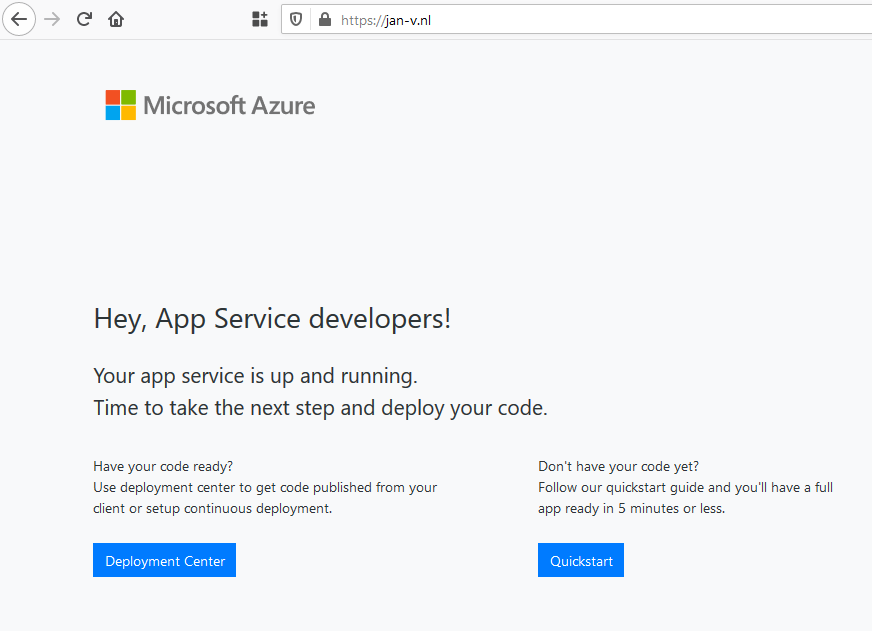
This is bad, really bad.
Of course, I can solve this by deploying the site to a Staging slot and swap with Production when ready. This is quite doable, but not a path I wanted to pursue.
Read more →Any now and then you have to make some major changes to the ARM templates of the project you’re working from. While this isn’t hard to do, it can become quite a time-intensive if you have to wait for the build/deployment server to pick up the changes and the actual deployment itself.
A faster way to test your changes is by using PowerShell
or the Azure CLI to deploy your templates and see what happens.
However, when using linked templates
this can become quite troublesome as you need to specify an absolute URL where the templates can be found. At this moment in time, linked templates don’t support using a relative URL
. While this issue currently is Under review, we still might want to test our templates today. So how to proceed?
Well, you will have to deploy your linked ARM templates to some (public) location on the internet. For your side projects, a GitHub repository might suffice, but for an actual commercial project, you might want to take on a different approach.
How to do this in Azure DevOps
For one of the projects I’m working on, I’m using the Azure Blob File Copy step in the deployment pipeline to copy over all of the ARM templates to a container in a Storage Account.
Read more →A couple of weeks ago I was busy creating some proof of concept applications using Blazor, which was still labeled preview at the time.
To get all of this deployed and working in an Azure App Service, I needed the preview .NET Core runtime installed. An App Service is a PaaS offering, which means you don’t have any influence on what version of the software gets installed on the underlying system.
Lucky for me, there’s a site extension which enables us to install the latest .NET Core version on an App Service.
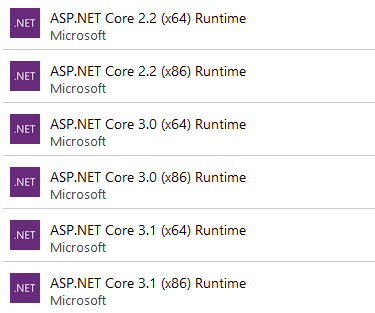
At the time of this blogpost, the 3.0 runtime still isn’t installed on App Services and the 3.1 runtime is still in preview. However, with this extension, you can install whatever you like and use the new features.
It’s, of course, also possible to install these extensions via an ARM template. The following excerpt installs the 3.0 x64 runtime to your App Service.
{
"type": "siteextensions",
    "name": "AspNetCoreRuntime.3.0.x64",
    "apiVersion": "2015-04-01",
    "location": "[resourceGroup().location]",
    "properties": {
        "version": "[variables('aspnetcoreVersion')]"
    },
    "dependsOn": [
        "[resourceId('Microsoft.Web/Sites', variables('webAppServiceName'))]"
    ]
}
As you can see I’m still stating which aspnetcoreVersion I want installed. With this property you can specify which Preview or RC version you need installed.
A very useful extension to use if you want to be on the latest runtime or if it takes too long for your liking for the App Services team to update the .NET version on the underlying systems.
Read more →As it happens, I started implementing some new functionality on a project. For this functionality, I needed an Azure Storage Account with a folder (containers) inside. Because it’s a project not maintained by me, I had to do some searching on how to create such a container in the most automated way, because creating containers in storage account isn’t supported. That is, until recently!
In order to create a container inside a storage account, you only have to add a new resource to it. Quite easy, once you know how to do it.
First, let’s start by creating a new storage account
.
{
    "name": "[parameters('storageAccountName')]",
    "type": "Microsoft.Storage/storageAccounts",
    "apiVersion": "2018-02-01",
    "location": "[resourceGroup().location]",
    "kind": "StorageV2",
    "sku": {
        "name": "Standard_LRS",
        "tier": "Standard"
    },
    "properties": {
        "accessTier": "Hot"
    }
}
Adding this piece of JSON to your ARM template will make sure a new storage account is created with the specified settings and parameters. Nothing fancy here if you’re familiar with creating ARM templates
.
Now for adding a container to this storage account! In order to do so, you need to add a new resource of the type blobServices/containers to this template.
{
    "name": "[parameters('storageAccountName')]",
    "type": "Microsoft.Storage/storageAccounts",
    "apiVersion": "2018-02-01",
    "location": "[resourceGroup().location]",
    "kind": "StorageV2",
    "sku": {
        "name": "Standard_LRS",
        "tier": "Standard"
    },
    "properties": {
        "accessTier": "Hot"
    },
    "resources": [{
        "name": "[concat('default/', 'theNameOfMyContainer')]",
        "type": "blobServices/containers",
        "apiVersion": "2018-03-01-preview",
        "dependsOn": [
            "[parameters('storageAccountName')]"
        ],
        "properties": {
            "publicAccess": "Blob"
        }
    }]
}
Deploying this will make sure a container is created with the name theNameOfMyContainer inside the storage account. You can even change the permission to this container. The default is None, but this can be changed to Blob in order to get file access or Container if you want people to be able to access the container itself.
Read more →