Some time ago, about 7 months, I had to build a service that creates a PDF document from HTML. The library of choice was IronPDF
. Creating PDF documents with this library is a breeze, but we stumbled across a small issue.
The HTML-to-PDF-converter-service is hosted inside an Azure Function, for reasons.
We noticed creating the documents took quite a lot of time. After inspecting the allocated instances we discovered both the CPU and Memory were constantly spiking to maximum capacity. That’s not good.
What made things worse, the generation sometimes took up to 37 minutes to complete! That’s not acceptable if your customers are waiting for the document.
This service was deployed on Windows instances, as it’s the default.
Because Linux is more lightweight compared to Windows, we started doing a test if the document rendering would be faster on Azure Functions hosted on Linux instances. The results were staggering!
On the Linux instances, all of the documents being generated never took more than 3 minutes to complete (99th percentile) and the used resources were less. We were still using a lot of CPU and memory, but acceptable levels. That’s the moment we decided to go forward using Linux hosted Azure Functions for this part of the system.
We just had to find out how to deploy them.
Read more →A while ago I was confronted with the fact one of our Azure App Services needed multiple hostname bindings.
I was planning to do this by making multiple Microsoft.Web/sites/hostNameBindings resources, for this specific App Service, in our ARM template. When deploying I was confronted with the following error
{
      "ErrorEntity": {
        "Code": "Conflict",
        "Message": "Cannot modify this site because another operation is in progress. [some more details]",
        "ExtendedCode": "59203",
        "MessageTemplate": "Cannot modify this site because another operation is in progress. Details: {0}",
        "Parameters": [
          "Id: {guid}, OperationName: {someName}, CreatedTime: 3/21/2020 11:13:54 PM, RequestId:{guid}, EntityType: 1"
        ],
        "InnerErrors": null
      }
    }
  ],
  "Innererror": null
}
This is because adding a hostnameBinding can’t be done simultaneously. The way to solve this is by using the copy() function.
To work with this function, you first need an array with data. I’ve named mine hostenameBindings as you can see below.
"variables": {
    "hostnameBindings": [
      "[concat(variables('appServiceCname') ,'.customer.com')]",
      "[concat(variables('appServiceCname') ,'-seconddomain.customer.com')]",
      "[concat(variables('appServiceCname') ,'-another.customer.nl')]"
    ]
}
Now continue creating your ARM template like you’re used to, but when defining the hostnameBindings resource(s), check out this sample.
{
    "type": "Microsoft.Web/sites/hostNameBindings",
    "apiVersion": "2019-08-01",
    "name": "[concat(variables('appServiceName'), '/', variables('hostnameBindings')[copyIndex()])]",
    "location": "[resourceGroup().location]",
    "dependsOn": [
        "[resourceId('Microsoft.Web/sites', variables('appServiceName'))]",
        "[resourceId('Microsoft.Web/certificates', variables('certificate').name)]"
    ],
    "copy": {
        "name": "hostNameBindingsEndpointLoop",
        "mode": "serial",
        "batchSize": 1,
        "count": "[length(variables('hostnameBindings'))]"
    },
    "properties": {
        "siteName": "Sitecore",
        "hostNameType": "Verified",
        "sslState": "SniEnabled",
        "thumbprint": "[parameters('certificateThumbprint')]"
    }
},
Over here I’m telling the resource manager to deploy these resources in serial with a batchSize of 1. This will make sure all hostnameBindings resources will be deployed after each other.
You can use the copyIndex() function to get the N-th element from your array.
Read more →You’re probably familiar with Azure Storage Accounts. They are great and cheap!
Also, it’s possible to add the features Storage Queues & Table Storage on those accounts. I’m using Storage Queues a lot! Most of the time because I don’t need the enterprise features which Azure Service Bus offers me.
Table Storage is also great if you want to store data in a cheap NoSQL-style database. While I try to avoid Table Storage, in favor of Cosmos DB most of the time, this ‘old’ service still has value in lots of use-cases.
There are however a couple of things that annoy me about the Storage Queue & Table Storage features.
One of them, which this post is about, is not being able to create them via ARM templates. This means you can’t properly deploy along with your other Azure resources. When running your application, you can use the option CreateIfNotExists(..) the SDK offers you. Using this method enables you to create the entities runtime if they don’t exist. I dislike the use of this method because in my opinion the infrastructure should be deployed via something like an ARM template, not inside my application.
To solve my ‘problem’, I have created a small PowerShell script to use inside a deployment pipeline. It’s stored in some shared location and gets packaged inside my deployment artifact. This is the first version of the script.
Read more →With all of the great services in Azure, it’s easy to set up a nice event-driven architecture. You have Storage Queues, Service Bus Queues & Topics, Event Grid and even more services which can help you accomplish great stuff.
I like the three services mentioned here and most of the time they cover the basics of my messaging infrastructure. One thing you need to do yourself is think about the boundaries of your domains and how to organize all of the services.
What I see happen quite often, and don’t disagree with, is placing all the Custom Topics for Event Grid inside a single, dedicated, resource group. From a developer & operations discovery perspective this makes quite a lot of sense.
There are of course downsides to this approach with the most obvious one being security. If you have access to this resource group, there’s a fairly big chance you have enough permissions to peek inside all of the Event Grid Topics. To lock this down you have to take additional measures which I will not cover over here.
Because we should all be using ARM templates (or something similar) nowadays, it makes sense to create the Event Grid Topics & Subscriptions in your deployment pipeline.
The documentation on this topic is very good and you can figure out how to create a custom topic
and subscription
quite easily. However, I did get stuck creating a subscription.
Read more →It has become quite popular to do webcasts, live-streaming and other types of video stuff on the internet. Last year, in 2019, I have started doing this myself also. We’ve started doing so-called 4DNCasts
, which is a webcast where a couple of colleagues and I talk about development & technology stuff.
I’m also doing live-coding sessions myself on Twitch
and store the recordings on my YouTube channel
. There are also a couple of other, virtual sessions, which you can find on this channel. I’m by no way an expert on this video and streaming stuff but have learned a thing or two in the process. Because of this, some people keep asking me questions on how to start themself. Instead of answering each individual with the same answer over and over, I decided to make a post about this.

The hardware
While some will say “It’s all about the content”, hardware matters also.
Sure, you can start recording videos or do streaming with the built-in stuff of your laptop but I recommend spending a couple of bucks to get a bit better quality in your videos.
The camera
We’re making videos, right? It makes sense to spend some money on the camera.
As I mentioned, the built-in camera of your laptop works fine, but it’s not great.
Read more →Recently, I was trying to deploy an Azure App Service which was in need for a couple of certificates, which are stored in Azure Key Vault.
Our ARM template looked very similar to the one below in order to install & configure the certificates in our App Service.
"resources": [
    {
        "type": "Microsoft.Web/certificates",
        "name": "[parameters('certificateName')]",
        "apiVersion": "2019-08-01",
        "location": "[parameters('existingAppLocation')]",
        "properties": {
            "keyVaultId": "[parameters('existingKeyVaultId')]",
            "keyVaultSecretName": "[parameters('existingKeyVaultSecretName')]",
            "serverFarmId": "[parameters('existingServerFarmId')]"
        }
    },
    {
        "type": "Microsoft.Web/sites",
        "name": "[parameters('existingWebAppName')]",
        "apiVersion": "2019-08-01",
        "location": "[parameters('existingAppLocation')]",
        "dependsOn": [
            "[resourceId('Microsoft.Web/certificates', parameters('certificateName'))]"
        ],
        "properties": {
            "hostNameSslStates": [
                {
                    "name": "[parameters('hostname')]",
                    "sslState": "SniEnabled",
                    "thumbprint": "[reference(resourceId('Microsoft.Web/certificates', parameters('certificateName'))).Thumbprint]",
                    "toUpdate": true
                }
            ]
        }
    }
]
When deploying said template, we quickly received a message the deployment had failed.
Resource Microsoft.Web/certificates ‘[myCert]’ failed with message
{ “Code”: “BadRequest”, “Message”: “The service does not have access to ‘/subscriptions/[subscription]/resourcegroups/[resourcegroup]/providers/microsoft.keyvault/vaults/[myVault]’ Key Vault. Please make sure that you have granted necessary permissions to the service to perform the request operation.”, “Target”: null, “Details”: [
{
"Message": "The service does not have access to '/subscriptions/[subscription]/resourcegroups/[resourcegroup]/providers/microsoft.keyvault/vaults/[myVault]' Key Vault. Please make sure that you have granted necessary permissions to the service to perform the request operation."
},
{
"Code": "BadRequest"
},
{
"ErrorEntity": {
"ExtendedCode": "59716",
"MessageTemplate": "The service does not have access to '{0}' Key Vault. Please make sure that you have granted necessary permissions to the service to perform the request operation.",
"Parameters": [ "/subscriptions/[subscription]/resourcegroups/[resourcegroup]/providers/microsoft.keyvault/vaults/[myVault]"
],
"Code": "BadRequest",
"Message": "The service does not have access to '/subscriptions/[subscription]/resourcegroups/[resourcegroup]/providers/microsoft.keyvault/vaults/[myVault]' Key Vault. Please make sure that you have granted necessary permissions to the service to perform the request operation."
Read more →
In my last post
, I described how to create a Hugo website
and what I did to migrate from my Miniblog platform, along with some details on how to create the build & deployment pipeline.
I started by deploying my Hugo websites to a regular Azure App Service. This is a full-blown web application platform. It’s a bit too overpowered for hosting a simple, static, website. As I mentioned in the earlier post, it makes a lot more sense to host static websites on an Azure Storage Account with the Static website hosting
. The main reason I postponed this is that I had some issues creating my routing rules.
Moving to static site hosting ASAP
After having migrated to Hugo & the App Service hosting model, I quickly noticed moving to the static site hosting option was quite important.
Every time my deployment pipeline was deploying the files to the App Service, the site became unavailable.

The pages returned a 404 and when navigating to the root site, the site was just empty.
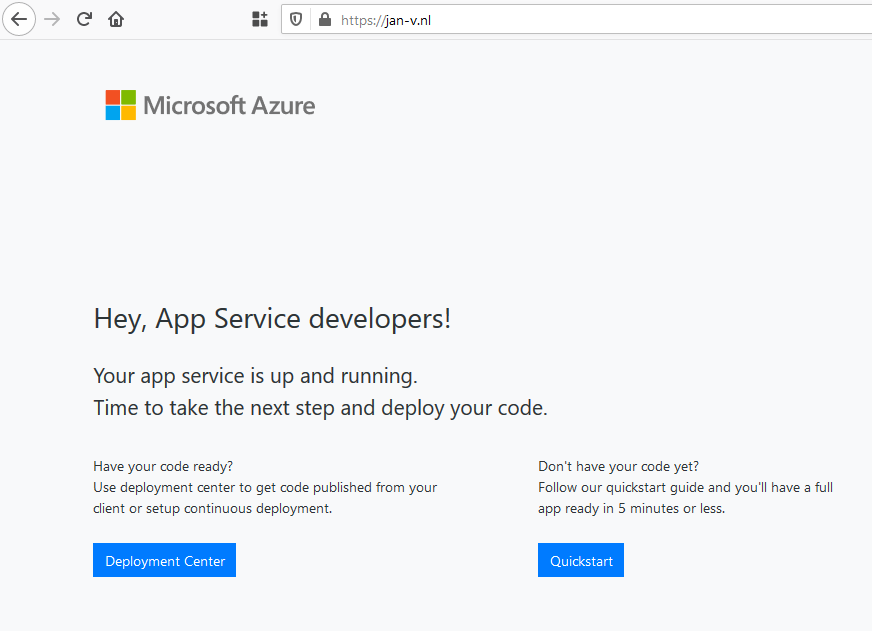
This is bad, really bad.
Of course, I can solve this by deploying the site to a Staging slot and swap with Production when ready. This is quite doable, but not a path I wanted to pursue.
Read more →I’ve been thinking about it for a while now, move my blog from Miniblog
to a different platform. The most obvious choice would be migrating to Miniblog.Core
, however, there are a couple of features missing (like themes
) and Open Live Writer
isn’t a very modern tool for blogging anymore.
Of course, both of them are open source, so I could spend a lot of time fixing the issues. But as with most of us, our schedule is already packed with a lot of other side-projects.
Static sites
Seeing my blog is rather static, I don’t need the power .NET Framework/Core offers me. A static site generator will suffice. I’ve used such a platform for my Keto site (https://keto.jan-v.nl/
), which is generated via Hugo
.
Hugo has a steep learning curve, but it does offer a lot of flexibility and features. Being familiar with the product was a nice benefit and the main reason to migrate my blog to Hugo and not some other generator.
The migration got kickstarted by one of my 4DotNet colleagues, Eduard Keilholz, who has started blogging some time ago and also decided to use Hugo
. Seeing him use Hugo convinced me to migrate ASAP!
The biggest problem I had is moving 13+ years of content to a different format. In the past, I’ve been using several other systems, like SharePoint, Orchard, Miniblog and my custom PHP framework. This means there’s a lot of legacy stuff and the formatting of the posts isn’t in a consistent state. It’s all HTML in the end, but when you take a look at the actual code you’ll get scared pretty quick.
Read more →A couple of weeks ago, I was tasked to implement authentication between the services we have in our Azure landscape. I knew this can be done by using the Managed Identity, as we were doing this on a project I was involved with in the past.
However, I had never actually done this myself. Most of the time the System Administrators were configuring everything and I just had to copy-paste some Guids in a configuration file. After doing some digging into the matter, it was a bit harder to set this up as I had expected at the start.
Lucky for me, Joonas Westlin
has some excellent posts on the matter which have helped me enormously. He was also able to help me out on Stack Overflow when I was stuck
and couldn’t find out why the authentication wasn’t working correctly.
Much of what I’ll be writing down here will be similar to Joonas his posts on the matter. I’ll be using some different wording.
The posts I’ve used to learn this stuff were:
Any now and then you have to make some major changes to the ARM templates of the project you’re working from. While this isn’t hard to do, it can become quite a time-intensive if you have to wait for the build/deployment server to pick up the changes and the actual deployment itself.
A faster way to test your changes is by using PowerShell
or the Azure CLI to deploy your templates and see what happens.
However, when using linked templates
this can become quite troublesome as you need to specify an absolute URL where the templates can be found. At this moment in time, linked templates don’t support using a relative URL
. While this issue currently is Under review, we still might want to test our templates today. So how to proceed?
Well, you will have to deploy your linked ARM templates to some (public) location on the internet. For your side projects, a GitHub repository might suffice, but for an actual commercial project, you might want to take on a different approach.
How to do this in Azure DevOps
For one of the projects I’m working on, I’m using the Azure Blob File Copy step in the deployment pipeline to copy over all of the ARM templates to a container in a Storage Account.
Read more →