I’m very happy GitHub Copilot exists and lately with the Agent-mode it’s even better. It’s making sure I can focus on the relevant pieces of my solutions and not have to worry too much about the plumbing part.
The models it’s using are quite powerful and contains a lot of (old) data. When using new libraries or versions of already existing libraries, the LLMs used under the hood often don’t provide useful suggestions or edits. Currently, telling GitHub Copilot to check the repository of the library to as reference material doesn’t work the way I’d like it to.
I’ve tried this, but it only fetched the contents of the readme file of the repository and didn’t traverse all files and searching for relevant bits.
What I’d like is for GitHub Copilot to index the entire repository/repositories of my libraries of choice and provide me suggestions or edits based on the codebase or documentation.
I figured this can be achieved by adding this capability as an MCP server. Turns out, I’m not the only one who wants this. Leonid Bugaev
has created an MCP server solution, docs-mcp
, that can be used to search through repositories. It’s powered by Probe
, also created by him
.
Read more →When creating solutions for a company, you often use an internal package feed.
There might come a time when you need to provide the source code to an external party or you want to make the solution open source.
If this has ever happened to you, you know one of the first things to validate if all dependencies (NuGet packages) are available to the public. Especially in large corporations it’s easy to use some platform packages used throughout the company but should not be shared with the public.
I recently had to so one of those exercises. And instead of manually searching for all packages on NuGet.org, I created a small PowerShell script to search for the packages and version in the feed.
# Path to the Directory.Packages.props file
$filePath = "C:\Projects\Internal\MySolution\Directory.Packages.props"

# Load the XML file
[xml]$xml = Get-Content $filePath

# Iterate through each PackageVersion element
foreach ($package in $xml.Project.ItemGroup.PackageVersion) {
    $packageName = $package.Include
    $packageVersion = $package.Version

    # Check if the package exists in NuGet
    $result = nuget list $packageName -Source https://api.nuget.org/v3/index.json

    if ($result -match $packageName) {
        Write-Host "Package '$packageName' (Version: $packageVersion) is available."
    } else {
        Write-Host "Package '$packageName' (Version: $packageVersion) is NOT available."
    }
}
By running this, you can see in the output if a package is or is not available for your external consumers. It’s not rocket science but has sure saved me hours of searching for this information manually.
Read more →When working on a project that’s being distributed you are often required to create a NOTICE file giving the necessary attribution to work you rely on. As written on the Apache site on this topic
:
If the Work includes a “NOTICE” text file as part of its distribution, then any Derivative Works that You distribute must include a readable copy of the attribution notices contained within such NOTICE file, excluding those notices that do not pertain to any part of the Derivative Works, in at least one of the following places: within a NOTICE text file distributed as part of the Derivative Works; within the Source form or documentation, if provided along with the Derivative Works; or, within a display generated by the Derivative Works, if and wherever such third-party notices normally appear. The contents of the NOTICE file are for informational purposes only and do not modify the License. You may add Your own attribution notices within Derivative Works that You distribute, alongside or as an addendum to the NOTICE text from the Work, provided that such additional attribution notices cannot be construed as modifying the License.
It’s not hard or complex to create these files, but it’s a LOT of work when starting.
Read more →It has been twenty years already!
Twenty years since I started my professional career. Of course, I had some side-gigs during college and a couple of internships, but I’m not counting those. After graduating in January 2005, my first real job started on February 1st, 2005, as a software engineer at Ordina, a large consultancy company in the Netherlands.
Over the years I’ve had the privilege to work with quite a few awesome persons, work on great projects and doing stuff I always dreamed of. I’ll reflect a bit in this post and say thanks to some of the people who have been the most influential in my career.
The start
My career started at Ordina as a software engineer. The team was responsible for creating (enterprise) applications on Pocket PC/PDA handhelds. Do you still remember those?
The operating system back then was Pocket PC 2002, Windows Mobile 2003, and Windows Mobile 5.0 later. The .NET Framework was still new during this time and on these mobile devices we had to resort using the Nano Framework or Compact Framework (if lucky). We weren’t that lucky, so had to use a very stripped-down version of C++. Most of the time we couldn’t use the ATL or MFC libraries due to hardware constraints.
I had not learned C++ during college, so that was a steep learning curve. My team consisted of some great colleagues who are experts in this field who were able to learn me a lot on how to build an application and user experiences on mobile devices. The latter has certainly helped me a lot later in my career, because mobile devices have become quite important this day and age.
Read more →It’s not something a lot of people need to do on a regular basis, but when you do, you don’t want to spend a lot of time doing it. I’m referring to the process of “create an SDK for your APIs”.
When your service is exposing endpoints for your consumers to use, it’s easy to refer them to using raw endpoints and let them figure out how to deal with it based on the Open API specifications
(formerly known as Swagger) provided. This requires quite a bit of plumbing on their part.
Needless to say, invoking endpoints from your API by using HTTP-calls isn’t very user-friendly and quite error prone. Providing your consumers with a proper SDK is much better from an onboarding perspective.
How to start building an SDK?
As mentioned, either you or your customer needs to do quite a bit of plumbing to invoke your API endpoints properly. This isn’t something anyone will enjoy, so automation is everyones friend over here.
To start, you first need to make sure you are generating Open API specs for the API. Just about every ecosystem has generators for this process. In het .NET ecosystem we’ve been using Swashbuckle
for a couple of years now, and with the release of .NET 9 there’s also out-of-the-box capabilities to generate the API specifications
.
With these files generated, you’re already halfway of creating an SDK. For best results, be as complete as possible with your Open API specs. Provide descriptions, all error codes, use DTOs, adhere to the HTTP specifications, etc.
Read more →I like creating complex solutions for simple problems just as much as every other engineer. That’s why I have dozens of side-projects going on where I’m trying out stuff. During my day job, I try to provide as much value to the customer/business with the most simple, most performant and cheapest solution I can think of.
That’s where Copilot Studio comes into play.
You’ve probably read a ton of posts and articles about bring-your-own-data, RAG, finetuning LLMs, etc. for the past couple of years. All great stuff and are great solutions for adding Generative AI to your solutions. However, most of the time this requires a lot of engineering effort, time, and adds quite a bit of overhead.
Copilot Studio
provides you capabilities to build your own agents, integrate them within your own environment and make the created Copilots available to your organization or the public, all with only a couple of clicks inside the portal. It’s a low-code experience compared to working with Azure AI Studio
, or making your own solution with Azure Open AI
. A low-code solution comes with a ton of benefits, but is also limited in capabilities compared to the ‘pro-code’ solutions. It’s a trade-off.
To get the hang of Copilot Studio I’ve started to create my very own Knowledge Base for this blog, so I can ask it questions and answers come up based on the posts I’ve had in the past. Similar to using search, but better!
Read more →I’ve been having issues with Disqus for a while now. Comments weren’t always placed under the correct post and I’ve done some extensive troubleshooting on it, invoking the Disqus API to resolve, added custom (meta) header fields on the pages. So far, I haven’t been able to fix it on all posts so have been looking for another system to facilitate adding comments to the posts.
This blog is a static website, created via Hugo
, so no databases, only Markdown. I don’t want to add some repository to this to keep the performance high and costs low.
I became aware of two commenting systems using GitHub Issues or Discussions as their underlying platform, last week. There’s giscus
and utterances
. Both appear to do a similar job, one using GitHub Issues, the other GitHub Discussions. There’s no real preference for me from the technical point of view, so I randomly picked one of them and picked giscus as my new commenting system.
The homepage has all the information I needed to get this up and running.
One needs to create a public repository to host the discussions, add the giscus app to the repository and turn on GitHub Discussions. All fairly straightforward.
Read more →The current large language models, like GPT-4, GPT-4 Turbo and GPT-4o are great when you need some output generated based on data you feed in the prompt. Even the small language models, like Phi-3
, are doing a great job at this. However, these models often don’t know a lot about the data within your company. Because of this, they can’t do a good job at answering questions that required data from your organization.
There is of course the M365 Copilot available, which is able to index all of the organization its data and provide answers based on it. On a high level, what this is doing, is using Retrieval-Augmented Generation (RAG). There’s a decent post about this on the IBM Research site
and there’s also a good post on the AWS site on it
.
By using RAG in combination with your LLM, you are able to index your own data and let the model interpret it.
A great way to get started with this, is by using the Azure Open AI Assistants feature
. The MS Learn page on this topic is quite good. If you’re interested in the topic, I’d suggest to check it out: https://learn.microsoft.com/en-us/azure/ai-services/openai/how-to/assistant
.
Get your data
The first thing you need to do is make sure all data is available to the assistant. At this moment, there’s a large list of supported file types, like docx, pptx, pdf, png, txt, etc. The most important file types for us engineers are CSV, JSON, and XML, because these are able to hold (semi-)structured data so the LLM can infer relationships and create appropriate answers.
Read more →My disk was full the other day, so I needed to clean up. First the obvious stuff, like the Downloads-folder, the Nuget-cache, the bin- & obj-folders and the Temp-directory. Second, I used WinDirStat
to figure out where the other biggest culprits of data-usage are to be found.
One of the directories was the main project I’m working on, with a staggering 24GB in disk size! Obviously, we’ve created a lot of code in the past years, but not THAT much.
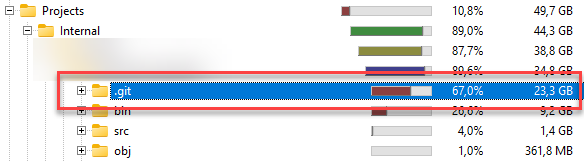
The cause of this, is at some point in time we committed a large file in the repository and it got a couple of revisions over time. Of course, we all know we should not commit large files in a Git repository and there are better solutions (Git LFS
), but real-world happens.
What not to do
In short, don’t nuke the file from your repository.
This messes up a lot of stuff for the other contributors. While it might be the best solution, it will break other peoples workflow. But if you don’t mind this, or are the single contributor, feel free to play around with the suggestions shared over here: https://www.baeldung.com/ops/git-remove-file-commit-history
Read more →A friend asked me a question, a while ago, stating:
Hey Jan,
One stupid question around which I have thought a lot and often get stuck while deciding.
When to make a function static/non-static specifically the helpers or utility ones.
I read 2 arguments
- All the functions that don’t need to use a state of the object, (don’t update any variable value of the object ) should be static.
- All the functions that should/can be test independently and have some logic. Not only transformation or mapping. Should be non-static.
These 2 arguments are against each other and are often confusing, and mostly in the context of our repo. We often use multiple resources and their clients to implement a logic.
Now these mostly don’t update any state of an object, mostly the value of the attributes of the class are read, never updated. And it does make sense to test them independently
One example
Reading from the storage account, filter data based on some logic and then updating that in, let’s say, a Function App.
Now, how do you decide?
Let me start by: There’s no such thing as a stupid question in engineering! These are the type of questions everyone is wondering about, but only few dare to ask. Iris Classon has done an entire blog-series on these ‘not so stupid questions
’.
Read more →