You know what’s cool? Having agents talk to each other and letting them figure out how to get to the answer you’re looking for.
One way to do this is by using the Agent-to-Agent protocol
in your application. Version 0.3.0 is the latest released version, and there’s an RC v1.0 available already.
The Microsoft Agent Framework
(MAF) also has an implementation of this protocol available. The current version of the MAF packages, 1.0.0b260130 at the time of writing, isn’t compatible with the proposed changes of 1.0, but I’m pretty sure this will be supported in upcoming releases. The team is adding and changing features quite quickly. There are also newer versions of MAF available now, but I have yet to validate those.
In my current project, we’re creating a dozen agents, each doing its own little thing. What we could do is create some workflow or state machine, invoking each agent in turn, much like the good old days. However, we don’t always need to run every agent or run them in a specific order. While it is possible to add this dynamic nature to an application, we can also leverage the power of a language model for this. Based on the knowledge of what an agent can do, the language model can figure out which agents to invoke and in what order. The A2A protocol can help here.
Read more →GitHub Copilot is great, but somehow I get better results and a nicer UX/DX with OpenCode
. It integrates with all the models I have available via GitHub Copilot and more.
There’s also a great ecosystem around this software and the documentation is quite good as well. The Awesome OpenCode
repository lists quite a few useful tools, plugins and agents. Currently, I use the Smart Title Plugin
and Open Agents Control
, but Oh My OpenCode
also has my interest even though it has a bit of overlap.
All of this is awesome and greatly enhances my joy in creating solutions during my dayjob and side projects. However, it does cost quite a bit of (premium) requests. Especially when using the rather expensive (and good) models.
What is great about OpenCode is you can connect it to your models deployed in Azure too!
This way, when your premium requests are all used up, you can use a GPT-Codex or Kimi model deployed in your own environment. Or even when you do still have premium requests available, you can offload your questions to a model of your choice.
When I was searching for the correct configuration I couldn’t find the correct documentation for this, so decided to post it over here.
If you have OpenCode installed, there should be a folder with an opencode.json file on your system. On a Mac it’s at ~/.config/opencode/opencode.json. In this file you can add a property called providers, if it doesn’t exist already, and configure your models.
Read more →It looks like everyone is creating agents nowadays. Most of the time with elaborate prompts to tell a language model what it should do.
Great, but we all know a language model isn’t good at doing everything. Also, I don’t want it to do everything either as it would need to be granted access to every possible resource in my environment.
To extend the capabilities of an agent (and the underlying language model), you can provide tools. With good tool documentation, agents are empowered to do more. Take, for example, counting how many times the letter r appears in Strawberry. Browsing around the internet, it looks like this is one of those important life questions everyone wants an answer to.
The problem is that people are asking this question to a model that’s good at language and guessing what the best possible output should be, not a model that’s good at counting.
What I did was create an agent that’s empowered with a few tools capable of doing simple math, just to see how this is supposed to work. I’m using the Microsoft Agent Framework. The team isn’t shying away from making breaking changes with every release, so newer (and older) versions may need a different implementation. Currently, I’m working in Python with the agent-framework-azure-ai package, version 1.0.0b260130.
Read more →Some time ago I had to validate who or what has access to the applications we created in our Azure environment.
There were hundreds of different applications with each their own specific Application Roles. Both users and service principals had roles assigned to the applications to perform the required operations.
It is possible to click through every application in Entra ID and validate the assigned roles. However, this takes quite a bit of time.
So I figured “Is it possible to iterate through all my applications in Entra ID and see who or what has an application role assigned?”
Needless to say, the answer is “Yes!”.
By using the Azure CLI and the Graph API I was able to accomplish what is required.
#########################################################
# Login if running local and you haven't done so already
#########################################################
Function Login {
    # Subscription used for logging in. Necessary to get a context to work in.
    $loggedInSubscription = "The subscription name"
    $tenantId = "73fefcf4-c062-45ef-9607-e19aba33f82d"
    az login --tenant $tenantId
    # # Log in to a subscription which resides in the tentant we want to add & configure MG's to.
    az account set --subscription $loggedInSubscription
}
Function Get-AppRoleAssignments {
    [CmdletBinding()]Param()
    Write-Verbose -Message "Starting to retrieve all Enterprise Applications matching the naming convention."
    $roleAssignmentsForAllApplications = $null
    $enterpriseAppRegistrationCollection =
        az ad sp list --filter "startswith(displayname, 'jv-sample-app1') or startswith(displayname, 'jv-sample-app2')"
        | ConvertFrom-Json

    Write-Verbose -Message "Found $($enterpriseAppRegistrationCollection.Length) enterprise applications."
    foreach ($enterpriseAppRegistration in $enterpriseAppRegistrationCollection) {
        $servicePrincipalAppRoles = $null
        $assignedAppRolesForServicePrincipal = $null

        # The service principal from 'az ad sp list' already has all the data we need
        $servicePrincipalAppRoles = $enterpriseAppRegistration.appRoles

        Write-Verbose -Message "Found $($servicePrincipalAppRoles.Length) appRoles for $($enterpriseAppRegistration.id)."
        $assignedAppRolesForServicePrincipal =
            az rest `
            --method get `
            --uri https://graph.microsoft.com/v1.0/servicePrincipals/$($enterpriseAppRegistration.id)/appRoleAssignedTo
            | ConvertFrom-Json
            | Select-Object -expand value

            Write-Verbose -Message "Found $($assignedAppRolesForServicePrincipal.Length) assigned identities for $($enterpriseAppRegistration.id)."
        $roleAssignmentsForAllApplications += foreach($assignedAppRole in $assignedAppRolesForServicePrincipal) {
            $role = $servicePrincipalAppRoles | Where-Object{ $_.id -eq $assignedAppRole.appRoleId}
            Write-Verbose -Message "Adding $($role.displayName) to collection for $($assignedAppRole.principalDisplayName) on application $($enterpriseAppRegistration.displayName)."
            New-Object PsObject -Property @{
                AppRoleId = $assignedAppRole.appRoleId
                AppRoleDisplayName = $role.displayName
                PrincipalObjectId = $assignedAppRole.principalId
                PrincipalDisplayName = $assignedAppRole.principalDisplayName
                ApplicationDisplayName = $enterpriseAppRegistration.displayName
                ApplicationApplicationId = $enterpriseAppRegistration.appId
                ApplicationObjectId = $enterpriseAppRegistration.id
            }
        }
    }
    return $roleAssignmentsForAllApplications
}
#Login
Get-AppRoleAssignments -Verbose | Sort-Object -Property ApplicationDisplayName | Format-Table -Property ApplicationDisplayName, ApplicationApplicationId, ApplicationObjectId, PrincipalObjectId, PrincipalDisplayName, AppRoleId, AppRoleDisplayName | Out-File "AppRoleAssignments.md"
The output looks pretty much like this
Read more →The project I am working on requires me to deploy our compute solution, .NET and Python, to an Azure service and it should only expose specific endpoints via Azure API Management (APIM). To accomplish this, I have set up some networking services including NSG-rules. The goal is to set up the network boundaries as strict as possible.
One of the things I started with is set up APIM in a subnet, the Container Apps in another subnet and use an NSG
to limit traffic to only use port 443. This is based on the knowledge of my containers and what is mentioned on the overview pages of the Container Apps networking page
.
   ┌─────────────────┐
   │      APIM       │
   │   (Subnet A)    │
   └─────────────────┘
           │
           │ HTTPS Traffic
           │ Port 443
           │
           │ NSG: Allow
           │ Port 443 Only
           │
           ▼
   ┌─────────────────┐
   │  Container Apps │
   │   (Subnet B)    │
   └─────────────────┘
Long story short: This does not work!
When trying to invoke any endpoint on the Container App via the APIM test page I continuously received an error.
Error occured while calling backend service.", “connection timed out: 10.0.6.139:443
As the IP-address is resolved, I know the DNS resolution works. Just a timeout on port 443.
Obviously, I’ve exposed port 443 in my containers. That’s the first thing you should probably validate when running into this issue.
Read more →I had the opportunity to get a new development machine and it had to be a laptop. I’ve used solely Windows machines in the past and was always annoyed to see my peers, using a Mac, have awesome battery life and could have their laptop on their lap or table without melting the surface and never have fans turning on when doing simple stuff.
That’s a couple of reasons I chose to get a Macbook Pro myself this time. Of course, having the laptop integrate with all my other Apple hardware at home is a nice perk too.
What did I get
At this moment, a Macbook Pro comes with an M4 chip.
Based on what I’m reading on the internet, you can’t go wrong with any of these chips. Be it the M4, M4 Pro or M4 Max. I did read the fan turns on from time to time with the M4 Max, but that kind of makes sense. The M4 Pro machine was within the budget I was looking for, so chose that one.
There isn’t much to choose from when you know the size, 14", and CPU you want. I went with the 48GB memory and 1TB of storage option and that’s the machine I’m typing this post on right now.
Read more →There’s a new feature over here, my weekly links archive
.
Every week a page will be added automatically based on content I have read and found interesting to share. I’m using a self-hosted Linkwarden
instance to collect pages and links for a variety of topics. For the purpose of this weekly links archive I have created a new tag called Newsletter which I use to fetch the weekly links to share with all of you.
Of course, I don’t want to make my Linkwarden service open to the internet. To fetch the content from Linkwarden in my scheduled GitHub Action I use Tailscale as shared earlier on this blog
.
Query Linkwarden API
Linkwarden provides a nice API that is documented (somewhat) on their site: https://docs.linkwarden.app/api/api-introduction
Not all features and possibilities are mentioned over here, but with some creativity you’ll be able to figure out a lot.
To use the API you first need an access token.
These tokens can be created on the Settings -> Access Tokens page.
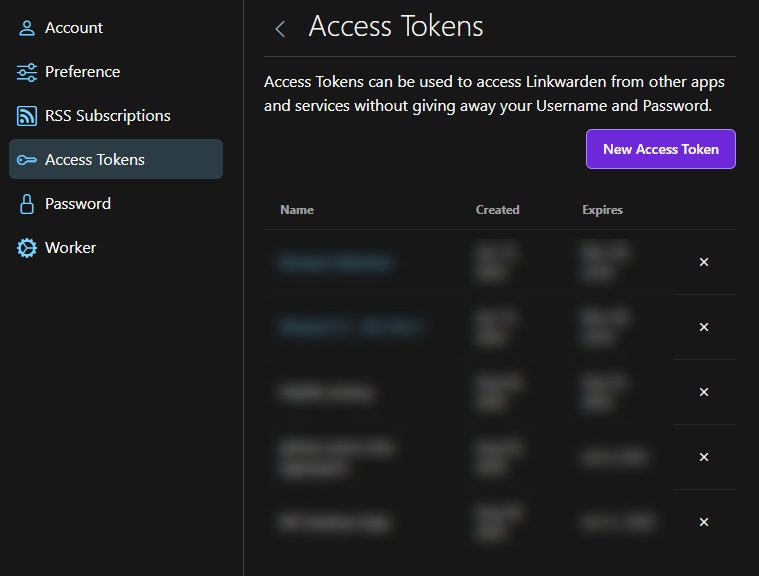
Once you have this token, make sure to store it somewhere safe.
As you can see in the documentation there’s a search endpoint. This one is useful to validate your requests are working. The endpoint I’m most interested in is the links endpoint and using the tagId querystring parameter
. To make good use of this, you do need to know which tag to query, in my case it’s 5.
Do note, this endpoint is being deprecated in favor of the search endpoint. At this point, I have not been able to figure out how to use the search-endpoint to retrieve all posts for a specific tag, but this will probably be necessary at some time in the future.
Read more →I have been a long time user of Tailscale
, a very easy to use VPN mesh system, to connect to my home network when I’m not at home. There are other solutions, like NordVPN Meshnet
, but I learned about Tailscale first. It’s especially useful when using your local DNS (PiHole) and taking advantage of the sites blocked by it.
Currently, I’m in the process of self-hosting services a bit more. Relying in (free) cloud services that might be turned on/off at a moment notice or removing features I use is something I’ve seen happen a bit too much lately.
Because of this, I’m running a container of Linkwarden
to act as a ‘Read it later’ or bookmarking service. I was using Omnivore for this, but that service got shut down at some point.
Some of the links I store in Linkwarden might also be interesting for others who might have missed them. I wanted to get a list of these links and share them on my site, which is why there’s now a Weekly Links Archive
. These pages contain all links I find interesting enough to share over here.
Because I’m a firm believer in automation, these pages are created via a GitHub Action workflow.
Read more →In an earlier post I wrote about using Semantic Kernel to create an Agentic AI solution, all using C#
. Of course, similar flows can be created with Python. To try this, I’ve created a sample solution
to update a resume so it’s more likely to pass the ATS requirements used by various companies nowadays.
My sample is heavilly inspired by Gian Paolo Santopaolo his CV-Pilot repository
, which I was not able to use due to the CrewAI tooling phoning home and my DNS (PiHole) blocking those requests. Even after disabling the tracking features
, the library/ies still tracked ‘something’, which caused the logic to break so I decided to create something myself using Semantic Kernel.
What did I create?
A tool/flow to update a resume so it can pass the ATS (Applicant Tracking System)
, based on the job description. These systems ofen check for specific wording and skills. For a human, it takes quite a bit of time to (re)write a resume to pass the ATS requirements. It’s the perfect job for a LLM to perform, as it’s built to create text based on other text input.
You can try doing this in a single prompt, but there’s a high probability this won’t perform the way you like. In my sample, I’ve created a ‘Project Manager’-, ‘Job Market Analyst’- and ‘Strategist’-agent. Each with their own specific job and goals.
Read more →We are finally at a state in the GenAI-space where we can create agentic AI solutions with ease.
I’m most familiar with Semantic Kernel, when working with LLMs, and this library works great for creating these solutions.
In a nutshell, what you need to do is create a group chat, add your agents to it, and then let them work together to solve a problem.
Do keep in mind, at the time of this writing, version 1.58.0 of the Semantic Kernel library is used. Development is going fast in this space, so behavior might change in future versions.
For my proof of concept, I’ve created a simple solution capable of creating a Fibonacci sequence, validate if a number is part of that sequence or answer random questions you would also ask to a regular LLM-powered chatbot. If you’re interested, the full sourcecode can be found on GitHub in my console-agent repository
.
Create the agents
Agents are created with the ChatCompletionAgent class. You should provide the instructions & the kernel to use.
The instructions is just a regular prompt we all know and love when working with an LLM and specifies what the agent should do. I won’t repeat it over here as it’s not relevant for this post.
Read more →