You might remember me writing a post on how you can set up your site with SSL while using Let’s Encrypt and Azure App Services
.
Well, as it goes, the same post applies for Azure Functions. You just have to do some extra work for it, but it’s not very hard.
Simon Pedersen
, the author of the Azure Let’s Encrypt site extension
, has done some work in explaining the steps on his GitHub wiki page
. This page is based on some old screenshots, but it still applies.
The first thing you need to do is create a new function which will be able to do the ACME challenge
. This function will look something like this.
public static class LetsEncrypt
{
    [FunctionName("letsencrypt")]
    public static HttpResponseMessage Run(
        [HttpTrigger(AuthorizationLevel.Anonymous, "get", "post", Route = "letsencrypt/{code}")]
        HttpRequestMessage req,
        string code,
        TraceWriter log)
    {
        log.Info($"C# HTTP trigger function processed a request. {code}");
        var content = File.ReadAllText(@"D:\home\site\wwwroot\.well-known\acme-challenge\" + code);
        var resp = new HttpResponseMessage(HttpStatusCode.OK);
        resp.Content = new StringContent(content, System.Text.Encoding.UTF8, "text/plain");
        return resp;
    }
}
As you can see, this function will read the ACME challenge file from the disk of the App Service it is running on and return the content of it. Because Azure Functions run in an App Service (even the functions in a Consumption plan), this is very possible. The Principal (created in the earlier post) can create these type of files, so everything will work just perfectly.
Read more →(Almost) No one likes writing code meant to store data to a repository, queues, blobs. Let alone triggering your code when some event occurs in one of those areas. Luckily for us the Azure Functions team has decided to use bindings for this.
By leveraging the power of bindings, you don’t have to write your own logic to store or retrieve data. Azure Functions provides all of this functionality out of the box!
Bindings give you the possibility to retrieve data (strong-typed if you want) from HTTP calls, blob storage events, queues, CosmosDB events, etc. Not only does this work for input, but also for output. Say you want to store some object to a queue or repository, you can just use an output binding in your Azure Function to make this happen. Awesome, right?
Most of the documentation and blogposts out there state you should define your bindings in a file called function.json. An example of these bindings is shown in the block below.
{
  "bindings": [
    {
      "name": "order",
      "type": "queueTrigger",
      "direction": "in",
      "queueName": "myqueue-items",
      "connection": "MY_STORAGE_ACCT_APP_SETTING"
    },
    {
      "name": "$return",
      "type": "table",
      "direction": "out",
      "tableName": "outTable",
      "connection": "MY_TABLE_STORAGE_ACCT_APP_SETTING"
    }
  ]
}
The above sample specifies an input binding for a Queue and an output binding for a some Table Storage. While this works perfectly, it’s not the way you want to implement this when using C# (or F# for that matter), especially if you are using Visual Studio!
Read more →In the past couple of years the software industry has come a long way in professionalizing the development environment. One of the things which has improved significantly is automating the builds and being able to continuously deploy software.
Having a continuous integration and -deployment environment is the norm nowadays, which means I (and probably you as a reader also) want to have this when creating Azure Functions also!
There are dozens of build servers and deployment tools available, but because Azure Functions are highly likely being deployed in Microsoft Azure, it makes sense to use Visual Studio Team Services with Release Management
. I’m not saying you can’t pull this off with any of the other deployment environment, but for me it doesn’t make sense because I already have a VSTS environment and this integrates quite well.
In order for you to deploy your Function App, the first thing you have to make sure is to have an environment (resource group) in your Azure subscription to deploy to. It is advised to use ARM templates for this. There is one big problem with ARM templates though, I genuinely dislike ARM templates. It’s something about the JSON, the long list of variables and ‘magic’ values you have to write down all over the place.
Read more →As with almost every application there is a point where you have to work with some kind of secret, like for example a connection string to a database. There are multiple ways to retrieve these secrets and this isn’t any different with Azure Functions.
If you have set up a continuous deployment build within Visual Studio Release Management you can just substitute the values in your build, which makes it easy, transparent and consistent to add and change the values.
A different approach is to provide the secrets by yourself in the application settings of your App Service. These Application Settings are already used by the Azure Functions in order to specify some settings which are necessary to run properly.
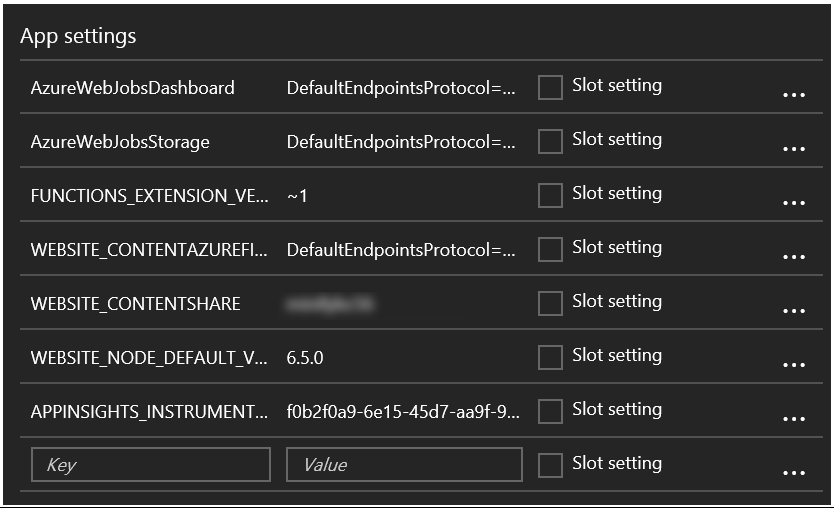
While I have nothing against either one approach, there is a better option available to retrieve secrets in your cloud software. This option is called Azure Key Vault
. The Azure Key Vault is a secure store which helps you safeguard keys and secrets used in your cloud applications.
One of the many advantages of using Azure Key Vault, compared to the alternatives, is having the possibility to revoke access to specific secrets for an application or user. This makes it much easier to lock down an application or user if it has been compromised. One other advantage is having a central location for all your keys & secrets and being able to update them when necessary.
As with almost any Azure service you get detailed logging of usage, which means your operations team is able to monitor the usage of the keys and secrets in more detail.
Read more →A couple of days ago I read a very cool blog post by Scott Hanselman about Monospaced Programming Fonts with Ligatures
.
I had never heard about the word ligatures, but he explains it quite well. They are ‘characters’ which are made up by combining multiple individual characters as one. Apparently this is quite common in the Arabic languages. Well, no matter, the thing that does matter is the fact you can use this inside your development environment also!
In order to use ligatures, just install the Fira Code font
(or any other font which supports ligatures) on your development machine and you are ready to go! It might be a good idea to place the zip file in your OneDrive folder, so it’s available on all of your machines.
Visual Studio automatically supports ligatures, you just have to select a font which has them. So, head down to the Fonts and Colors setting and change the Plain Text font to Fira Code Retina.
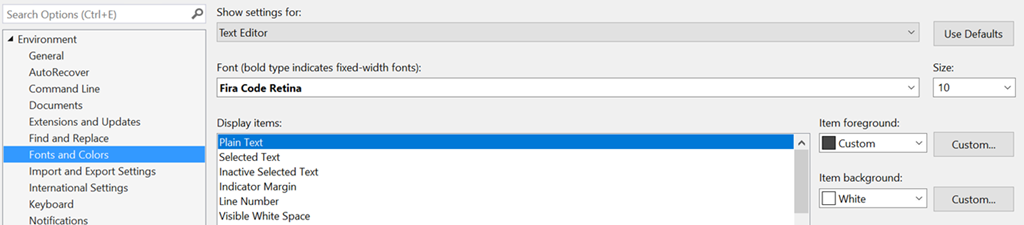
Note, I had to use the Fira Code Retina font. I first tried the Fira Code font, but I didn’t see any ligatures pop up. There aren’t many differences between the non-retina and the retina version, so just use the one which works best for you.
Read more →Lately, I’ve been busy learning more about creating serverless solutions
. Because my main interest lies within the Microsoft Azure stack I surely had to check out the Azure Functions offering
.
Azure Functions enable you to create a serverless solutions which are completely event-based. As it’s located within the Azure space, you can integrate easily with all of the other Azure services, like for example the service bus
, Cosmos DB
, storage
, but also external services like SendGrid
and GitHub
!
All of these integrations are fine and all, but seeing Azure Functions perform in action is still easiest with regular HTTP triggers
. You can just navigate with a browser (or Postman) to a URL and your function will be activated immediately. I guess most people will create these kind of functions in order to learn to work with them, at least that’s what I did.
Creating your Azure Functions App
In order to create Azure Functions, you first have to create a so called Function App in the Azure Portal. Creating such an app is quite easy, the only thing you have to think about is which type of Hosting Plan you want to use. At this time there are 2 options, the Consumption Plan or the App Service Plan.
Read more →You’ve probably heard a lot of talk around a new buzzword serverless. It’s a pretty confusing name for an awesome technology/technique.
The main reason the word serverless isn’t a very good one is because it implies there aren’t any servers when using this technique. I found a fairly funny CommitStrip about this topic.

https://www.commitstrip.com/en/2017/04/26/servers-there-are-no-servers-here`
But what does the term mean then?
Well, it means you don’t have to worry about servers anymore. You just upload your software to the cloud provider of your choice and it runs on-demand/by-request. As Mark Russinovich said in an interview with InfoWorld
_“I don’t have to worry about the servers. The platform gives me the resources as I need them.”. _Of course the hardware, operating system, webserver, firewall, etc. is all still there, but as a developer and operational person you don’t really have to care about it.
Isn’t this the same as PaaS from a couple of years ago?
The answer is: Yes and no!
Yes, there are a lot of similarities and the serverless offerings from each cloud provider are based upon their current PaaS offerings. Therefore, you could call it an evolution of PaaS.
No, because the ideology is a bit different.
Read more →There are dozens of blog posts, articles and books talking about microservices. Some of them talk about the design, other on how to implement and even others talk about why and when to use them.
This post will be a combination of them all. I won’t claim to be the all-time-expert on the matter, but I have read quite a bit on the subject, attended some talks and have had the honor to design (and implement) such a solution a couple of years ago.
First and foremost, it’s important to understand a microservices design is just another standard architectural design pattern. This pattern can help you to create a high-performance, scalable software solution, but it can also bankrupt your company!
The short explanation
If you don’t have much time to read, or don’t really want to, here’s the elevator pitch for microservices:
It’s a set of small (independent) services, each of them able to carry out their own (functional/business) responsibility without having direct dependencies to other services.
The long explanation
Of course, such a short explanation is a bit short, to say the least.
The general overview
The microservices pattern is a combination of several other, well-known, patterns which we probably have been using for a couple of years now. Take for example the Service-oriented Architecture
, Event-driven architecture
, Database per Service
, API Gateway
/ Backend for Frontend
and many more. All of them combined can form an architecture which has multiple small services, all operating individually.
Read more →It has become increasingly important to have your site secured via some kind of certificate. Even your Google ranking
is affected by it.
The main problem with SSL/TLS certificates is the fact most of them cost money. Now, I don’t have any problem with paying some money for something like a certificate, but it will cost quite a lot if I want to set this up for all of my sites & domains. In theory it’s possible to create a self-signed certificate
and publish your site with it, but that’s not a very good idea as there’s no one who trusts your self-signed certificate besides yourself.
Luckily Mozilla is helping us, poor content-creators, out with their service called Let’s Encrypt. Let’s Encrypt
is a rather new Certificate Authority
which is offering a free, open and automated service to create certificates. Their Getting Started
guide contains some details on how to set this up for your website or hosting provider.
This is all fun and games, but when hosting your site(s) in the Azure App Service ecosystem you can’t do much with the steps defined in the Getting Started guide. At least, I couldn’t make any sense off it.
There’s a developer who has been so kind to create a so called Site extension for an Azure App Service called Azure Let’s Encrypt. It comes in two flavors for both x86 and x64 systems. Depending on which platform you have deployed your site to, you need to activate one corresponding this platform.
Read more →For years we (a lot of people I know and myself included) have been using the Unit of Work
and Repository
pattern combined with each other. This makes quite a lot of sense as, in most cases, they both have something to do with your database calls.
When searching for both of these patterns you’ll often be directed to a popular article on the Microsoft documentation site
. The sample code over there has a very detailed implementation on how you can implement both of these patterns for accessing and working with your database. I kind of like this post as it goes in great length to describe both the unit of work- and repository pattern and the advantages of using them. I see a lot of projects/companies having implemented the pattern combo like described in the Microsoft article. I can’t really blame them as it’s one of the top hits when you search for it in any search engine.
There is a downside to this sample though. It violates the Open/Closed principle
which states
software entities (classes, modules, functions, etc.) should be open for extension, but closed for modification
Whenever you need to add a new repository to your database context, you also need to add this repository to your unit of work, therefore violating the open/closed principle.
Read more →