You might remember me writing on how to warm up your App Service instances when moving between slots
. The use of the applicationInitialization-element is implemented on nearly every IIS webserver nowadays and works great, until it doesn’t.
I’ve been working on a project which has been designed, as I’d like to call it, a distributed monolith
. To give you an oversimplified overview, here’s what we have.
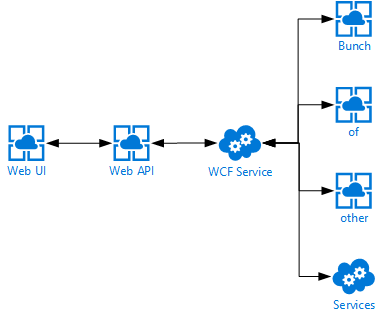
First off we have a single page web application which communicates directly to an ASP.NET Web API, which in turn communicates to a backend WCF service, which in turn also communicates with a bunch of other services. You can probably imagine I’m not very happy with this kind of a design, but I can’t do much about it currently.
One of the problems with this design is having cold-starts whenever a service is being deployed.
Since we’re deploying continuously to test & production there are a lot of cold starts. Using the applicationInitialization-element really helped spinning up our App Services, but we were still facing some slowness whenever the WCF service was being deployed to any of our environments. This service is being deployed to an ‘old-fashioned’ Cloud Service so we figured the applicationInitialization-element should just work as it’s still running on IIS.
Read more →The last two posts had me writing about how logging can be implemented in your Azure Functions
and how you can reuse class libraries using a different logging library, like log4net
. You probably already have some logging- and monitoring system in place, but if you’re starting to use Azure Functions (or any other Azure service for that matter), the best tooling to use is Application Insights
, in my opinion. You don’t even have to use Azure services in order to use Application Insights. You can also integrate it with any other on-premise server or client application.
For those of you who aren’t yet familiar with Application Insights, you should check it out immediately! It’s an awesome tool in Azure which enables you to view logging, metrics, exceptions, performance and more of your applications. It’s also possible to create enormous dashboards, reports and alerts, so everything you need in order to monitor your applications. A real must-have for a professional devops team.
Integrate with Azure Functions
Integrating your Azure Functions (Function App) with Application Insights is pretty straightforward.
The easiest way is to integrate is by selecting Application Insights when creating a Function App. Just press On, the location you want it deployed and proceed with creating the Function App. This will make sure the newly created Application Insights instance will be used by your Function App.
Read more →As I mentioned in my earlier post, there are 2 options available to you out of the box for logging. You can either use the TraceWriter or the ILogger. While this is fine when you are doing some small projects or Functions, it can become a problem if you want your Azure Functions to reuse earlier developed logic or modules used in different projects, a Web API for example.
In these shared class libraries you are probably leveraging the power of a ‘full-blown’ logging library. While it is possible to wire up a secondary logging instance in your Azure Function, it’s better to use something which is already available to you, like the ILogger or the TraceWriter.
I’m a big fan of the log4net logging library
, so this post is about using log4net with Azure Functions. As it goes, you can apply the same principle for any other logging framework just the implementation will be a bit different.
Creating an appender
One way to extend the logging capabilities of log4net is by creating your own logging appender. You are probably already using some default file appender or console appender in your projects. Because there isn’t an out-of-the-box appender for the ILogger, yet, you have to create one yourself.
Read more →Creating a solution with multiple small services is great of course. It provides you with a lot of flexibility and scalability.
There are however a couple of things you have to think about when designing and developing a solution with multiple services. One of the things you need to figure out is how to implement proper logging. For an actual production system you need to have this in place in order to monitor and debug the overall solution.
We, developers using Azure Functions, are already blessed with some logging mechanisms and tools provided out of the box! The out of the box stuff is pretty basic, but it gets the job done and will make your life much easier when the need arises to analyze a production issue.
Logging in your function
When first creating your Azure Function you will probably see a parameter being passed in your Run method called log.
public static class Function1
{
    [FunctionName("Function1")]
    public static async Task<HttpResponseMessage> Start(
        [HttpTrigger(AuthorizationLevel.Anonymous, "get", Route = null)]
        HttpRequestMessage req,
        TraceWriter log)
    {
        log.Info("C# HTTP trigger function processed a request.");
        // Logic
    }
}
This log-parameter can be used to do some simple logging inside your Azure Function. When invoking this function you’ll be able to see the specified log entry in your console.
Read more →So you might remember me posting about using the Let’s Encrypt
site extension for Azure App Services, called Azure Let’s Encrypt, created by SJKP.
This has quite well for over a year now and even works for Function Apps
.
However, last month I got notified my SSL certificate was expired on one of my sites. Strange, as an automated job should just handle this for me. I thought the job probably didn’t execute because of some glitch in the matrix. Therefore I logged in manually, started the site extension wizard again and was stuck on this screen.
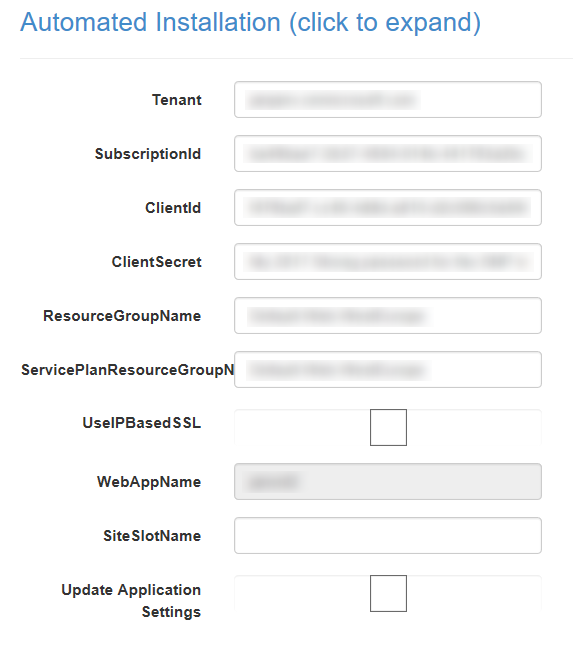
The reason I was stuck was because the ClientId and ClientSecret didn’t work anymore. As these settings hadn’t changed since I started using this extension I found it quite strange.
Apparently, the Server Principal
, which I had created last year, somehow had changed and I didn’t know how to change it back. Lucky for me, managing the AAD isn’t very hard to do nowadays. With a bit of trial and error I was able to create a new SNP and use these details on the Let’s Encrypt site extension.
Creating a new application in AAD
First thing you need to do is add a new Appliction to your AAD. Be sure to pick the option App registrations over here and press the New application registration.
Read more →In a couple of weeks, on the 22nd of February, I’ll be talking at a free event organized by 4DotNet
and SnelStart
called Move Up with Azure
. I’m not the only one who will be speaking over there, there’s also a great session by Henry Been
(SnelStart) and an awesome talk from Christos Matskas
(Microsoft).
I myself will be talking on how to create a serverless solution using Azure Functions. This of course is a very broad subject and I’d like to know what you think I should focus on or what you would like to see covered in this session?
Some areas which I’ll be covering for sure is a short introduction on the serverless paradigm, how to design and create a scalable architecture, using built-in functionality offered by Azure Functions to make your life easier, working with Visual Studio to get stuff done and of course how to test your solution.
There are a lot of other subjects which I can also cover and deep-dive into. Feel free to comment over here if you have a specific interest in something related to serverless or Azure Functions. For example Durable Functions, performance, common patterns & principles.
Hope to see you on the 22nd of February in Nieuwegein. Be sure to register on Eventbrite
to get your free ticket for this event!
Read more →Warming up your web applications and websites is something which we have been doing for quite some time now and will probably be doing for the next couple of years also. This warmup is necessary to ‘spin up’ your services, like the just-in-time compiler, your database context, caches, etc.
I’ve worked in several teams where we had solved the warming up of a web application in different ways. Running smoke-tests, pinging some endpoint on a regular basis, making sure the IIS application recycle timeout is set to infinite and some more creative solutions.
Luckily you don’t need to resort to these kind of solutions anymore. There is built-in functionality inside IIS and the ASP.NET framework. Just add an applicationInitialization-element inside the system.WebServer-element in your web.config file and you are good to go! This configuration will look very similar to the following block.
<system.webServer>

  ...
	<applicationInitialization>
		<add initializationPage="/Warmup" />
  </applicationInitialization>
</system.webServer>
What this will do is invoke a call to the /Warmup-endpoint whenever the application is being deployed/spun up. Quite awesome, right? This way you don’t have to resort to those arcane solutions anymore and just use the functionality which is delivered out of the box.
The above works quite well most of the time.
However, we were noticing some strange behavior while using this for our Azure App Services. The App Services weren’t ‘hot’ when a new version was deployed and swapped. This probably isn’t much of a problem if you’re only deploying your application once per day, but it does become a problem when your application is being deployed multiple times per hour.
Read more →A new year has started, so it’s time to reflect and think of what we’ll be doing the rest of this new year.
2017 has been a great year for me, not only from a technical point of view, but also personally.
First of all, I have had the chance to be an amazing dad for our son. Being a dad is the best thing one can imagine. Seeing the joy in your child’s eyes whenever you get home and seeing him grow up so quickly is just amazing! 2017 is also the year we got blessed by being pregnant again! We are expecting our second kid any day now. Both of these things are probably the biggest highlights of the year. Of course, we also moved between houses, just in time for our baby to get born in the new house. Really looking forward to this event!
As I said, 2017 also was a great year for my professional life. First of all I’ve had to chance to speak at a 4DotNet event
early in the year and a couple of months later I was picked to deliver 2 sessions at the TechDays Netherlands
. Aside from these two big events I also talked a couple of times at some smaller user groups and companies.
Read more →Using certificates to secure, sign and validate information has become a common practice in the past couple of years. Therefore, it makes sense to use them in combination with Azure Functions as well.
As Azure Functions are hosted on top of an Azure App Service this is quite possible, but you do have to configure something before you can start using certificates.
Adding your certificate to the Function App
Let’s just start at the beginning, in case you are wondering on how to add these certificates to your Function App. Adding certificates is ‘hidden’ on the SSL blade in the Azure portal. Over here you can add SSL certificates, but also regular certificates
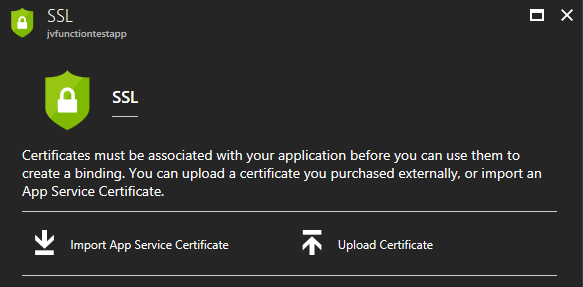
Keep in mind though, if you are going to use certificates in your own project, please just add them to Azure Key Vault
in order to keep them secure. Using the Key Vault is the preferred way to work with certificates (and secrets).
For the purpose of this post I’ve just pressed the Upload Certificate-link, which will prompt you with a new blade from which you can upload a private or public certificate.
![clip_image001[4]](https://jan-v.nl/files/8047a43c-7dd3-4c73-8f80-f76e0789deb4.png)
You will be able to see the certificate’s thumbprint, name and expiration date on the SSL blade if it has been added correctly.
Read more →So, one of my previous customers reached out to me a couple of weeks ago. They had a question concerning on how to use dependency injection in their AutoMapper
profiles. For this project we were using profiles which were dynamically loaded inside the application using MEF
and were using Autofac
for dependency injection.
The way you would normally load all of these profiles is by using the AddProfiles method when initializing AutoMapper. The code would look similar to the following excerpt.
private static void RegisterAutomapperDefault(IEnumerable<Assembly> assemblies)
{
    AutoMapper.Mapper.Initialize(cfg =>
    {
        cfg.AddProfiles(assemblies);
    });
}
This works fine on most occasions and is the recommended approach, to my knowledge.
When you start thinking about using dependency injection
(constructor injection in this case), you might want to rethink your mapping profile. Because, if you have the need for dependencies when mapping object properties to the properties of a different object it probably means there’s too much logic going on over here.
Of course, if you need this, one thing you might want to consider is using the custom type convertors
or custom value resolvers
. You can use dependency injection (constructor injection) using these convertors and resolvers by adding a single line in the Initialize method of AutoMapper
.
Read more →