A few months ago I decided to migrate my weblog from SharePoint to Orchard
, because it’s more lightweight and better suited as a simple blog. I also started to develop some custom modules and themes for this CMS and have to say I like it!
One thing though, which has bothered me from the beginning, was the empty Archive block at the right side of my blog. I had done so much work to import the SharePoint blog entries to Orchard (a manual copy-paste action), so I knew the posts were there, I could even browse to them.
Why was it my posts weren’t visible in the archive block?
Today, I found the answer to my problem. It’s a small bug in Orchard when you set the blog to be the homepage
of the site. Somehow the records in the [Orchard_Blogs_BlogArchivesPartRecord] table aren’t updated properly. The BlogSlug column should be changed to NULL and not contain the name of your weblog.
Once I knew this I changed the entries so they would contain the value NULL:
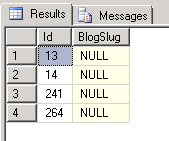
Note: You probably have got 1 record, but apparently I’ve done some adding and deleting of blogs, so I’ve got multiple. I can probably delete 3 of them, but just to be sure I didn’t.`
Read more →A few weeks ago I was finally able to install some updates on my ForeFront TMG server, so I installed SP1 of Windows Server 2008R2, all other updates and Internet Explorer 9.0. After noticing my internet connection didn’t work anymore I logged in on the server and wanted to check what was wrong using the Management Console.
This is when I noticed the ForeFront TMG Management Console didn’t work anymore. Every treenode I selected resulted in an alert message stating ‘Member not Found’, ‘Refresh failed’, etc.
At times like this you wish you had created a backup of the server, before you updated it.
Lucky for me I was able to go to the internet with a direct line on my router and search for a solution. Because these updates were long overdue, someone must have had the same issue as me. This is one of the reasons I don’t like working with new/beta software of area’s I don’t know much about. I know a thing or two about managing a Microsoft network, but most things are magic to me.
An answer to my problem could be found on the ForeFront Technet forums of Microsoft
.
To fix the issue you need to edit some file/html of ForeFront which resided on your local filesystem. The file which needs to be edited is: “C:\Program Files\Microsoft Forefront Threat Management Gateway\UI_HTMLs\TabsHandler\TabsHandler.htc”.
Open this file using Notepad as an Administrator.
Read more →It’s one of those things you need to do once and forget about it. Sometimes it’s necessary to develop something which required talking to a webservice. A lot of the times, the webservice is secured with an SSL certificate in the real world.
As most companies don’t want to spend good money to real SSL certificates for development workstations/servers, we have to create our own. You can of course develop the functionality with a non-secured environment, but for testing purposes it’s probably useful to have the test environment match the QA or production servers.
A while back I had an issue in some production software. We discovered something was malfunctioning I was needed to figure out what was wrong. As the code hadn’t changed in quite some time and it appeared the code was good (enough), I started looking at the infrastructure and discovered it might have something to do with the webservice (in SSL) it was talking to. As I couldn’t connect to the production environment, I had to connect to a local service which was running in SSL, so I did.
If you want to do this, you need to take quite some steps if you are running on IIS 6.0. This feature has improved a lot IIS 7.0/7.5. ScotGu has written a nice walkthough
about this. Just hit the Create Self-Signed Certificate link and you are done. Too bad I was still developing in an IIS 6.0 environment (Windows 2003R2). I’ll describe the needed steps below.
Read more →In the past couple of years I’ve written quite a lot of documentation, be it functional, technical, help files for end-users, flyers, proposals and much more. Most developers I know try to avoid writing these kind of things as much as they can, but let’s face it, it is part of our job.
At the moment I’m working in a team with pretty smart and experienced developers, but as it goes, one of our team members has been placed on an other team at a different customer and I was asked to replace him. The leaving developer had created an awesome framework, the code looks good, unit test coverage was (and still is) near 100% and it’s quite understandable if you step through the code. The only thing missing was technical and functional documentation. He and I tried to write some of documentation on the framework, but what do you need write in such documents?
Then it struck me, we developers are always trying to improve our coding and design skills and trying out new things and new languages, but we hardly try to improve ourselves in writing documentation.
I’ve never had a class at school on how to write functional or technical documents. Also, I’ve never seen any specifications at a company on how such documents should look like or what you should describe. Most of the time you have to figure it out yourself, think of some stuff you would like to see in it yourself and create some UML-diagrams to keep managers happy (a lot of developers don’t understand UML, so they skip it).
Another thing is where do you save these documents. Do you want them in a project repository (TFS), on a file share, in a CMS, etc.? In the past, most documents I’ve written were saved on some file share with a version number in the filename. A bit old-fashioned, but it works (for 1 editor at a time). At the current customer we’ve created a Wiki site in SharePoint in which we describe all the functional and technical specs. This is a bit better as to saving a Word document on a file share as everyone can change the contents and it’s available through the web. Also, it’s easier to maintain and SharePoint has it’s own versioning system for checking the changes.
Read more →As of two weeks ago I’ve had the privilege to start doing some development work in a project where a lot of expression trees are used and most classes have at least one implementation of a Func delegate. There’s nothing wrong with that, as it’s something which dates from the .NET 3.0 era if I’m not mistaken, so every .NET 3.5 certified/professional developer should know the existence of them. Downside is, if your only real experience with the matter is reading them up in a text book, there’s a big chance you have forgotten on how and why to use it. Most importantly, what it does.
Lucky for me I’ve done a WP7 project in the recent past
where I became a bit more familiar with the Func and Action delegates. Still, I got the feeling I don’t know half of the stuff you can use it for. This became even more clear 2 weeks ago when I started on this project. I could read the code and visualize what the code was doing, but couldn’t implement new features in a reasonable amount of time. Lucky for me I’m working in a team with several other developers who have (a lot) more experience on the subject explained what I needed to do. While listening to them I thought “Hey, this is easy, why didn’t I think of it!” and started implementing the new code.
Read more →Another SharePoint farm installation, another problem.
I had to install SharePoint 2007 (don’t ask..) on a Windows Server 2008R2 development machine. This is quite doable, as long as you install Service pack 2 of SharePoint
. I figured it would be no problem and just another install, like I’ve done a gazillion times before.
Everything went quite well and because of the SSD disk, the installation didn’t take as long as I was used to. After the full installation was done I checked the Event Log to see if I maybe forgot something. Most of the time there’s something wrong with the Search services or something else which is easily forgotten. This time I saw a familiar message of some COM object not being able to start because of a permission error. A message similar as this one:
The application-specific permission settings do not grant Local Activation permission for the COM Server application with CLSID {61738644-F196-11D0-9953-00C04FD919C1} to the user [account and SID]. This security permission can be modified using the Component Services administrative tool.`
I’ve seen this a few times before and knew how to fix it.
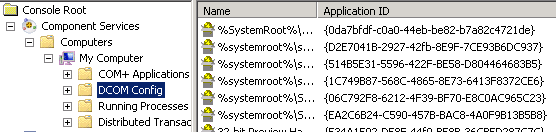
Start up the Component Services on the machine:

Expand the treeview of the Component Services on My Computer:
Read more →A few weeks ago I had to create an application which would download files from several SharePoint libraries. I had just done a similar thing for a Windows Phone 7 application, so I could reuse most of the code.
After running the application I received an awkward exception message which said: “This stream does not support seek operations”. This exception was triggered by the following code snippet:https://
HttpWebRequest request = (HttpWebRequest)WebRequest.Create(filelocationUrl);
HttpWebResponse response = (HttpWebResponse) request.GetResponse();
var stream = response.GetResponseStream();
I though this probably had something to do with it being a stream from a web so it can’t really check the size of a file. Lucky for me I wasn’t the first developer who had stumbled upon this issue. This blog post
describes the same issue.
The code I was supposed to use is this:
Stream respStream = myResponse.GetResponseStream();
MemoryStream memStream = new MemoryStream();
byte[] buffer = new byte[2048];
int bytesRead = 0;
do
{
	bytesRead = respStream.Read(buffer, 0, buffer.Length);
	memStream.Write(buffer, 0, bytesRead);
} while (bytesRead != 0);
respStream.Close();
buffer = memStream.ToArray();
string html = System.Text.Encoding.ASCII.GetString(buffer);
Using this I’m specifying the size of the chunks which need to be downloaded. This code is something I had used in the past also, but after I saw how easy it was in an asynchronous environment (WP7 / Silverlight) I had hoped it would work in ASP.NET / SharePoint also.
Read more →It’s been about 8 or 9 years since I’ve bought a new desktop system for myself. You can imagine the desktop I had was pretty antique and didn’t run the newest software quite well. Running Windows 7 on the Pentium 4 @ 3.2GHz
and a ATI Radeon 9800XT
was a pain. Even running Windows XP SP3 was a starting to be a bit too much for the system.
Most of the time I’m buying a system I don’t need to upgrade too much in the future, perhaps some extra memory, but that’s about it. That’s why I needed to configure some high-end system which would be able to load a developer environment without much delay. Also running multiple VM’s is a requirement. Visual Studio requires quite some disk I/O, so an SSD is needed. VM’s can grow quite large, which means a second bulk storage disk has to be bought also. The more cores, the merrier. Lucky for me Intel had just released the Sandy Bridge
architecture processors, which have 4 cores and Hyper Threading, resulting in 8 ‘cores’. An SB system should be compatible with 32GB of memory. At the moment RAM isn’t that expensive, but getting 32GB right from the start might be a bit overkill. I needed to save a bit of money for other parts, so I decided to go for 8GB for now. This means I can run 1 or 2 VM’s at the same time (depending on what’s running on them), which is good enough for now.
Read more →This is something which has been available in the .NET Framework since, well, forever. I’m talking about encrypting data in the config file of your (web)application. Every time I studied for the Microsoft developer exams I was reminded on this feature and thought “Hey, I really should use this in the next project”. Up until now I’ve never used this feature though.
The project I’m currently working on has some setup which encrypts the the config file when it’s deployed. A great feature, but this means I can’t read and edit the config file anymore. Manually editing the file shouldn’t be done anyway, but reading it would be nice though.
I knew this data could be decrypted also, but not how to do it exactly. Lucky for me this is a really old feature and there are dozens of people who have written something about it. This article on MSDN
helped me out the most. I also read the feature had became available in the .NET Framework 2.0, apparently this wasn’t available in version 1.1.
As with most encrypting algorithms you need some kind of seed to create a stronger (and safer) encryption. If I’m not mistaken this method used the machine key of the computer it’s encrypted on. That’s not all too bad, but this means you can’t decrypt the encrypted data on a system with a different machine key.
Read more →Al een aantal jaar drinken we thuis koffie uit de Philips Senseo
die we hebben gekregen. Een ideaal apparaat om en snel kopje koffie mee te zetten. Toch vonden we de smaak al sinds de eerste keer niet echt super (understatement)
Bij een klant waar ik nu zit hebben ze sinds kort een redelijk luxe espresso appraat staan en de koffie die daar uit komt is enorm lekker. Nu wilde ik dit thuis ook wel graag hebben, dus was ik op zoek gegaan naar die apparaten. Behalve dat ze behoorlijk prijzig zijn, is er ook nog heel veel keus.
Uiteindelijk heb ik maar een 2e hands gekocht, zodat het toch nog betaalbaar is voor een software ontwikkelaar. Het is de Saeco Talea Touch
geworden, inclusief een melk eiland.
Read more →