All of a sudden all my websites didn’t work anymore. Using some common sense in searching for the root of the problem I discovered the IIS Admin Service hadn’t started after booting up my machine. Trying to manually start up the service didn’t help much either, I was confronted with a message telling me
The system cannot find the file specified.
Sadly, the event logs didn’t help much, as the logs told me about the same
The IIS Admin service terminated with the following error. The system cannot find the file specified_
Having not much to go from here I had to start searching the web to check if other people had stumbled across this issue also. Lucky for me, someone had indeed solved this problem, back in 2008 and blogged about it
. Muqeet had discovered this error usually occurs when the metabase.xml file is missing or corrupt.
Checking out the default location of the metabase.xml file (C:\WINDOWS\system32\inetsrv\) confirmed this. Somehow the file was gone from the file system. Lucky for me IIS is backing up the file when a change is made within the IIS configuration. The backups can be found in the History folder (C:\WINDOWS\system32\inetsrv\History\).
Restoring the most recent backup to the original location had fixed the problem. The IIS Admin Service was able to start again, which means all the websites in IIS had started also.
Read more →Some time ago my ForeFront TMG server had crashed and not being an expert sysadmin, I wasn’t able to figure out what was wrong. The only thing I could think of was restoring the server from an earlier snapshot. Thanks to the Hyper-V interface this is really easy, even a software developer can do this.
After having restored the server to an earlier state I connected to the server and was prompted with a message telling me “the trust relationship between this workstation and the primary domain failed”. I figured this had probably something to do with restoring the snapshot from quite a while back. Doing some research on the issue
confirmed my suspicions.
Apparently this happens when your machine can’t communicate securely with the Active Directory anymore. This can happen for a number of reasons. Reason for my machine not being able to communicate anymore has probably something to do with some password changes, which the old snapshot wasn’t aware off.
Microsoft has an article dedicated to this issue
. They tell you to remove the machine from the domain and rejoin. This seems a bit rigorous and I don’t really want to do such things to my ForeFront server. Without it I don’t have internet!
Read more →At the moment I’m working on a (Orchard) project which is deployed to Windows Azure and uses a SQL Azure database. As my team needed to fix some issues which occurred in the Acceptance and Production environment, I wanted to get a recent database dump so we would be able to reproduce the issues on the development machines.
I couldn’t find an easy way to synchronize the databases or create a backup which I could restore. After doing some extensive searching I discovered there is a way you can restore a SQL Azure database to a local SQL Server 2012 environment.
To do this, you have to create an export in the Azure Management portal and import this export into your SQL Server 2012. I’ll describe the necessary steps below.
First, head to the Azure Management portal and go to the Database tab. On this screen you’ll see the option Export the database at the bottom of the screen.
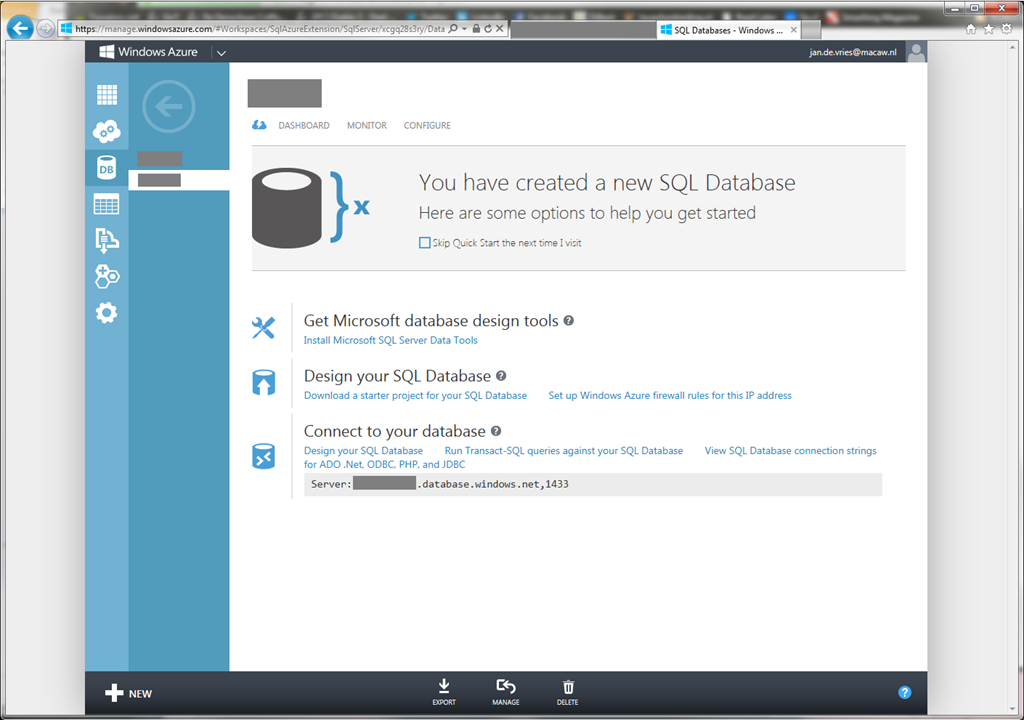
Clicking on this button pops up a modal dialog. In this dialog you need to specify the name of the export, a bacpac file, which storage account you’ll use, container to save the file and the login credentials of the database.
Read more →A few days ago I listened to a new episode of the .NET Rocks podcast
, with Kimberly Tripp
on the show. While she was going through the list of things every developer needs to know, one in particular caught my interest. She mentioned we should use the different types consistently in the database. Not using types consistently within your database can cause quite some performance loss. This is because SQL Server ‘upcasts’ the minor type to the higher type (example: varchar to nvarchar). As the term ‘quite some performance loss’ is a bit broad, I wanted to know how much this performance loss is exactly and if it’s worth rewriting/redesigning your database.
To test this case I’ve created a small database, named Performance, with a lot of records inside it. The database has 3 tables, named AsciiTable, MainTable and UnicodeTable. All three of them contain 2 columns, ID and a text column. The AsciiTable-table it’s text column has the type varchar(30), the MainTable and UnicodeTable it’s text column has the type nvarchar(30). I’ve created these to test how long some specific queries will take. At the end of this post I’ve inserted the script to create this database if you want to try it for yourself.
Read more →Including a lot of files in your website can impact the performance of your site. Your browser needs to request all those files from the webserver(s) and download them individually. Luckily this fetching is pretty fast and your browser can do multiple requests at once. However, there is a maximum to the number of requests a browser can make, so if you include 100 external files, will probably be (relatively) slow.
I’ve tested this by creating a new MVC 3 web application, copying the Site.css file 12 times and include all of them in the head-element of the page. Below you can see the FireBug
and YSlow
reports for this test page.
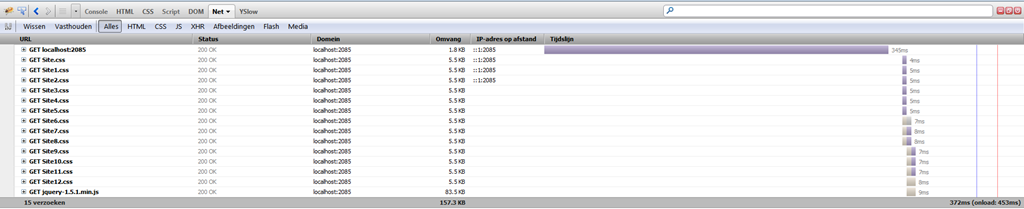
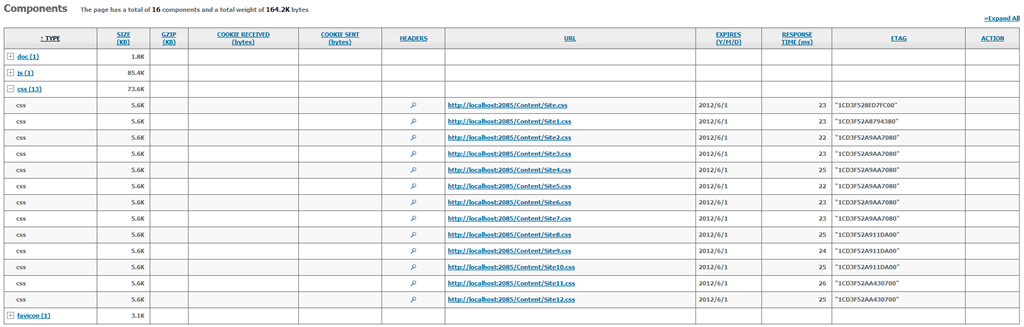
I’ve pressed the Refresh-button several times and came to the conclusion each individual file has a loading time between 5ms and 25ms.
Even though 13x25ms still is pretty fast, you probably understand it’s better to minimize the number of requests, because each request has some overhead and some have to wait for the other to be completed.
To minimize the number of files which need to be included in a website, devigners
often create one huge CSS file and one huge JavaScript file which contains everything needed for the website to work. This way the browser only needs to make 3 requests to load the page, the HTML, the CSS and the JavaScript. An additional request will be made for the JavaScript framework you are using (if any) and some more additional requests will be made to fetch the images of the page you are loading.
Read more →Note:
Going through my blogpost draftfolder I noticed this post which I wrote about a year ago. Seeing a lot of time has gone into it I decided to post it anyway. It’s based on Orchard version 1.2, so things might have changed, but the basics are probably the same. Now for the real post.
I’ve got a new job where I was needed to create a new CMS website and add some client specific features on it. As Orchard is my preferred choice at the moment, it didn’t take me long to choose which CMS I was going to use.
To create some new, custom, features to the website I had to create new Modules and wanted to let them act as a Widget. A Widget in Orchard is much like a SharePoint webpart or an old-fashioned ASP.NET usercontrol.
Lucky for me the Orchard team has documented their work quite good, so I could use a lot of code from the ‘Writing a Content Part
’ and ‘Writing a Widget
’ tutorials.
One of the things I was asked to create is a widget which implements the SlideShowPro
viewer. This widget is what I’ll use in this blogpost as an example.
Read more →I finally succeeded in setting up a VM with OSX Lion installed. Setting up an OSX environment in any VM tool has always been hard, but since Apple has decided to build for the x86 platform it has gotten a lot easier.
In the past couple of years I’ve tried to set up an Apple VM, but never really succeeded in it. Today I decided to try again. Apparently there are a lot of torrents out there containing OSX VM’s, so I’ve downloaded one of them to try out the OS.
After setting up the VM in VMWare Workstation and booting up I received an error telling me this guest OS couldn’t run with software virtualization and I had to enable hardware virtualization. My development machine has the VT-x option (Intel Virtualization Technology) in the BIOS, so enabling that fixed this issue.

Now, booting the guest OS again gave another error. VMWare Workstation told me the guest OS wasn’t Mac OS X Server. Changing this option to ‘Other 64-bit’ didn’t help either.

The virtual processors kept failing when booting up.
Lucky for me, the guys at SysProbs had already created a fix for this problem
. Running the windows.bat file which is nested in the tar
file of their download added a new option to the VMWare Workstation software
Read more →As I’m busy designing and developing my new weblog I noticed a minor Orchard version was released. Because I’m in the starting phase of the development cycle, I decided to upgrade to the latest version.
This is rather easy, as you can just download the latest sources from CodePlex
, extract and copy them over the old codebase (well, I deleted the original 1.3 files and copied the 1.4 files to a ‘clean’ folder).
Upgrading the Orchard sources broke several of my new modules, so I had to fix the broken code. After resolving those issues I pressed [Ctrl]+[F5] to see if everything was still working. It wasn’t.
Starting the site, I received a 404 error, because the pages couldn’t be found. Logs weren’t very helpful, aside from telling me some queries couldn’t run correctly. Deleting the /Sites/-folder in the App_Data did help me a bit, because now it showed me the normal ‘Orchard set up new site’ form.
Because I was starting to get a bit frustrated I decided to create a new website and have the connectionstring map to my old Orchard weblog database. This didn’t work either. Now there was an error the Recipes modules couldn’t be found or instantiated.
Read more →One of my development machines has a dual-boot to a 2008R2 environment via the Boot from VHD
technique. This works all quite well, but today I received the message the C-drive was getting a bit full. Most of the time this isn’t much of a problem, just delete some log files, do a disk cleanup, empty the recycle bin and maybe use SpaceMonger
to see what’s using up the rest of the space. Also, most of the time there’s about 500MB left free on the disk.
Today was different. Visual Studio wasn’t able to build my solution due to insufficient free disk space on the C-drive. Upon further inspection I saw a total of 0 free bytes were available. After doing the regular cleanup I had a stunning 119MB free on my C-drive. SpaceMonger had already shown me there was a hibernate file on the C-drive which took up 8GB. Quite strange considering I had turned off all of my hibernate options in Windows (I really don’t like hibernating). Also, this hibernate file doesn’t get generated when booting the machine in VMWare Player or VMWare Workstation.
All of my internet sources say you have to run powercfg -h off and reboot to completely remove the file. Problem with that is it gave (and still gives) me the following error:
Read more →Because of a failing hard drive I had to re-install my Windows installation, including cloning all of my BitBucket repositories back to my projects folder.
Getting all the solutions back on the local development machine is very easy, but after opening, I discovered they couldn’t be build anymore. The reason for this: several references were missing. This wasn’t that strange at all, because these references were libraries pulled pulled down via NuGet and not pushed into the repository.
I had suspected there was something in NuGet which would make it easy to download the referenced packages. Reason for me to expect this is the packages.config file which is created after pulling down NuGet packages. This file contains all the information needed to re-download them, you see?
<?xml version="1.0" encoding="utf-8"?>
<packages>
  <package id="FluentAssertions" version="1.7.1.1" />
  <package id="Moq" version="4.0.10827" />
</packages>
At the moment there isn’t an option (i.e.: I couldn’t find it) to re-download the referenced libraries in the NuGet package manager. After doing a bit more research on the matter I discovered a page in the NuGet documentation called ‘Using NuGet without committing packages to source control’
.
Over there they tell you to use the ‘Enable NuGet Package Restore’-option, which is available after right-clicking on the solution file.
Read more →