The past couple of days I’ve had the pleasure to start using a Git server as the new version control system at my customer. I’ve already had the pleasure to use GitHub and BitBucket in the past, which works like a charm with tools like GitHub for Windows and SourceTree. Because I’m used to using these tools, I really wanted to use them on my day job also.
Because we chose to use SSH keys as a validation mechanism I had to create one. Once you know how to do this it’s quite easy, but till 2 days ago I didn’t had a clue.
Lucky for me there’s a nice tutorial on how to create SSH keys on the GitHub help pages
. Also Atlassian has provided an extensive help document
with a couple of steps. In retrospect I think the Atlassian help page is the most useful for helping out with local Git servers. However, these help documents don’t take into account the usage of SourceTree and you will need to do some extra steps to get this working.
For future reference, I’ll describe the steps I had to take below.
First thing you want to do is install Git
, the Git Extensions
and if you haven’t already, SourceTree
.
Read more →While creating the PowerShell scripts for automatic deployment of the project’s Azure environment I discovered there are multiple Azure PowerShell modules.
When you want to manage a single resource, such as storage accounts, websites, databases, virtual machines, and media services, you need the (default) Azure
module. However, when you need to manage resource groups, you will need the AzureResourceManager
module.
This is useful information if you want to deploy new Azure websites with a specific hosting plan, like Basic or Standard. To create such websites the command Get-AzureResourceGroup is necessary. If you use PowerShell ISE you will notice this command isn’t available. In order to make this command available, run the following:
Switch-AzureMode AzureResourceManager
Doing so will activate the AzureResourceManager module and you will have a couple of different commands available.
If you want to see which commands are available within this module, run this command:
Get-Command -Module AzureResourceManager | Get-Help | Format-Table Name, Synopsis
Switching back to the ’normal’ Azure module is also very easy. You just need to switch back to the different AzureMode again.
Switch-AzureMode -Name AzureServiceManagement
After switching back, all your normal commands are back again.
Keep in mind, if you need both modules, you need to switch between the AzureModes in your script also!
Read more →There are quite a couple of Azure cmdlets made available by Microsoft. All of this sweetness can be installed on your system via the Web Platform Installer
. After installing these modules you can start managing your Azure subscription in PowerShell scripts.
Most of the stuff for managing your Azure subscription is implemented in these Azure cmdlets. One of the things which isn’t implemented (yet) is managing the Service Busses in your subscription. It is possible to add, delete and get a new Service Bus namespace with the New-AzureSBNamespace, Remove-AzureSBNamespace and Get-AzureSBNamespace cmdlets, but that’s all you get. You will probably understand, this isn’t enough if you want to deploy your complete environment via a PowerShell script.
Luckily for us we have the ability to use all of the .NET libraries and assemblies on your system. When you search online you will probably find some articles describing how to create service bus queues in C# by using the NamespaceManager. I’ve written some PowerShell which uses this class and creates queues in your subscription.
#First, create a new service bus namespace. This doesn't return the newly created object
New-AzureSBNamespace -Name $servicebusNamespace -Location $locationWestEUDataCenter -CreateACSNamespace $true
#Get the newly created service bus namespace, so we can do stuff with the information.
$azureServicebus = Get-AzureSBNamespace -Name $servicebusNamespace

#We need a tokenprovider for proper credentials
$tokenProvider = [Microsoft.ServiceBus.TokenProvider]::CreateSharedSecretTokenProvider("owner", $azureServicebus.DefaultKey)
#The uri of the namespace
$namespaceUri = [Microsoft.ServiceBus.ServiceBusEnvironment]::CreateServiceUri("sb", $servicebusNamespace, "");
#Now we can finally crate a NamespaceManger which has the power to create new queues.
$namespaceManager = New-Object Microsoft.ServiceBus.NamespaceManager $namespaceUri,$tokenProvider

Write-Host "Creating the queues" -ForegroundColor Green -BackgroundColor Black
#Creating the queues should work by now.
$namespaceManager.CreateQueue($nameOfTheServiceBusQueue)
If you want to start over, you can just delete the complete namespace and run the script again. This can be done with the following command.
Read more →The project I’m working on at the moment has a lot of analytics data. This means there’s a lot of inserts and updates in the database and queries have to be fast! At the moment all of this is hosted in a single MS SQL Server which does a pretty decent job. Still, this seems like a perfect scenario to introduce a noSQL database, especially as we are migrating to the cloud to improve performance of the application as a whole.
After a having reviewed a couple of noSQL databases, our weapon of choice became MongoDB. It’s popular, fast and there are a couple of providers which offer it as a hosted solution.
While reviewing MongoDB I discovered you not only need to change your ‘scheme’, but also the way you query the database. I have spent quite some hours on finding out why the performance was so incredibly slow, therefore it seems like a good idea to share my findings.
To make life easier, the most important stuff to set up a connection to a MongoDB store is thread safe
. This is great as you don’t have to setup a connection to MongoDB every time you want to use it. In my testing code I’ve set up some static properties to keep the connection alive.
Read more →About 1.5 years ago I received my Nokia Lumia 925 phone as a replacement for my Nokia Lumia 620, which I had lost. I couldn’t be more happy at that moment. It has a great screen, it’s quite fast and nice to look at.
The only downside was, it sometimes rebooted while I was doing something. This happened almost all the time when I was taking a picture, but also when listening to podcasts, driving my car, reading e-mail, etc. It’s rather annoying when you are using a phone and it reboots almost all the time, especially if you don’t know why!
After having read a lot of forums, discussed with some colleagues and tried a lot of stuff myself, I discovered the Wi-Fi Sense (Dutch: Wi-Fi-inzicht). Disabling these options solved the issue of the spontaneous reboots. As I didn’t use these options anyway, I’m not missing out on anything either.
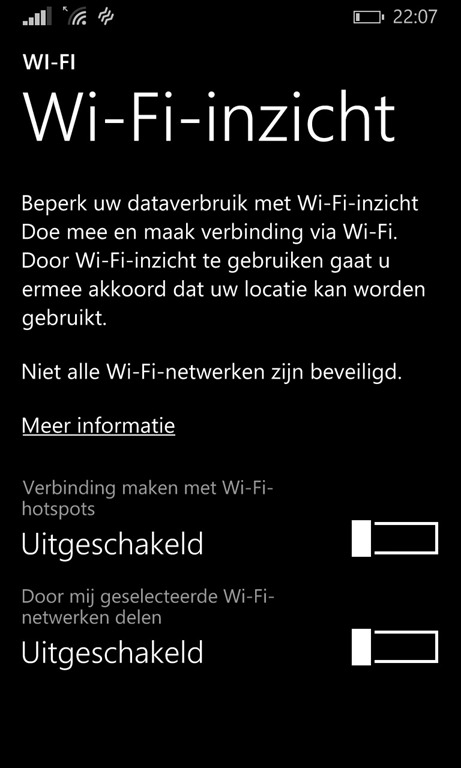
So, if you are experiencing (a lot of) random reboots on your Windows Phone 8 phone, try turning of the Wi-Fi Sense options. It might help.
Read more →For quite a couple of years now, the SQL Data Sync software has been available to synchronize data between MS SQL Server databases. This SQL Data Sync however has been decommissioned
and we have to resort to the the (new) SQL Data Sync (Preview)
nowadays.
SQL Data Sync is a solution/feature which allows you to synchronize data between several SQL (Azure) databases. The best thing is, you don’t have to synchronize your complete database. You can choose which tables and columns need to be synchronized. This is a very nice feature if you have, for example, your database scaled out in multiple regions of the world and some of the data has to be kept in sync.
The new SQL Data Sync has been made available through the Azure management portal. When navigating to the SQL Databases tab you will have an option available to Add Sync, which will create a new SQL Data Sync group_._
For the purpose of this post I have created 2 databases, one located in West Europe and one located in East US.
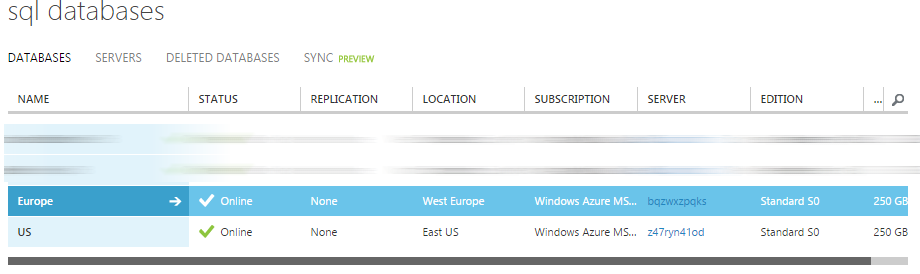
To keep them synchronized I’ve added a new Sync Group via the portal.
When creating the sync group, you have to specify which database will operate as the Hub. Basically this means which database will be the master. It’s also possible to select the conflict resolution in this step. The default value is Hub Wins, but you can also specify the client should win in case of a conflict.
Read more →As I wanted to move an on-premise MS SQL database to Azure SQL I was notified with an error message telling me this:
Error SQL71564: Element Column: [dbo].[SomeTable].[Id] has an unsupported property IsRowGuidColumn set and is not supported when used as part of a data package.
Every table in the database has a GUID (uniqueidentifier) as a primary key and apparently, the ROWGUID is set to YES. It’s too bad there isn’t much documentation on the ROWGUID
option telling us what it actually does. By searching for this feature I have discovered it is meant to create a unique key across multiple servers
, only useful if you want to enable the SQL Server Replication feature. I’m not really sure about this description, as a uniqueidentifier (GUID) should be unique no matter what. However, this post is not about GUIDs in SQL.
Because of the above error, I had to change all tables in the database. The ROWGUID had to be removed. This can be done manually of course, but that’s not really fun.
I decided to generate a query which creates an ALTER script for me. The script will iterate through all tables and SELECT the query which needs to be run. All which is left to do is copy the result to a query window and run it.
Read more →Sometimes you’re hired by a company which is a bit rigorous on blocking outgoing communication. A security consultant would probably agree on this practice, but most developers won’t. Nowadays a lot of services in the cloud operate on different ports. Azure services don’t always operate on port 80 and 443, hosted noSQL providers have connection strings with (seemingly) random ports, etc. It’s not always easy to get approval to open ports in the company firewall, especially if you’re doing some tests and proof of concept projects. A way to get around this policy is to create a virtual machine in Azure.
When you choose to create a new virtual machine from the gallery you can create an image with Visual Studio pre-installed on it. Even the latest versions are available!
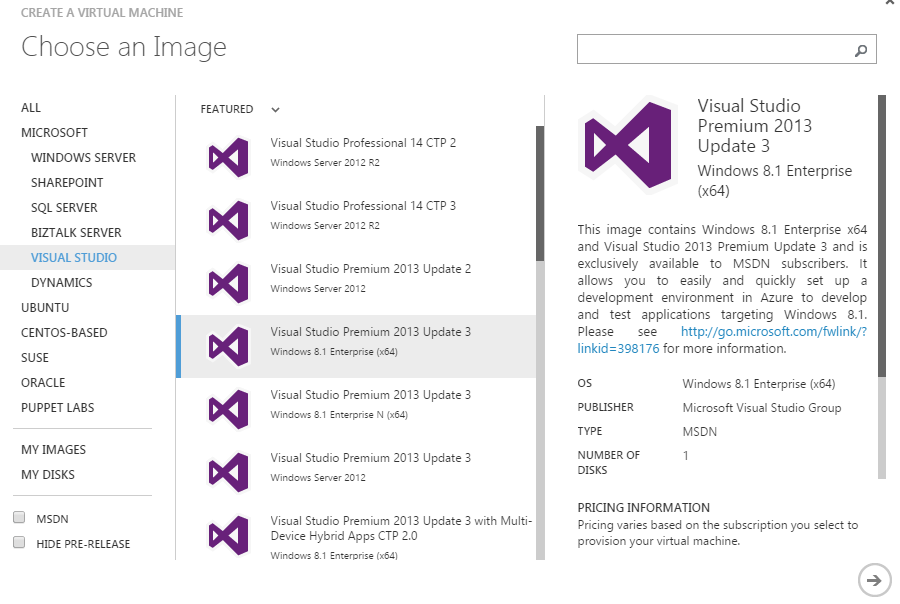
After completing the wizard you’ll have to wait a few minutes for the machine to spin up.
Don’t be happy just yet. When you try to connect to the machine, you’ll probably get a timeout or some other connection problem. This is because the configured RDP port is probably also blocked by your company firewall. A way to fix this is to set the public RDP port to 80 or 443 (which company would block normal HTTP(S) traffic?). This setting can be configured on the Endpoints tab of the virtual machine.
Read more →The past couple of days I’ve been working on migrating my blog from the Orchard CMS
to MiniBlog
. The main reason for me to migrate to a different system is because I don’t work a lot with Orchard anymore. There were also some crashes from time to time which I couldn’t explain.
I’m currently hosting my websites on Azure Websites, because of that I didn’t feel much for using a database system. SQL Azure is very nice of course, but it can also be quite expensive, especially if you don’t really need the features. The alternative is SQL Compact, but I’m not very keen on using this as well.
While searching for a database-less blogging system, I came across several solutions like Ghost
, Jekyll
and MiniBlog. All of these systems are slightly different and work with different techniques. The main reason I’m using MiniBlog as my new blogging engine is because it’s based on .NET. I could list all the cool features which are included, but as it’s already stated on the GitHub page, I won’t repeat it over here.
MiniBlog is a system which saves it’s posts in XML files. Therefore, I had to migrate all of my posts from the Orchard database to the files which MiniBlog understands. There’s already a project on GitHub called MiniBlogFormatter
. This tool is able to export posts from DasBlog
, BlogEngine.NET
and WordPress
to the MiniBlog format. I’ve used the code from this project as a basis for exporting my own Orchard posts.
Read more →There are 2 ‘features’ in SharePoint (MOSS2007) which have kept me busy for quite some time in my last project. Yes, you’ve read it right the first time, my latest project was a MOSS 2007 web portal. Of course these issues aren’t really quirks as the product behaves by design, but it has kept me busy for more time as I would bargain for.
First quirk
For some reason I had to create a console application to query the SharePoint user list and delete the users. Normally this doesn’t pose a problem at all. However, this time the following error was thrown every time:
The Web application at https://your-website-here:80 could not be found.
Verify that you have typed the URL correctly.
If the URL should be serving existing content,
the system administrator may need to add a new request URL mapping to the intended application.
Quite strange, as the website does exist, I even double checked it.
After doing some research on the matter it turns out you need to specify the Platform target for your application. Mine was set to Any CPU and had to be changed to x86. After changing this specific option the code was running correct.
Read more →